
Disclosure: This post may contain affiliate links. If you purchase through our links, we may earn a commission at no extra cost to you.
Last updated: July 2026
Tested by: Emanuel S
Between answering emails, dealing with clients, and trying to keep the books from turning into a mess, most of us don’t have time to test fifteen AI tools just to find out which ones actually help. So this isn’t one of those lists. It’s just two tools: Zapier and ChatGPT. I picked these because they’re the ones that keep coming up when you talk to other small business owners, and because they’re the two I actually used myself, not something I watched in a YouTube video and repackaged here.
You won’t find “50 AI tools you must try in 2026” here. It’s simpler than that: two tools, talked about honestly, with what works, what doesn’t, and what they cost. If you’re running your business solo, freelancing and juggling a handful of clients, or leading a small team without anyone dedicated to marketing or operations, this is written with you in mind.
If what you’re after is cutting down on repetitive busywork, or just want some help drafting an email, outlining something you’re writing, or making sense of a long document without reading the whole thing, these two tools cover a fair amount of ground between them, even if they go about it in very different ways, as you’ll see below.
How We Chose These Tools
We didn’t just pull names from “best AI tools” search results. Each tool on this list was evaluated against a few practical criteria that matter more to small business owners than flashy feature lists:
- Ease of use: Can someone without a technical background get value in the first session, or does it require a manual?
- Pricing transparency: Is there a usable free plan or trial, and is the paid pricing clear without hidden add-ons?
- Real-world utility: Does the tool solve an actual small business problem (time, cost, communication) rather than being a novelty?
- Reliability and reputation: How consistent is the tool, and what does the broader user base say about it over time?
- Learning curve vs. payoff: Some tools take longer to “click,” but if the payoff is worth it, that’s noted honestly.
Where a tool was personally tested, that’s stated clearly. Where it wasn’t, the write-up relies on official documentation, pricing pages, and aggregated user feedback, and it says so.
Quick Comparison Table
| Tool | Best For | Starting Price | Free Plan? |
| Zapier | Automating repetitive tasks between apps | $19.99/month (paid tiers) | Yes, limited free plan, plus a 14-day trial on paid tiers |
| ChatGPT | Writing, research, image generation, document analysis | $20/month (Plus) | Yes, free tier covers most everyday tasks |
1. Zapier: Best For Automating Repetitive Business Tasks
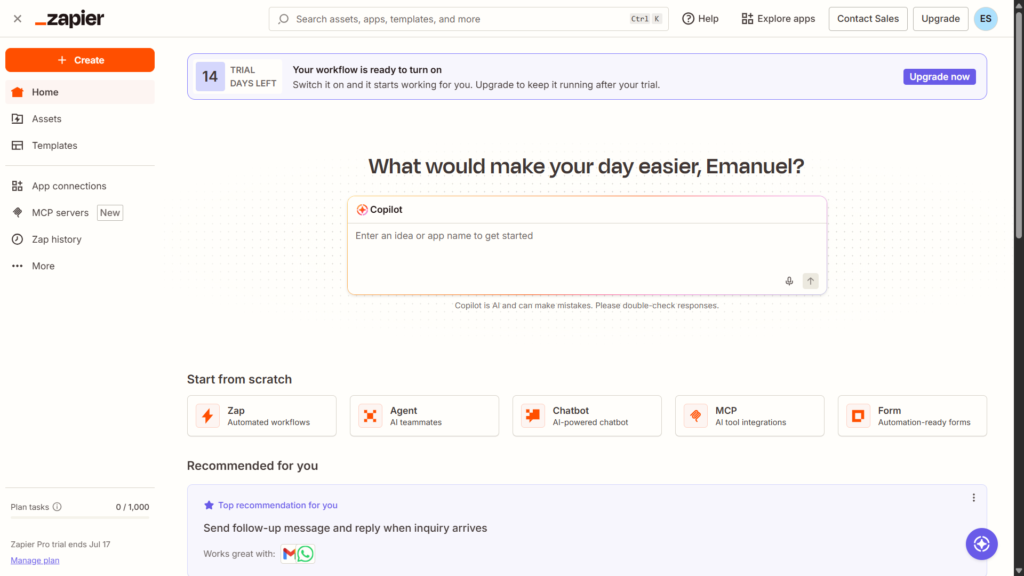
Zapier is an automation platform that connects different apps so they can talk to each other without you manually copying data between them. Think “when a new lead fills out my contact form, automatically add them to my email list and send me a Slack notification.” It’s not an AI tool in the generative sense, but it increasingly bakes AI-powered steps (like text summarization or smart data extraction) into its automation workflows, which is why it keeps showing up on small business AI tool lists.
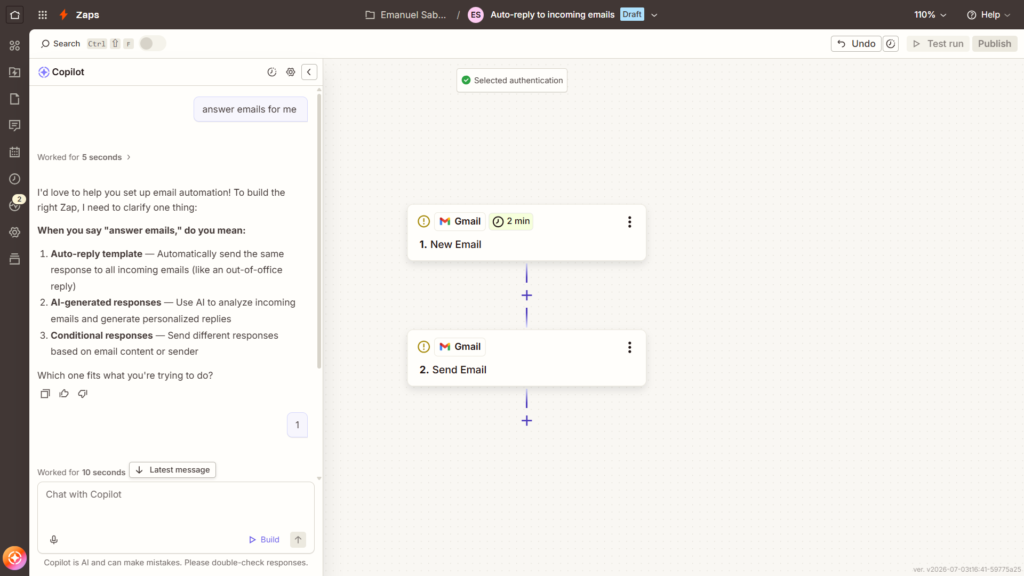
I’ll admit upfront: I only tested Zapier lightly, so this isn’t a deep, weeks-long review. But the first-session experience told me a lot.
Key Features
- App integrations: Connects with thousands of apps, from Gmail and Slack to Shopify and QuickBooks.
- “Zaps”: Pre-built or custom automation workflows triggered by an event in one app that causes an action in another.
- AI-powered steps: Options to summarize text, extract data, or generate content within a workflow.
- Templates library: Pre-made automation templates for common business tasks (lead capture, invoicing reminders, social media posting).
- Multi-step workflows: Chain several actions together instead of a single trigger-action pair.
Pricing
Zapier offers a free plan with limited monthly tasks and single-step Zaps, which is enough to test the waters but not enough to run a business on. Paid plans start at around $19.99/month (billed annually) and scale up based on the number of tasks and complexity of workflows you need. There’s also a 14-day free trial on paid tiers, which is what I used to get started. You can check current pricing directly on Zapier’s official pricing page, since these numbers do shift over time.
Pros and Cons
Pros:
- Genuinely fast to get a basic automation running, I had a simple email automation working in under a minute once I understood what I was looking at
- Huge library of app integrations, so it’s unlikely your tools aren’t supported
- The free plan and 14-day trial make it low-risk to test
- Templates lower the learning curve for non-technical users
Cons:
- The initial concept isn’t intuitive. I didn’t understand what Zapier actually did until I was a few minutes into using it, and that confusion is a real onboarding hurdle
- Free plan is quite limited for anyone running more than a handful of automations
- Costs can climb quickly once you need multi-step or higher-volume workflows
- There’s a lot of depth to the platform that takes real time to explore, I’ve only scratched the surface myself
If you’re the kind of small business owner who’s currently doing repetitive copy-paste work between apps (moving form submissions into a spreadsheet, manually forwarding leads, posting the same update in three places), Zapier is built to eliminate exactly that. Just budget time to actually explore it beyond the first automation, because there’s clearly more under the hood than a first login reveals.
2. ChatGPT: Best For Writing, Research, and Everyday Business Tasks
ChatGPT, built by OpenAI, is the tool I’ve used the most out of the two on this list, and it shows how confidently I can talk about it. It’s a general-purpose AI assistant that handles writing, brainstorming, answering questions, analyzing documents, and even generating images, all from a single chat interface.
For small business owners, that generalist quality is the whole appeal: instead of learning five specialized tools, you get one that reasonably covers a wide range of daily tasks.
Key Features
- Text generation: Drafts emails, product descriptions, social captions, blog outlines, and more.
- Document understanding: Upload a PDF or Word file and ask questions about it, summarize it, or pull out key points.
- Image generation: Create visuals from text prompts, useful for quick social media graphics or concept mockups.
- Task assistance: Helps outline plans, brainstorm ideas, troubleshoot problems, or explain unfamiliar concepts in plain language.
- Conversational memory within a session: Keeps context as you go back and forth, so you’re not re-explaining yourself constantly.
Pricing
ChatGPT has a genuinely useful free plan that covers a large share of everyday small business needs, writing help, quick research, basic document questions. The paid Plus plan starts at $20/month and adds higher usage limits, faster response times, and access to more advanced features. I currently use the paid plan myself, but honestly, the free tier alone would cover most of what a small business owner needs day to day. You can compare plan details on OpenAI’s official ChatGPT pricing page.
ChatGPT vs Claude vs Gemini: Full Comparison for 2026 → https://theaitoolreview.com/chatgpt-vs-claude-vs-gemini/
Pros and Cons
Pros:
- Easy to sign up and start using immediately, no learning curve to get basic value
- Versatile: writing, task planning, document analysis, and image creation in one place
- The free plan genuinely covers most day-to-day use cases, which isn’t true of every AI tool
- Consistent quality across different types of tasks, from drafting to research
Cons:
- Not built for automating workflows between apps, it’s an assistant, not a connector like Zapier
- Occasionally produces confident-sounding but inaccurate information, so business-critical facts still need a human check
- Image generation, while useful, isn’t a replacement for professional design work
- Longer or highly technical documents sometimes need to be broken into chunks for the best results
Between the two tools on this list, ChatGPT is the one I’d point a small business owner to first if they only have time to try one thing. It’s not industry-specific and it won’t automate your backend systems, but for day-to-day writing, planning, and research, it earns its spot with very little ramp-up time.
Frequently Asked Questions (FAQ)
Do I need both Zapier and ChatGPT, or just one?
It depends on your bottleneck. If your biggest time drain is manually moving data between apps, Zapier addresses that directly. If your biggest need is writing, research, or quick content creation, ChatGPT is the better starting point. Many small businesses eventually use both, since they solve different problems rather than competing with each other.
Are the free plans actually usable, or just a teaser?
ChatGPT’s free plan is genuinely usable for most everyday tasks, that’s been true in regular personal use. Zapier’s free plan is more limited and is better thought of as a way to test the concept before deciding whether to pay, especially once you need multi-step automations.
Is AI going to replace the need for a human doing this work?
No tool here is a full replacement for judgment, strategy, or oversight. Both Zapier and ChatGPT are best understood as time-savers that handle repetitive or first-draft work, not as autonomous employees. Human review still matters, especially for anything customer-facing or financially sensitive.
Which tool is easier to learn for a non-technical business owner?
ChatGPT has a shorter learning curve, you type a question or request and get a usable answer almost immediately. Zapier takes a bit more upfront understanding of what “triggers” and “actions” mean, though templates help shortcut that process once the concept clicks.
Conclusion
If you’re a small business owner deciding where to start, the honest answer depends on what’s eating your time. ChatGPT is the safer first pick for most people, it’s fast to learn, the free plan covers a lot of ground, and it’s useful across writing, research, and everyday problem-solving without much setup. Zapier is the better pick if your real pain point is repetitive manual work between the apps you already use, though expect a short adjustment period before the automation concept fully clicks.
Neither tool is a magic fix for running a business, and neither guarantees more revenue or saves hours on its own, the value comes from how consistently you actually use them. But as a starting pair for small business owners exploring AI tools in 2026, these two cover a meaningful amount of ground between writing/research and workflow automation.
Sources & Official Pricing Pages
- Zapier Official Pricing: https://zapier.com/pricing
- Zapier Help Center / How Zaps Work: https://help.zapier.com
- ChatGPT (OpenAI) Official Pricing: https://openai.com/chatgpt/pricing
- OpenAI ChatGPT Help Center: https://help.openai.com
Pingback: Writesonic Review 2026: Honest Pros, Cons, Pricing & Verdict
Pingback: Grammarly Review 2026: Is the Free Plan Actually Useful?