
Disclosure: This post may contain affiliate links. If you purchase through our links, we may earn a commission at no extra cost to you.
Last updated: July 2026
Tested by: Emanuel S
Grammarly Review articles are everywhere, but many of them focus only on the paid version. That is not always helpful. A lot of people do not want to pay immediately, add a credit card, or commit to another monthly subscription just to fix a paragraph, improve an email, or write something cleaner.
So I tested Grammarly using the free plan, without adding a card. My goal was simple: see if Grammarly is actually useful when you do not upgrade. I wanted to know how easy it is to sign up, how beginner-friendly the interface feels, and whether the free writing tools are good enough for basic everyday writing.
My experience was mostly positive. Grammarly was quick to register, the design felt minimal and easy to understand, and I did not feel lost inside the platform. I asked it to write a one-paragraph article about AI, and it generated the paragraph in under 10 seconds. The quality was good for a simple test, and the paragraph improvement and humanizing tools were more useful than I expected. Still, some features were locked behind the paid plan, which is something you should know before depending on it too much.
What Is Grammarly?
Grammarly is an AI writing assistant that helps users check, rewrite, improve, and generate text. It is best known for grammar and spelling corrections, but the tool has expanded beyond basic proofreading. Today, Grammarly also includes AI writing features, tone improvements, paragraph rewriting, and suggestions that can make your writing sound clearer.
The main idea is simple: you write something, and Grammarly helps you make it better. That can mean correcting grammar mistakes, improving sentence structure, changing the tone, or generating text from a prompt. Grammarly describes itself as an AI-powered writing assistant, and its current product pages show that it offers both free writing assistance and paid features through Grammarly Pro.
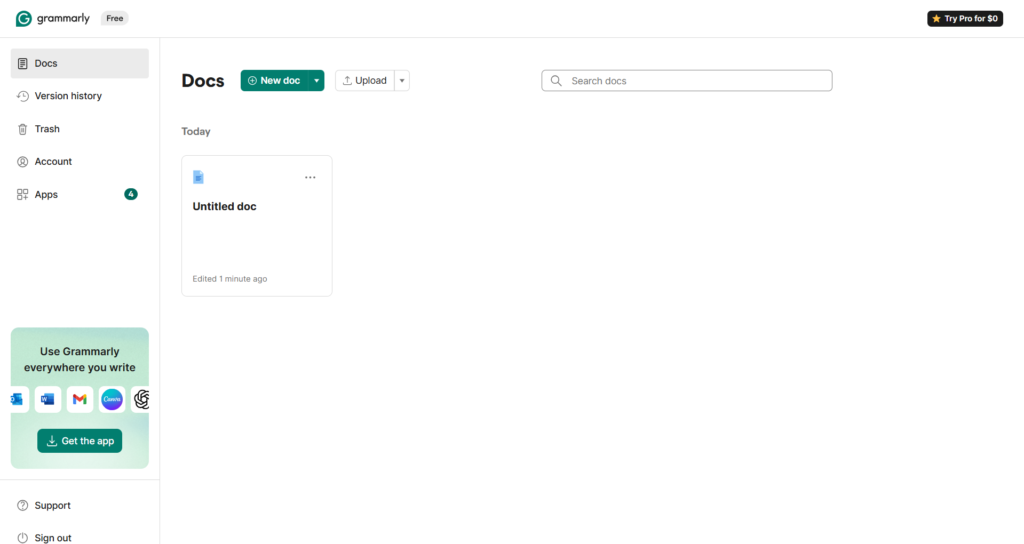
In my experience, Grammarly feels easier to use than many AI writing tools because it does not overwhelm you at the start. Some platforms show too many menus, templates, dashboards, and confusing buttons. Grammarly felt more direct. I signed up quickly, did not need a credit card, and could start testing without feeling like I had to watch a tutorial first.
That matters, especially for students, bloggers, freelancers, and small business owners who just want help writing better. Not everyone wants a complicated AI platform. Sometimes you only need a tool that says: “Here is your text, here is what can be improved, and here is a better version.”
2 Best AI Tools for Small Business Owners in 2026 → https://theaitoolreview.com/best-ai-tools-small-business-owners-2026/
Key Features of Grammarly
Grammarly has grown from a grammar checker into a more complete AI writing assistant. The free plan gives you enough to test the platform, while the paid plan unlocks more advanced writing and rewriting tools.
Here are the main features I noticed while testing Grammarly.
Grammar and spelling suggestions
This is still Grammarly’s most famous feature. It helps detect grammar issues, spelling mistakes, punctuation problems, and awkward wording. For basic writing, this is probably the main reason many people use it.
The benefit is that Grammarly is easy to understand. You do not need to be a grammar expert. The tool shows suggestions in a simple way, and you can accept or ignore them.
For students and bloggers, this is useful because small grammar errors can make writing look less professional. Grammarly helps clean up those mistakes before publishing or submitting text.
AI text generation
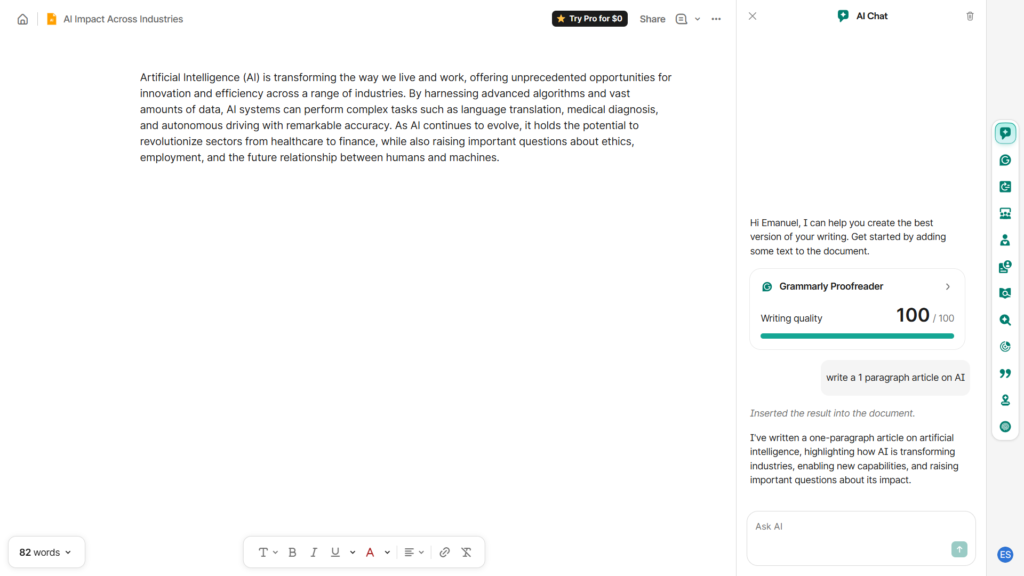
During my test, I asked Grammarly to write a one-paragraph article about AI. It generated the paragraph in less than 10 seconds. I did not test a long article, a full blog post, or a complex research piece, so I cannot say how strong it is for every type of content. But for a short paragraph, the speed and quality were good.
The paragraph was readable, organized, and clear. It was not perfect or deeply original, but for a simple writing task, it did the job well.
This makes Grammarly useful for small writing needs like:
- Short paragraphs
- Email drafts
- Social media captions
- Simple explanations
- Rewriting rough ideas
- Cleaning up quick notes
Paragraph improvement
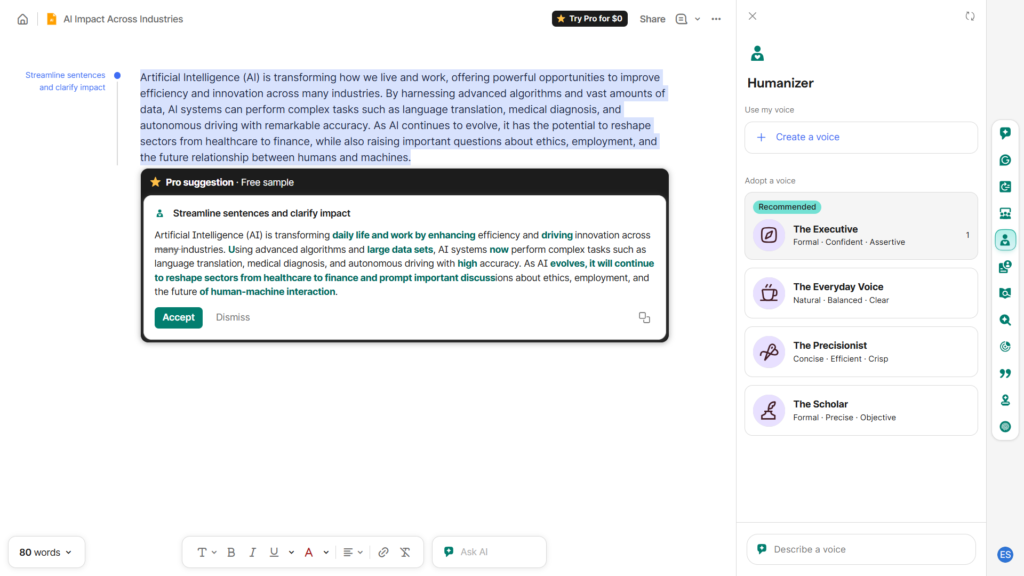
One feature I liked was the paragraph improvement tool. I tested it with a basic paragraph, and it helped make the text cleaner and more polished.
This is where Grammarly feels different from a basic grammar checker. Instead of only fixing mistakes, it can improve the way the paragraph flows. That is helpful when your writing is technically correct but still feels weak, repetitive, or too simple.
For example, a student might write a paragraph that explains the idea but sounds too casual. A blogger might have a paragraph that needs to sound smoother. A small business owner might need a product description to feel more professional. Grammarly can help with those situations.
Humanizing text
I also tested the humanizing feature, and it worked well in my experience. This is useful because AI-generated writing can sometimes sound too formal, too robotic, or too generic.
The humanizing feature can make text feel more natural. I would still recommend reviewing the final result yourself because no AI tool understands your exact voice perfectly. But as a starting point, it was helpful.
This is especially useful if you use AI to create drafts but want the final version to sound less stiff. Grammarly can help make the text feel more readable and less mechanical.
Minimalist interface
Grammarly’s interface is one of its biggest strengths. The design is clean, simple, and easy to navigate. I did not feel confused while using it.
That sounds basic, but it is important. Many AI tools have powerful features but feel complicated. Grammarly does not feel like that at the beginning. It is difficult to get lost, and the login process is simple.
For beginners, this is a real advantage. A tool can be powerful, but if users do not know where to click, they will leave. Grammarly avoids that problem better than many writing platforms I have tested.
Paid feature prompts
Not everything is free. While testing, I noticed that some features asked for the Pro plan. Grammarly was showing me an offer where Pro appeared at $0, but I would not treat that as a permanent price because offers can change by account, region, or time.
The important point is this: the free plan is usable, but Grammarly will show paid upgrade options. That is normal for a freemium tool, but you should expect some limits.
Grammarly Pricing: How Much Does It Cost?
Grammarly has a free plan, and that was the plan I tested. I signed up without a credit card, which is a big plus if you only want to try the tool.
According to Grammarly’s official pricing information, Grammarly Pro is listed at $12 per member per month when billed annually and $30 when billed monthly. Grammarly also states that Pro includes everything in Free, plus features such as full-sentence rewrites, tone adjustments, brand-related features, and AI prompts.
Here is the simple breakdown:
| Plan | Best for | Notes |
| Free | Basic grammar help, short writing tasks, testing the platform | No card was required in my test |
| Grammarly Pro | Users who write often and want more rewriting features | Official pricing shows annual and monthly options |
| Enterprise / team options | Larger teams and organizations | Best checked directly on Grammarly’s official site |
The free plan is the most interesting part of this Grammarly Review because many users are not ready to pay. Based on my test, the free plan is useful for basic writing, quick AI generation, and simple improvements. However, if you write every day for work, publish content often, or need advanced rewriting, the paid plan may become more attractive.
I recommend checking Grammarly’s pricing page before subscribing because prices, offers, and included features can change. That is especially true when a platform offers temporary discounts or account-specific promotions.
3 Best AI Tools for Freelancers in 2026 → https://theaitoolreview.com/best-ai-tools-for-freelancers/
Pros and Cons of Grammarly
No tool is perfect. Grammarly does many things well, but the free plan also has limits.
Pros
- Fast sign-up: I registered quickly and did not need a credit card.
- Beginner-friendly design: The interface is minimal, clean, and easy to understand.
- Good short-form writing quality: My one-paragraph AI test came out clearly written.
- Fast response in my test: Grammarly generated my short paragraph in under 10 seconds.
- Useful paragraph improvement: The improvement feature helped make text cleaner.
- Helpful humanizing tool: The humanizing feature made the writing feel more natural.
- Hard to get lost: The dashboard and writing flow are simple compared with many AI tools.
Cons
- Some features require Pro: You will see paid upgrade prompts for certain tools.
- Free plan may not be enough for heavy users: If you write long content daily, you may feel limited.
- AI output still needs review: The paragraph quality was good, but you should still edit and fact-check important writing.
- Temporary offers can be confusing: I saw a Pro offer at $0, but that should not be assumed as the standard price.
- Not a replacement for your own judgment: Grammarly can improve writing, but it should not decide your final message for you.
The biggest advantage is ease of use. The biggest disadvantage is that some of the more powerful features are not fully available for free.
Who Is Grammarly Best For?
Grammarly is best for people who write often but do not want a complicated writing tool.
I would recommend Grammarly for:
- Students who want help cleaning up assignments, discussion posts, and essays.
- Bloggers who need grammar checks, paragraph improvements, and cleaner drafts.
- Freelancers who write emails, proposals, captions, or client messages.
- Small business owners who need better product descriptions, replies, or marketing text.
- Non-native English writers who want support with clarity and grammar.
- Professionals who write emails and want them to sound more polished.
For casual users, the free plan may be enough. If you only need to fix grammar, improve short paragraphs, or generate simple text, Grammarly Free is actually useful.
For heavy writing work, the Pro plan makes more sense. If you publish blog posts, send a lot of professional emails, or need advanced tone and rewriting features, you may eventually feel the free plan is too limited.
I would not recommend Grammarly as your only writing tool if you need deep research, long-form SEO articles, or advanced content strategy. Grammarly can help improve text, but it is not the same as a full research assistant or SEO platform.
Grammarly vs QuillBot: Quick Comparison
For this section, I am comparing Grammarly with QuillBot, one of the most common alternatives for rewriting and paraphrasing. Both tools can improve writing, but they feel different.
| Feature | Grammarly | QuillBot |
| Main purpose | Grammar, clarity, rewriting, AI writing help | Paraphrasing, rewriting, summarizing |
| Ease of use | Very beginner-friendly | Also simple, but more focused on rewriting modes |
| Free plan | Useful for basic writing support | Useful for paraphrasing and rewriting tests |
| Best strength | Grammar correction and clean writing suggestions | Rewriting and paraphrasing text |
| Best for | Students, professionals, bloggers, emails | Students, writers, rewriting-heavy tasks |
| My experience | Minimalist, fast, easy to use | Not tested for this review |
Grammarly feels better if you want a general writing assistant. It helps with grammar, tone, clarity, and rewriting. QuillBot is more focused on paraphrasing and rewriting existing text.
For everyday writing, I would choose Grammarly first because it feels more complete as a writing helper. For rewriting the same text in different ways, QuillBot may be worth testing too.
Our Verdict: Is Grammarly Worth It?
Yes, Grammarly is worth trying, especially because the free plan does not require a credit card.
The biggest reason is simple: Grammarly is easy. I registered quickly, the interface was clean, and I could start using it without confusion. In my test, Grammarly generated a short AI paragraph in under 10 seconds, and the quality was good for a basic writing task.
The paragraph improvement feature also worked well. That was one of the most useful parts of the test because it showed Grammarly can do more than correct spelling. It can help make writing smoother and more polished.
The humanizing tool was also helpful. If you use AI-generated drafts, Grammarly can help make them sound more natural. That does not mean you should publish everything without editing. You should still read the final version, check accuracy, and make sure it sounds like you.
The free plan is actually useful, but it is not unlimited. Some features require the paid plan, and Grammarly will show upgrade prompts. That is not a dealbreaker, but it is something to keep in mind.
My honest verdict: Grammarly Free is good for beginners, students, casual writers, bloggers, and anyone who wants fast writing help without paying upfront. Grammarly Pro is better for people who write every day and want more advanced rewriting tools.
Frequently Asked Questions (FAQ)
Is Grammarly free?
Yes, Grammarly has a free plan. In my test, I was able to sign up without adding a credit card. The free plan gives you access to basic writing help, but some features require Grammarly Pro.
Is Grammarly Free actually useful?
Yes. Based on my experience, Grammarly Free is useful for basic writing tasks, grammar checks, short AI-generated text, paragraph improvement, and making writing cleaner. It is not perfect for every advanced need, but it is useful enough to try.
Does Grammarly require a credit card?
During my test, Grammarly did not require a credit card to start using the free plan. That made the sign-up process simple and low-risk.
Is Grammarly good for AI writing?
Grammarly can help with AI writing, especially for short paragraphs, rewriting, and making text sound more natural. In my test, it generated a one-paragraph article about AI in under 10 seconds. The quality was good for a simple paragraph, but I would still review and edit the final result before publishing.
Conclusion
Grammarly is one of the easiest AI writing tools to recommend for beginners. It is quick to start, simple to use, and helpful for everyday writing. The free plan is not just a fake trial. It gives enough value to test the tool and improve basic writing without paying right away.
My recommendation is to start with Grammarly Free. Use it for emails, paragraphs, blog drafts, and grammar checks. If you find yourself using it every day and constantly running into Pro limits, then consider upgrading. For casual users, students, and beginner bloggers, the free plan is a solid place to start.
For current feature and pricing details, you can check Grammarly’s official pages:
Pingback: QuillBot vs Grammarly (2026): Which One Is Better?
Pingback: How to Use Grammarly Free to Improve Your Writing