
Disclosure: This post may contain affiliate links. If you purchase through our links, we may earn a commission at no extra cost to you.
Last updated: July 2026
Tested by: Emanuel S.
Choosing between QuillBot vs Grammarly can be difficult because both tools now offer much more than basic grammar correction. They can generate text, rewrite paragraphs, adjust tone, detect AI content, and help users improve drafts. However, they do not approach these tasks in exactly the same way.
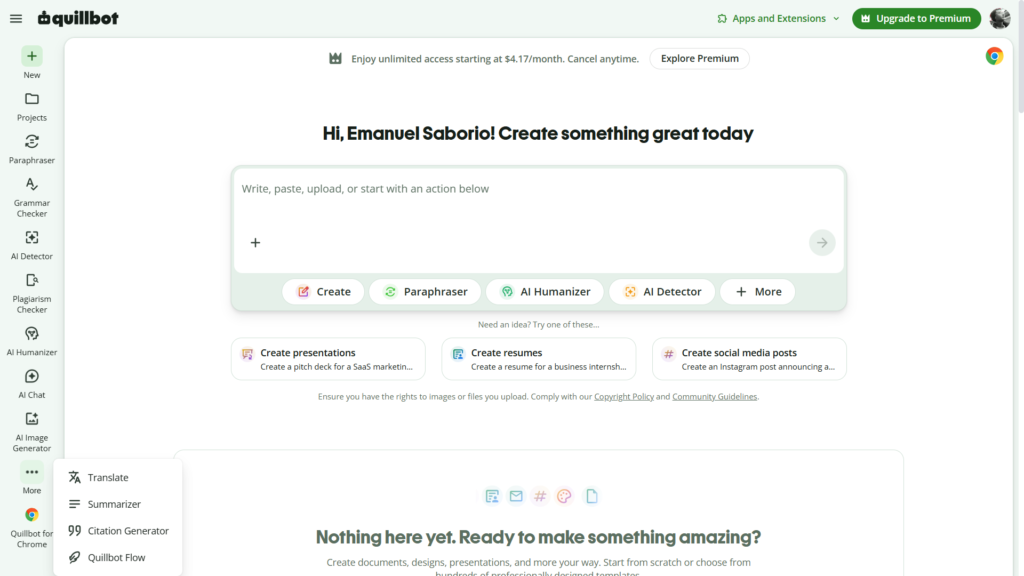
QuillBot feels like a collection of separate writing and AI tools. Its platform includes paraphrasing, grammar checking, summarization, AI detection, humanization, citation generation, and even image generation. Grammarly focuses more strongly on improving communication while you write, with grammar suggestions, rewriting tools, tone adjustments, AI assistance, and integrations across different apps.
I tested both platforms using the same basic writing prompt so that I could compare their speed, output quality, usability, and free access more fairly. I also explored additional features, including QuillBot’s AI detector and image generator and Grammarly’s paragraph improvement and humanizer tools.
This QuillBot vs Grammarly comparison explains where each tool performs well, where the free versions feel limited, and which option makes more sense for different types of users.
Quick Comparison Table
| Feature | QuillBot | Grammarly |
| Best known for | Paraphrasing and rewriting | Grammar checking and writing improvement |
| Free account required | Not required for some basic tools | Generally required for the main writing workspace |
| Ease of use | Very easy, with separate tools in one dashboard | Very easy, with a clean and minimal interface |
| AI text generation | Available | Available |
| Paraphrasing | One of its main features | Available through rewriting tools |
| Grammar correction | Included | One of its strongest core features |
| AI humanizer | Available | Available |
| AI detection | Available with limited free access | Available, although it appeared restricted during my test |
| Image generation | Available after signing in | Not a core Grammarly feature |
| Citation tools | Available | Available through selected tools and AI agents |
| Best for students | Strong for paraphrasing, summaries, citations, and AI checking | Strong for correcting and improving assignments |
| Best for professional writing | Useful, especially for rewriting | Strong for emails, documents, and communication |
| Interface style | Tool-based dashboard | Minimal writing assistant |
| Free plan | Useful but includes word and feature limits | Useful for basic writing assistance, with advanced features restricted |
| Paid plan starting price | $9.95 monthly or $4.17 per month when billed annually | $30 monthly or $12 per month when billed annually |
Pricing and features can change. The amounts shown above are based on the companies’ official pricing information available when this article was updated.
What Are QuillBot and Grammarly?
What Is QuillBot?
QuillBot is an AI-powered writing platform best known for its paraphrasing tool. Users can paste text into the platform and ask it to rewrite the content using different styles or modes.
The platform has expanded considerably beyond paraphrasing. Its current tool collection includes a grammar checker, summarizer, AI detector, AI humanizer, translator, citation generator, plagiarism checker, AI chat, and image tools. QuillBot also provides browser extensions, desktop applications, mobile options, and integrations for common writing environments.
One reason QuillBot is attractive to casual users is that some tools can be tested without creating an account. During my test, I was able to start using the platform without entering account information.
However, not every tool was available before signing in. For example, I needed to create an account before I could use the image-generation feature.
Read our complete QuillBot review →https://theaitoolreview.com/quillbot-review/
What Is Grammarly?
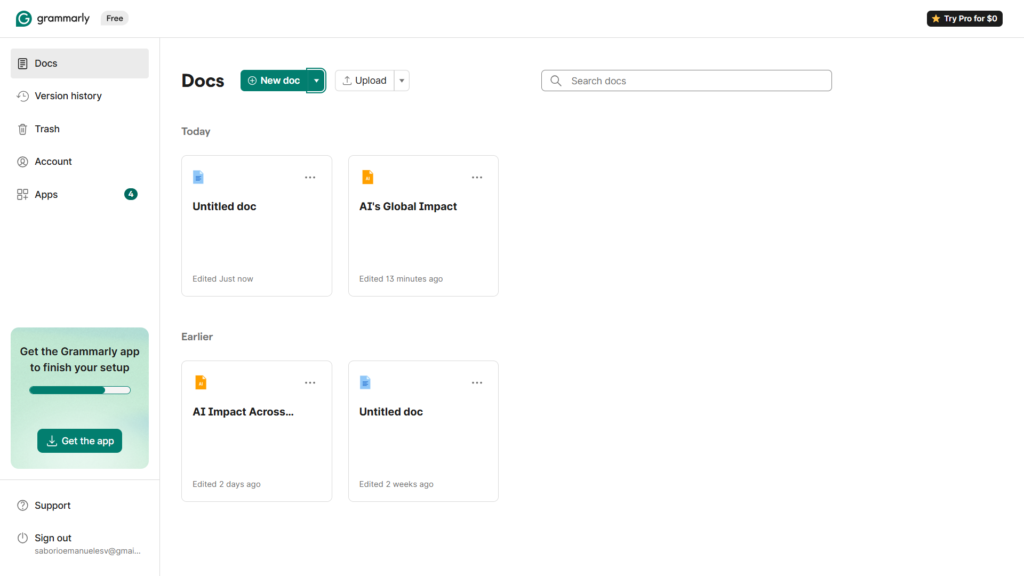
Grammarly is a writing assistant designed to identify errors and improve clarity, tone, structure, and communication. It can work inside Grammarly’s own editor as well as across supported websites, browsers, documents, and applications.
Although Grammarly originally became popular as a spelling and grammar checker, it now includes generative AI tools for drafting, rewriting, brainstorming, replying, improving text, and adapting writing for different audiences. Grammarly Pro currently advertises access to advanced writing features and a monthly allowance of generative AI prompts.
My registration process was quick, and I was not asked to provide a credit card. The interface also made a strong first impression because it was minimal and difficult to get lost in.
Grammarly feels less like a directory of separate utilities and more like an assistant that follows the writing process. That difference becomes important when deciding between Grammarly and QuillBot.
Read our complete Grammarly review→ https://theaitoolreview.com/grammarly-review-free-plan/
Feature-by-Feature Comparison
QuillBot vs Grammarly: Ease of Use
Both tools are beginner-friendly, but they organize their features differently.
QuillBot displays its tools clearly, allowing users to select the paraphraser, grammar checker, AI detector, summarizer, humanizer, translator, image generator, or another utility. This approach works well when you already know exactly what task you need to complete.
During my test, QuillBot was very easy to understand. I did not need to create an account before trying its basic writing features, which reduced the number of steps required to begin.
The main limitation is that moving between different tools can make the experience feel more divided. You may write text in one area, check it in another, and then move it again to the humanizer or detector.
Grammarly takes a more unified approach. Its design is clean, and the most relevant writing actions are presented around the document or selected paragraph. I found the registration process simple, and the platform did not request payment information during setup.
The layout was also difficult to misunderstand. Grammarly may therefore be the easier choice for someone who wants ongoing guidance instead of choosing from a large collection of individual tools.
Ease-of-use verdict: Both are accessible to beginners. QuillBot is convenient when you want a specific standalone tool, while Grammarly feels more focused and guided.
AI Writing and Output Quality
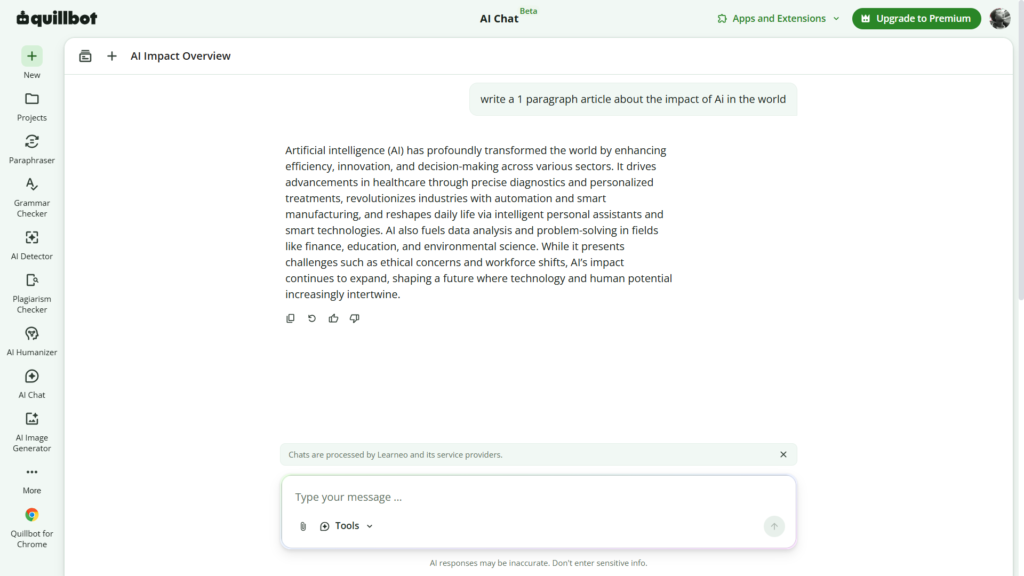
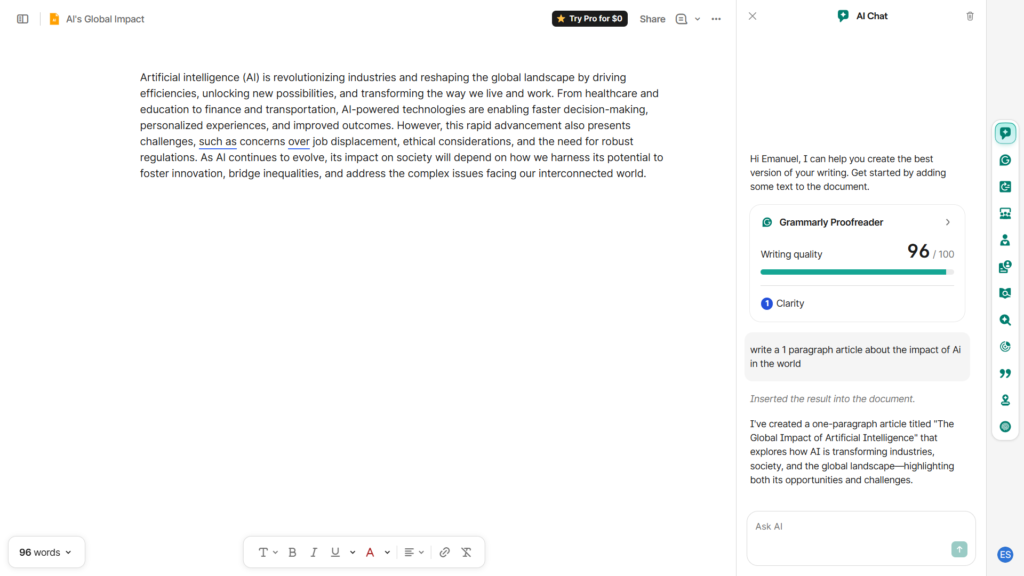
To make the comparison more consistent, I gave both tools exactly the same prompt:
“Write a 1 paragraph article about the impact of AI in the world.”
QuillBot generated the paragraph in less than 10 seconds during my test. The content was good and followed the basic request successfully.
Grammarly completed the same task even faster in my experience. Its paragraph was also good quality and usable as a starting draft.
This does not prove that Grammarly will always generate text faster. Response times may depend on the account, internet connection, server demand, selected tool, and complexity of the prompt. It only reflects what happened in my direct comparison.
Neither result should automatically be published without review. AI-generated paragraphs can contain general statements, repetitive phrasing, incorrect information, or language that does not match the writer’s natural voice. A human editor should check facts, add original examples, and adjust the final wording.
For producing a quick first paragraph, both tools worked well. Grammarly was faster in this particular test, but the difference was not large enough to make QuillBot feel slow.
Output-quality verdict: Both produced good initial content from the same prompt. Grammarly was faster in my test, while QuillBot still responded in under 10 seconds.
Paraphrasing, Rewriting, and Humanizing
Paraphrasing remains one of QuillBot’s most recognizable features. Its free plan currently allows users to paraphrase a limited amount of text and provides access to two paraphrasing modes. Free users can also try limited humanization and basic grammar correction.
This makes QuillBot useful when the main goal is to restructure a sentence, replace repetitive wording, shorten a paragraph, or explore another way to express an idea.
Grammarly also provides rewriting features, but its approach is more connected to editing. A user can highlight text and request improvements, tone changes, greater detail, or clearer wording.
I tested Grammarly’s paragraph improvement feature and found it genuinely useful. It made the original paragraph feel more polished without requiring me to rewrite everything manually.
I also tried Grammarly’s humanizer and was satisfied with the result. Grammarly describes this tool as a way to make AI-assisted writing sound more natural while preserving the original meaning.
The important point is that “humanizing” should not be treated as a method for disguising dishonest academic work or bypassing institutional rules. These tools are better used to remove robotic phrasing, improve flow, and make a legitimate draft sound closer to the writer’s intended voice.
Rewriting verdict: QuillBot is the stronger choice for users who specifically want a dedicated paraphrasing workspace. Grammarly is more convenient for improving text while editing a complete document.
AI Detection and Additional Tools
QuillBot offers a broad selection of additional tools, and this is one of its biggest advantages over Grammarly.
To test the AI detector, I first asked another AI platform to generate an article. I then pasted that article into QuillBot’s detector. In this example, QuillBot classified the text as 100% AI-generated.
That result matched the known origin of the article, so the detector worked correctly in this individual test. However, one successful example does not prove that the tool will identify every AI-generated or human-written passage correctly.
QuillBot itself explains that AI detectors provide estimates rather than definitive proof. Detection results should support human review, not replace it.
QuillBot currently promotes limited AI detection as part of its free offering. Its detector can provide an AI score and more detailed analysis of the submitted text.
I also tested QuillBot’s image generator after creating an account. I entered the prompt:
“Dragon in the forest.”
The image was generated in less than 20 seconds and looked very good in my test. This feature makes QuillBot more versatile for users who want both writing and basic visual-generation tools in one account.
Grammarly also operates an AI detector and promotes tools related to originality and responsible AI use.
However, the detector was not available to me during my test and appeared to require a paid plan in my account. Access conditions may vary by product version, account, region, or later platform updates, so I would not assume every user will see exactly the same restriction.
Additional-tools verdict: QuillBot offers a wider variety of standalone tools, especially because it combines text assistance, AI detection, citations, and image generation. Grammarly remains more concentrated on written communication.
Pricing Comparison
| Plan | QuillBot | Grammarly |
| Free plan | $0 with limits on words, modes, and selected features | $0 with basic writing assistance and limited AI access |
| Monthly paid plan | $9.95 per month | $30 per member per month |
| Quarterly paid plan | $19.95 every three months, averaging $6.65 per month | $60 per member every three months, averaging $20 per month |
| Annual paid plan | $49.95 per year, averaging $4.17 per month | $144 per member per year, averaging $12 per month |
| Credit card required for free test | I could begin using basic tools without an account | I registered without entering a card |
| Main paid-plan value | Higher limits and access to premium writing tools | Advanced writing support, rewriting, brand voice, and more AI usage |
These prices are based on the official QuillBot and Grammarly pages available in July 2026. Taxes, promotions, student offers, regional pricing, and renewal terms may change the final amount.
On standard listed prices, QuillBot is the less expensive paid option. Its annual plan has a lower effective monthly cost than Grammarly’s annual subscription.
That does not automatically make it the better value for every user. Someone who mainly needs paraphrasing, summarization, AI detection, citations, and multiple standalone tools may receive more value from QuillBot.
A professional who writes throughout the day in emails, documents, browser applications, and team communication may find Grammarly’s integrated corrections more valuable, even at a higher price.
Before subscribing, test the free plan and confirm that the paid features you need are included in the exact plan shown in your account.
Pros and Cons of Each Tool
QuillBot Pros and Cons
Pros
- Some tools can be used without creating an account.
- The interface is easy to understand.
- Strong focus on paraphrasing and rewriting.
- Includes grammar checking, summaries, citations, AI detection, and humanization.
- Offers image-generation and image-related tools.
- Generated good text from my test prompt.
- Every response I generated during my tests took less than one minute.
- Lower standard paid prices than Grammarly.
- Useful for students, bloggers, and users who regularly rewrite text.
Cons
- Not every feature is available without signing in.
- Free users face word, usage, and mode restrictions.
- The separate-tool layout can require copying text between different sections.
- AI detector scores should not be treated as definitive evidence.
- Users focused only on grammar correction may not need the full collection of tools.
Grammarly Pros and Cons
Pros
- Registration was quick and did not require a credit card.
- Minimal interface that is difficult to get lost in.
- Strong focus on grammar, clarity, tone, and communication.
- Produced good-quality text from my test prompt.
- Generated the test paragraph faster than QuillBot in my comparison.
- Paragraph improvement worked well in my test.
- Humanizer produced useful results.
- Suitable for emails, school drafts, professional documents, and routine communication.
- Rewriting features fit naturally into the editing process.
Cons
- Several useful features require Grammarly Pro.
- The AI detector was unavailable to me during testing.
- Standard paid plans cost more than QuillBot.
- It does not offer the same variety of visual-generation tools.
- Users who only need occasional paraphrasing may find QuillBot more direct.
Which One Should You Choose?
Choose QuillBot if…
Choose QuillBot when paraphrasing is your main priority. Its dedicated paraphraser makes it easy to test alternative versions of a sentence or paragraph without working through a full writing editor.
It is also the stronger option when you want several utilities in one place. QuillBot combines rewriting, summarization, grammar checking, AI detection, humanization, translation, citations, and image tools.
QuillBot makes particular sense for:
- Students who need help reorganizing drafts and creating citations
- Bloggers who want to rewrite or summarize sections
- Users looking for a more affordable premium plan
- People who want to test basic tools without immediately registering
- Users who want writing and image generation within the same platform
- Anyone who wants access to a limited free AI detector
Choose Grammarly if…
Choose Grammarly when your priority is improving writing as you work. Its minimal design and editing-focused suggestions make it suitable for people who produce emails, reports, assignments, messages, and documents regularly.
Grammarly makes particular sense for:
- Professionals who write emails and documents throughout the day
- Students who want grammar, clarity, and tone feedback
- Users who prefer guided suggestions instead of separate tools
- Writers who want to improve complete paragraphs
- People who need help making drafts sound more natural
- Users willing to pay more for a writing assistant centered on communication
The right choice depends less on which platform has the longest feature list and more on how you actually write.
Our Verdict: QuillBot vs Grammarly, Which Wins?
The fairest QuillBot vs Grammarly verdict is that each tool wins in a different category.
QuillBot wins for tool variety, paraphrasing, free experimentation, AI detection access, image generation, and lower standard pricing. It is a flexible option for users who move between several specific writing tasks.
Grammarly wins for focused editing, interface simplicity, paragraph improvement, and everyday writing support. It feels more natural for someone who wants one assistant to review and improve communication while they work.
In my direct writing test, Grammarly generated its response faster. Both platforms produced good paragraph-quality results, and neither took close to one minute to respond.
For most users focused on rewriting and getting multiple AI tools at a lower price, I would recommend starting with QuillBot. For users focused on grammar, clarity, tone, and professional communication, I would start with Grammarly.
Because both have free options, the best approach is to test the same paragraph in each platform. The difference in workflow becomes clearer after a few minutes of actual use.
Frequently Asked Questions (FAQ)
Is QuillBot better than Grammarly?
QuillBot is better for dedicated paraphrasing, summarization, AI detection, citations, and access to a broader collection of individual tools. Grammarly is better suited to ongoing grammar correction, clarity improvements, tone adjustments, and professional communication.
Neither is universally better. The right option depends on whether you need a multipurpose rewriting toolkit or an integrated writing assistant.
Is QuillBot or Grammarly better for students?
QuillBot may be more useful for students who need paraphrasing, summaries, translations, citations, and AI-content analysis. Grammarly may be better for students who want help correcting grammar, strengthening clarity, and polishing assignments.
Students should follow their school’s academic-integrity policies. AI tools should support original work rather than replace it.
Can QuillBot and Grammarly detect AI writing?
Both companies currently provide AI-detection tools. QuillBot’s detector correctly identified a completely AI-generated article in my individual test, but that result should not be treated as proof of perfect accuracy.
Grammarly promotes its own AI detector, although I could not access it under the conditions of my test. AI-detection scores from either platform should be reviewed carefully because detection systems can produce incorrect classifications.
Can I use QuillBot and Grammarly for free?
Yes. Both platforms offer free access, although the free versions include restrictions.
QuillBot’s free offering includes limited paraphrasing, grammar correction, humanization, summarization, and AI detection. Grammarly’s free option provides basic writing assistance and access to selected AI features. The exact limits and available tools can change, so check the current plan page before choosing a subscription.
Conclusion
QuillBot and Grammarly are both capable writing tools, but they solve slightly different problems.
QuillBot is the more versatile and affordable choice for paraphrasing, summaries, citations, AI detection, and access to additional creative tools. Grammarly provides a more focused experience for correcting, refining, and improving communication across complete documents.
My recommendation is to choose QuillBot for rewriting and tool variety and Grammarly for editing and everyday writing quality. Free users can test both before paying, using the same paragraph or assignment draft to determine which workflow feels more useful.
External Sources
For current information about plans, features, and AI detection tools, visit the official sources below:
- QuillBot Official Pricing Page
- QuillBot AI Detector
- Grammarly Official Plans and Pricing
- Grammarly AI Detector User Guide
Prices, limits, and available features may change over time. Check the official websites for the most current information.