
Disclosure: This post may contain affiliate links. If you purchase through our links, we may earn a commission at no extra cost to you.
Last updated: July 2026
Tested by: Emanuel S.
If you are searching for a QuillBot review because you want a fast paraphrasing tool, grammar helper, AI detector, or simple writing assistant, this article is based on my own hands-on test of the free plan.
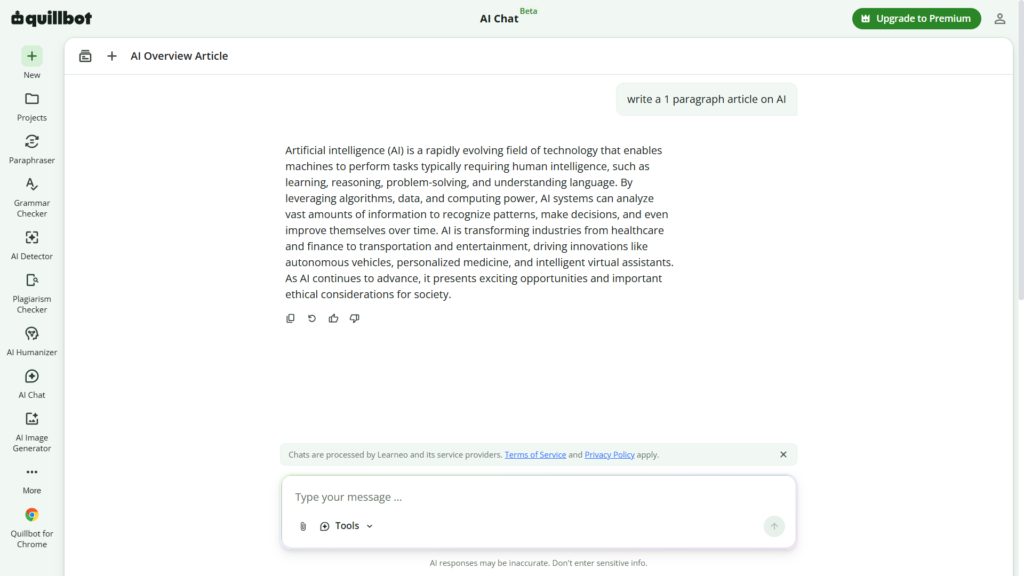
I tested QuillBot with simple prompts, without entering payment information. My experience was very straightforward: I could start using the tool without even creating an account, the interface was easy to understand, and the responses were fast. For example, I asked it to “write a 1 paragraph article on AI,” and it generated a good paragraph in less than 5 seconds.
That does not mean QuillBot is perfect. The free experience has limits, and some tools are not fully available unless you create an account or upgrade. But for quick rewriting, checking AI-generated text, and testing basic writing features, QuillBot is one of the easiest tools I have tried.
What Is QuillBot?
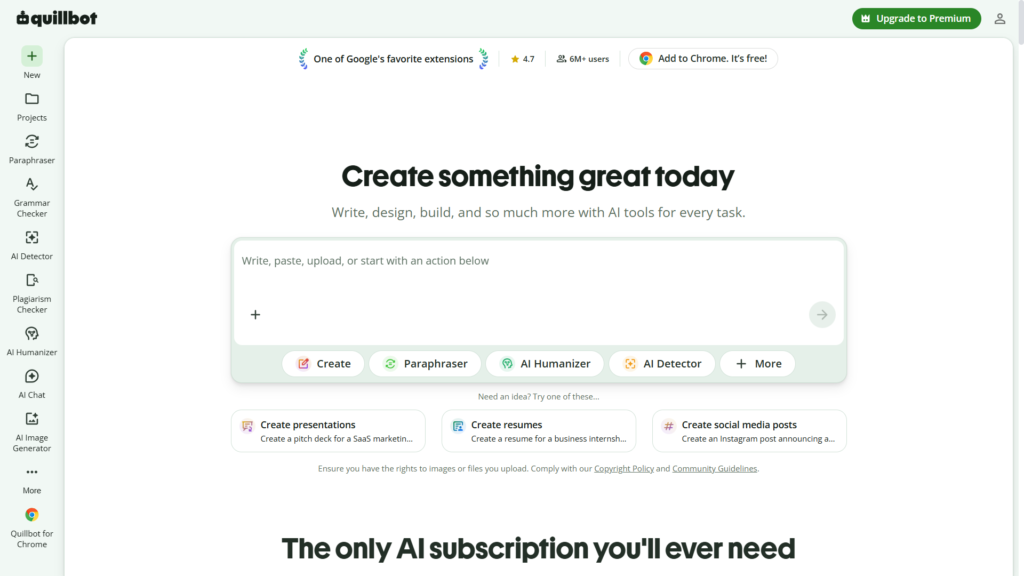
QuillBot is an AI writing platform best known for its paraphrasing tool. Its main purpose is to help users rewrite, improve, summarize, check, and generate text. According to QuillBot’s official site, its tools include a paraphraser, grammar checker, AI detector, plagiarism checker, summarizer, citation generator, translator, AI chat, and AI image generator.
The tool is especially popular with students, bloggers, content writers, and people who write in English as a second language. You can paste text into QuillBot, choose a writing mode, and get a rewritten version that sounds different while keeping the same general meaning.
In my test, the biggest advantage was how fast and simple it felt. I did not need to study the platform or watch tutorials. I opened it, typed a prompt, and got an answer almost immediately.
That matters because many AI writing tools feel overloaded. They have too many menus, too many buttons, and too many unclear features. QuillBot feels more focused. It is not trying to be a huge productivity workspace. It is mainly built around writing assistance.
Perplexity AI Review 2026: A Better Search Engine? → https://theaitoolreview.com/perplexity-ai-review/
Key Features of QuillBot
QuillBot has several tools, but the most important ones are the paraphraser, grammar checker, AI detector, summarizer, and newer AI generation features.
Paraphrasing Tool
The QuillBot paraphrasing tool is the core feature. You can paste a sentence, paragraph, or article section, and QuillBot rewrites it in a different way.
This is useful when you want to:
- Improve clarity
- Make a paragraph sound smoother
- Avoid repeating the same wording
- Rewrite rough drafts
- Get alternative sentence structures
QuillBot’s official paraphrasing page says the tool is designed to help users rewrite, edit, and change the tone of their text to improve clarity and comprehension.
In my experience, the tool was very beginner-friendly. I did not feel lost, and I did not need to create an account just to start using the basic version.
AI Writing Tools
QuillBot is no longer only a paraphraser. It now includes several AI writing tools, including options for translation, paragraph rewriting, sentence rewriting, and generative writing support. QuillBot’s official AI writing tools page lists tools such as Paraphraser, Translate, QuillBot Flow, Sentence Rewriter, and Paragraph Rewriter.
For my test, I asked QuillBot: “write a 1 paragraph article on AI.” It generated the paragraph in less than 5 seconds, and the quality was good for a simple request.
That result impressed me because it was fast and clear. I would not use a one-paragraph AI output as a final blog post without editing, but as a quick starting point, it worked well.
AI Detector
QuillBot also includes an AI detector. This tool checks whether a text appears to be AI-generated.
I tested this by asking another AI tool to create an article. Then I pasted that article into QuillBot’s AI detection tool. In my example, QuillBot returned a result of 100% AI, which matched what I expected because the text was fully generated by AI.
That does not mean AI detectors are perfect. QuillBot itself says AI detector accuracy can vary depending on the length, topic, and how the text was written or edited. It also says the detector is generally more accurate when evaluating longer text.
So my honest opinion is this: QuillBot’s AI detector worked in my example, but I would not treat any AI detector as final proof by itself. It is better as a helpful signal, not a courtroom-level decision.
AI Image Generator
One interesting part of my test was the image generation feature. Without logging in, not all tools were available to me. For example, I could not use the image feature before creating an account.
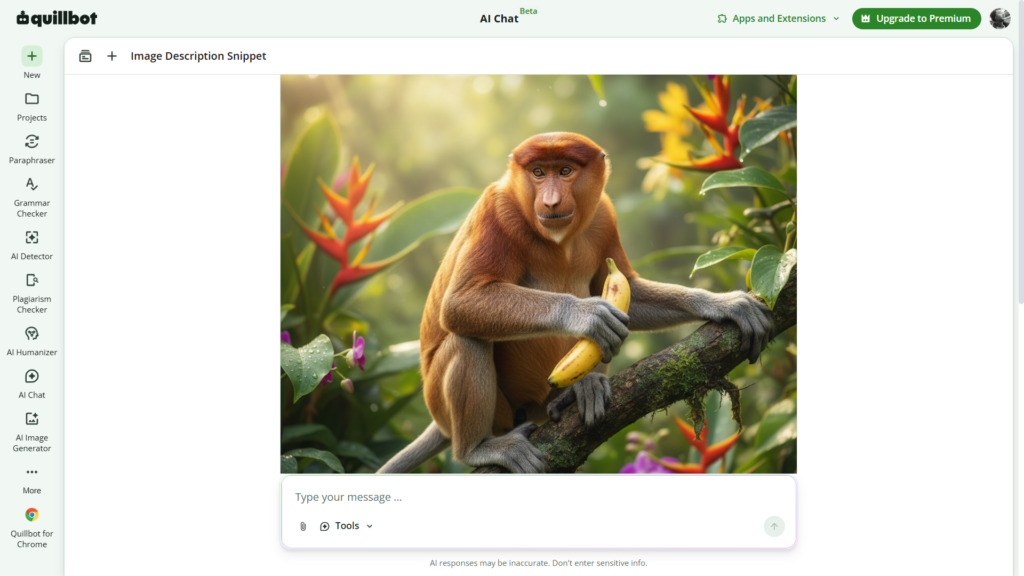
After I created an account, I asked QuillBot to generate an image with the prompt: “monkey grabbing a banana.” It created the image very well in less than 20 seconds.
That was better than I expected because I mainly think of QuillBot as a writing tool, not an image generator. Still, I would treat this as a bonus feature. If your main goal is professional AI image generation, a dedicated image tool may give you more control. But for quick, simple image prompts, QuillBot was useful in my test.
Grammar Checker
QuillBot also offers grammar correction. This is helpful for fixing spelling, punctuation, and basic writing mistakes.
I did not run a deep grammar-only test for this review, so I will not claim that it is better than Grammarly or other dedicated grammar tools. But based on QuillBot’s official product pages, grammar checking is part of the platform’s writing assistant features.
For everyday writing, this feature can be helpful if you want everything in one place: paraphrasing, grammar, summarizing, and AI detection.
Summarizer
The summarizer helps shorten longer text into key points. This can be useful for students, bloggers, researchers, or anyone who needs to understand a text faster.
Again, the value depends on how you use it. A summarizer can save time, but you still need to check the result. AI tools can miss context, remove important details, or simplify too much.
QuillBot Pricing: How Much Does It Cost?
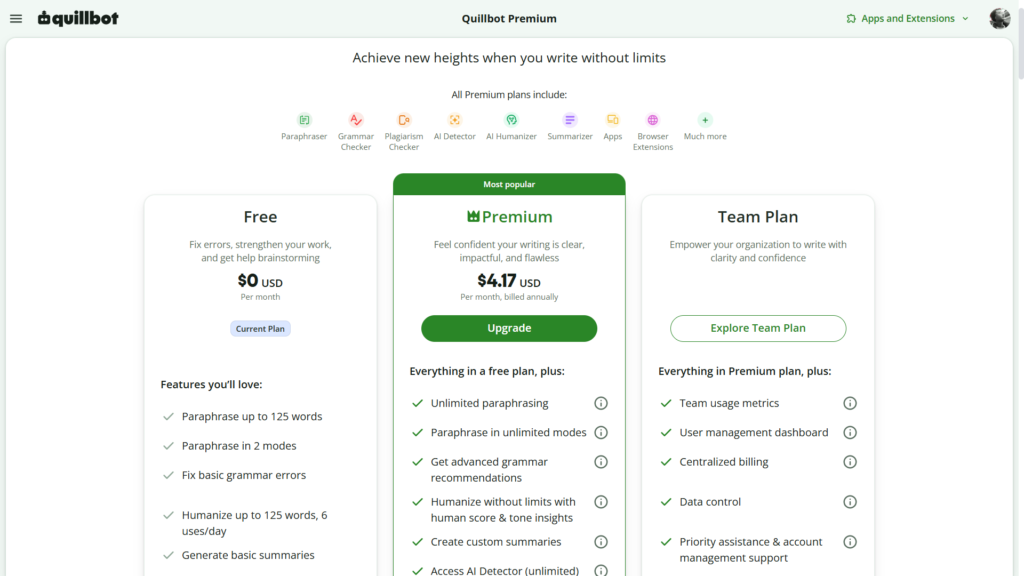
QuillBot has a free plan and paid Premium plans. The good part is that I was able to start using QuillBot without a card, and I could test basic features before deciding whether it was worth paying for.
According to QuillBot’s official pricing page, Premium is listed at $9.95 per month, $19.95 billed every 3 months, or $49.95 billed annually, which comes out to $4.17 per month on the annual plan.
QuillBot’s Premium page also shows a free plan at $0 per month. The free plan includes limited access to features such as paraphrasing, basic grammar fixes, limited humanizing, basic summaries, and limited AI detector access.
Here is the simple breakdown:
| Plan | Best For | Price |
| Free | Testing QuillBot, short rewriting, basic writing help | $0/month |
| Monthly Premium | Users who want Premium without a long commitment | $9.95/month |
| Quarterly Premium | Users who want a lower average monthly price | $19.95 every 3 months |
| Annual Premium | Frequent users who want the lowest listed monthly average | $49.95/year |
Prices can change, so always check QuillBot’s official pricing page before buying.
Pros and Cons of QuillBot
No review is useful if it only talks about the good parts. After testing QuillBot, here are the main pros and cons I noticed.
Pros
- Very easy to use: I did not feel confused when starting.
- No card needed for basic testing: I could try the tool without entering payment details.
- Fast responses: In my examples, no response took more than 1 minute.
- No account needed to start: I could begin using some features without signing up.
- Good basic AI writing output: My one-paragraph AI article was generated quickly and looked solid.
- AI detector worked in my example: It correctly identified a fully AI-generated article as 100% AI in my test.
- Image generation was better than expected: After creating an account, my “monkey grabbing a banana” image came out well in less than 20 seconds.
Cons
- Some tools are locked without an account: I could not access everything before signing in.
- Free users do not get the full experience: The free plan is useful, but it is limited.
- AI detection should not be treated as perfect: Even QuillBot explains that accuracy can vary.
- Image generation feels secondary: It worked well for me, but QuillBot still feels more like a writing tool than a dedicated image platform.
- Premium may be unnecessary for casual users: If you only rewrite a few sentences sometimes, the free version may be enough.
Who Is QuillBot Best For?
QuillBot is best for people who want a simple writing assistant without a complicated setup.
I would recommend QuillBot for:
- Students who want help rewriting notes, improving clarity, or summarizing text
- Bloggers who need quick paragraph rewrites or headline variations
- Freelance writers who want faster editing support
- Non-native English writers who want cleaner sentence structure
- Content creators who need quick drafts, rewrites, or AI detection checks
- Beginners who want an AI writing tool that does not feel hard to learn
I would not recommend QuillBot as your only tool if you need advanced SEO research, long-form content planning, brand voice management, or professional image generation. It can help with writing, but it is not a full content marketing platform.
For my workflow, I see QuillBot as a support tool. It is useful when you already have text and want to improve it. It is also useful when you want to test whether a piece of writing looks AI-generated. But I would still edit manually before publishing anything on a blog.
3 Best AI Tools for Freelancers in 2026 → https://theaitoolreview.com/best-ai-tools-for-freelancers/
QuillBot vs Grammarly: Quick Comparison
The closest competitor to QuillBot is probably Grammarly. Both tools help improve writing, but they are not exactly the same.
Grammarly focuses heavily on grammar, tone, writing suggestions, and writing assistance across apps. Its official pricing page lists a Free plan at $0/month and a Pro plan at $12 per member/month when billed annually or $30 when billed monthly.
QuillBot, on the other hand, feels more focused on paraphrasing, rewriting, summarizing, AI detection, and quick text transformation.
| Feature | QuillBot | Grammarly |
| Best known for | Paraphrasing and rewriting | Grammar and writing correction |
| Free plan | Yes | Yes |
| No-card testing | Yes, based on my test | Yes, free account available |
| AI detector | Yes, limited on free plan | Not the main focus |
| Image generation | Available after account in my test | Not the main focus |
| Best for | Rewriting, paraphrasing, summaries, AI checks | Grammar, tone, everyday writing polish |
| Beginner-friendly | Yes | Yes |
My honest take: choose QuillBot if your main goal is paraphrasing and rewriting. Choose Grammarly if your main goal is grammar correction, tone suggestions, and writing support across different apps.
Some people may use both. For example, you could rewrite a paragraph in QuillBot, then check grammar and tone in Grammarly. That workflow makes sense if you write often.
Grammarly Review 2026: Is the Free Plan Actually Useful? → https://theaitoolreview.com/grammarly-review-free-plan/
Our Verdict: Is QuillBot Worth It?
Yes, QuillBot is worth trying, especially because the free plan is easy to access and does not require a card.
In my experience, QuillBot was fast, simple, and useful. I liked that I could start without creating an account. I also liked that the tool generated a one-paragraph AI article in less than 5 seconds and that the image generator worked well after I signed in.
The biggest reason I would recommend QuillBot is convenience. It combines several useful writing tools in one place: paraphrasing, summarizing, grammar checking, AI detection, and AI generation. For beginners, that is a strong advantage.
The biggest limitation is that the free version does not unlock everything. If you want full access, you will probably need Premium. But I would not pay immediately. Test the free plan first, see how often you use it, and upgrade only if it saves you real time.
For casual users, the free plan may be enough. For students, bloggers, and writers who rewrite or edit text every day, Premium may be worth considering.
Frequently Asked Questions (FAQ)
Is QuillBot free?
Yes, QuillBot has a free plan. The free plan gives limited access to several tools, including paraphrasing and other writing features. QuillBot’s official Premium page lists the Free plan at $0 per month.
Do you need a credit card to use QuillBot?
In my test, I did not need a credit card to start using QuillBot. I was able to use some features without even creating an account. However, some tools were not fully available until I signed in.
Is QuillBot good for paraphrasing?
Yes, QuillBot is good for basic paraphrasing and rewriting. It is one of the easiest paraphrasing tools I have tested. It works best when you already have a draft and want to make it clearer, smoother, or less repetitive.
Is QuillBot’s AI detector accurate?
QuillBot’s AI detector worked correctly in my example. I tested it with an article generated by another AI tool, and it returned 100% AI. However, AI detectors are not perfect. QuillBot states that accuracy can vary based on text length, topic, and how the text was written or edited.
Conclusion
QuillBot is a strong choice if you want a fast, simple, beginner-friendly AI paraphrasing tool. It is not perfect, and the free version has limits, but it gives enough value to make it worth testing before paying.
My recommendation is simple: start with the free plan. Use it for paraphrasing, short writing tasks, summaries, and AI detection checks. If you find yourself using it every day, then Premium may be worth it. For casual users, the free version is already useful.
- QuillBot Official Website: https://quillbot.com/
- QuillBot Pricing Page: https://quillbot.com/upgrade
- QuillBot Premium Page: https://quillbot.com/premium
- QuillBot AI Detector: https://quillbot.com/ai-content-detector
- QuillBot Paraphrasing Tool: https://quillbot.com/paraphrasing-tool
- Grammarly Official Website: https://www.grammarly.com/
- Grammarly Pricing Page: https://www.grammarly.com/plans
Pingback: QuillBot vs Grammarly (2026): Which One Is Better?
Pingback: 4 Best Free AI Tools for Students in 2026