
Disclosure: This post may contain affiliate links. If you purchase through our links, we may earn a commission at no extra cost to you.
Last updated: July 2026
Tested by: Emanuel S
I’ll be honest I was skeptical the first time someone told me an AI tool could replace Google search. I’ve heard that pitch before, and most of the time the “AI search engine” turns out to be a chatbot wearing a search engine costume. So when I sat down to actually test Perplexity AI, I went in expecting to find the cracks quickly.
I didn’t have to look hard for what worked, though. Within seconds of landing on the site, I was typing a question, no account, no email, no credit card. That alone puts Perplexity ahead of a lot of AI tools that make you jump through hoops before you get a single answer. This review covers what I found after spending real time in the tool: how it works, what the free plan actually gives you, and whether it’s worth building into your daily routine as a search engine alternative.
If you’re trying to decide whether Perplexity deserves a spot next to (or instead of) your regular search engine, keep reading. I’m going to walk through the features, the pricing, and the honest pros and cons, including the parts that confused me.
What Is Perplexity AI?
Perplexity AI is an AI-powered answer engine. Instead of handing you ten blue links and letting you do the digging, it reads across the web in real time and gives you a direct, written answer with sources cited right next to the claims. Think of it as the midpoint between a traditional search engine like Google and a conversational AI like ChatGPT, you ask a question in plain language, and it responds with a synthesized answer plus links to where that information came from.
The company has grown quickly since launch, expanding from a single free chat-style tool into a broader ecosystem that now includes a dedicated browser (Comet), enterprise offerings, and multiple subscription tiers. But at its core, the product hasn’t changed much: you type a question, it searches, it answers, it cites.
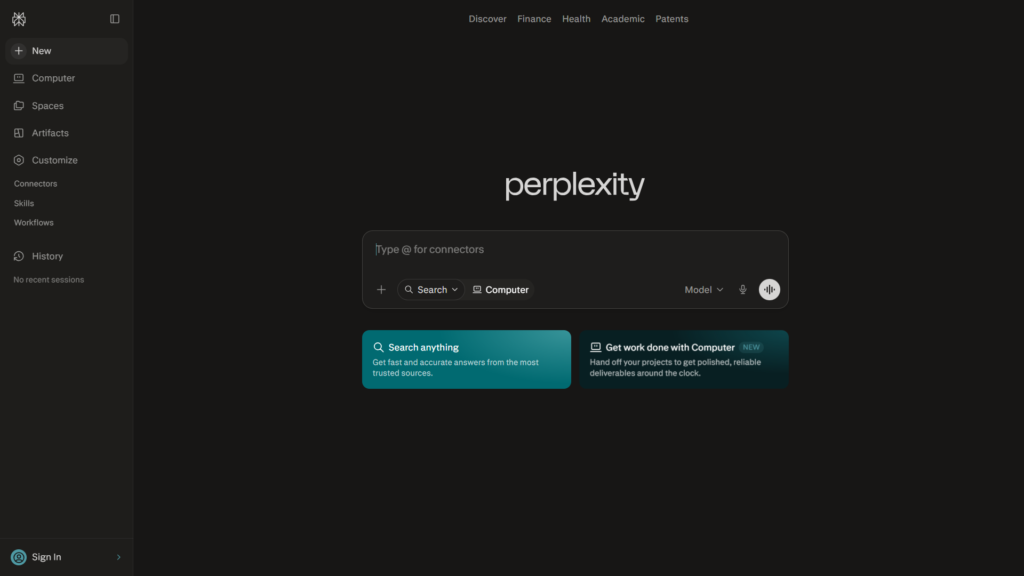
What stood out to me immediately during testing was how little friction there is to get started. I opened the site, typed a question, and got an answer, no signup wall blocking the entry point. That’s not something you can say about every AI tool on the market right now, and it’s a meaningful E-E-A-T point in Perplexity’s favor: the barrier to trying it is essentially zero.
Key Features of Perplexity AI
Here’s what I actually experienced using the tool, plus what the platform documents about its own capabilities:
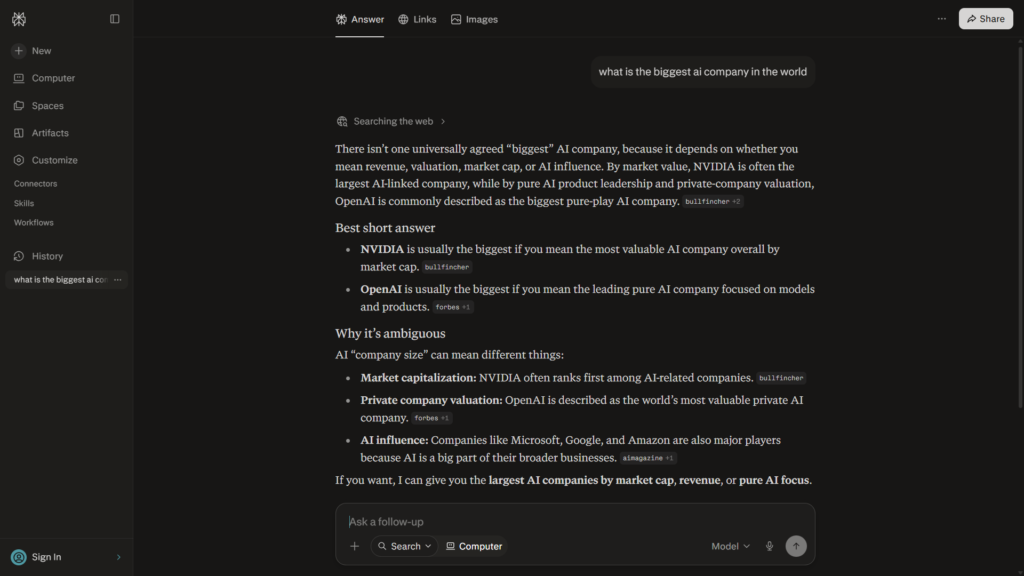
- No registration required to start: I typed my first question, “what is the biggest AI company in the world,” directly into the search bar without creating an account, and got a fast, coherent answer with sources attached. This is a genuinely low-friction way to test a product before committing to anything.
- Clean, simple interface: The design is uncluttered. There’s a single search bar front and center, and the layout doesn’t try to overwhelm you with menus or settings before you’ve even asked your first question.
- Speed: My test query returned an answer quickly, even as a completely anonymous, non-logged-in user. For a tool that’s pulling live information from the web and running it through a language model, that responsiveness matters.
- Source citations: Answers come with clickable references, so you can verify claims instead of taking the AI’s word for it. This is arguably Perplexity’s biggest differentiator versus a standard chatbot.
- News section: The platform includes a news feed, though I’ll admit I didn’t fully understand how it curates or ranks stories after a first look. It’s there, it’s usable, but it wasn’t immediately intuitive to me what makes it different from just asking Perplexity a news-related question directly.
- Model tiers: The free plan runs on Perplexity’s standard model, not the premium ones. If you want access to more advanced AI models for deeper reasoning, that sits behind a paid plan.
- Easy account creation (when you choose to): I did eventually create an account to poke around further settings, and the process was straightforward, no unnecessary steps, and importantly, no credit card requested anywhere in the flow.
ChatGPT vs Claude vs Gemini: Full Comparison for 2026 → https://theaitoolreview.com/chatgpt-vs-claude-vs-gemini/
One thing worth flagging for anyone comparing tools: Perplexity also ships a Chromium-based browser called Comet, which bakes the AI assistant directly into your browsing experience. It was released for Windows and macOS in July 2025 and made available as a free download in October 2025. I didn’t test Comet as part of this review, this article focuses specifically on the core Perplexity search/answer product, but it’s worth knowing it exists if you want the assistant to follow you around the web rather than living in a single tab.
Perplexity AI Pricing: How Much Does It Cost?
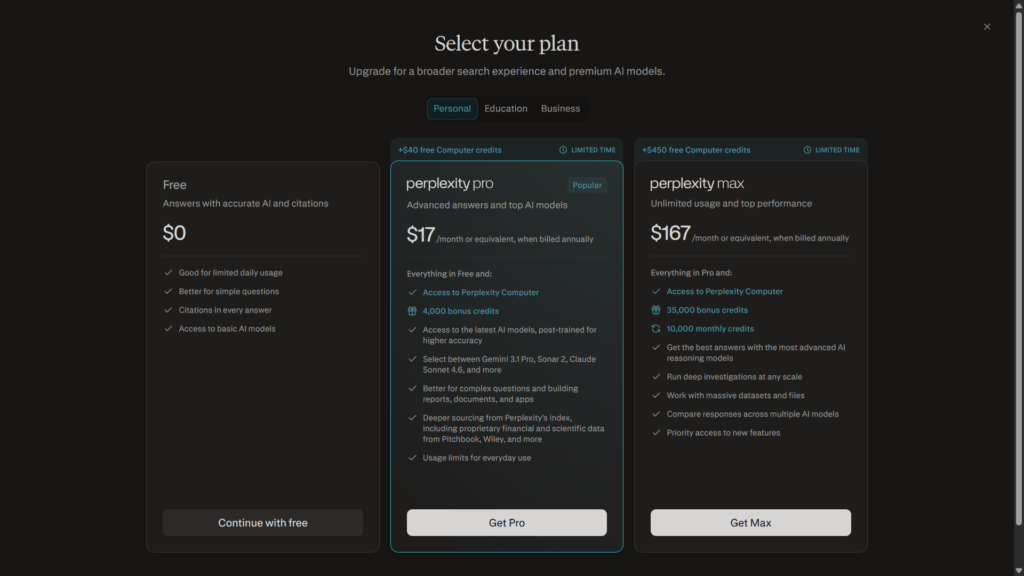
This is where a lot of people get confused, because Perplexity’s plan lineup has grown over time. Here’s the breakdown as it stands:
| Plan | Price | Best For |
| Free | $0 no card required | Casual use, quick questions, testing the tool |
| Pro | $20/month or $17/month billed annually | Frequent users who want top-tier models and fewer limits |
| Max | $200/month or $167/month billed annually | Power users who lean on Perplexity as core work infrastructure |
| Enterprise Pro / Max | Custom, seat-based | Teams and organizations needing admin controls and compliance features |
What I can confirm firsthand: the free plan doesn’t require a credit card, and signing up is quick. That’s a real advantage if you’re the type of person who’s been burned before by “free trials” that quietly wants your card details up front. I never hit a paywall or a card request during my testing session, even after asking follow-up questions.
The catch, based on my own use, is that the free tier only includes Perplexity’s basic model, not the more capable models the company advertises for paid users. Perplexity’s free tier is described as providing access for occasional research needs rather than serving as a limited trial, giving unlimited quick searches alongside a small daily allowance of more advanced Pro searches. If your questions are simple lookups, the free plan will likely feel like plenty. If you want the deeper reasoning or the newest frontier models, you’ll need to upgrade.
For the most current numbers, it’s worth checking Perplexity’s own pricing page directly, since AI companies tend to adjust these tiers fairly often: Perplexity Pro official page.
Pros and Cons of Perplexity AI
Pros:
- No signup wall, you can use it immediately, which is rare for AI tools this capable
- No credit card required for the free plan, ever, based on my testing
- Fast responses, even for an anonymous, non-logged-in user
- Simple, uncluttered design that doesn’t require a learning curve
- Source citations built into every answer, which supports trust and lets you fact-check
- Easy account creation if and when you decide you want one
Cons:
- Free plan is limited to the basic model, you don’t get access to the premium AI models without paying
- Some features feel unexplained, like the news section, which I found present but not clearly integrated or explained within the interface
- Upgrade path isn’t always obvious from inside the free experience, you have to actively seek out what Pro or Max unlock
- Pricing has multiple tiers now, which can be confusing if you’re just trying to figure out whether you need to pay at all
Who Is Perplexity AI Best For?
Based on what I tested, Perplexity makes the most sense for:
- Students and casual researchers who want quick, sourced answers without wading through ten search results themselves
- Anyone hesitant to hand over a credit card just to try an AI tool, the no-card free plan removes that barrier entirely
- People who value citations, since Perplexity shows its sources instead of just asserting facts
- Users who don’t need the most advanced AI models daily, the free tier’s basic model was fast and usable for a straightforward factual question in my test
It’s probably less ideal for professionals who need frontier-level reasoning models for complex research tasks every day, that’s specifically gated behind the paid Pro or Max tiers, and the free experience won’t get you there.
Perplexity AI vs Google: Quick Comparison
| Feature | Perplexity AI | Google Search |
| Answer format | Direct, synthesized answer with citations | List of links, snippets, occasional AI overview |
| Registration needed | No | No |
| Cost | Free tier available, no card required | Free |
| Source transparency | Citations shown inline | Varies by result |
| Best for | Quick factual questions, research | Broad browsing, shopping, navigation |
Google still wins on sheer breadth, maps, shopping, images, local results, all in one place. But for a straightforward factual question, my experience with Perplexity was that it got me to an answer faster, without me having to click into multiple tabs myself. It’s less a full replacement for Google and more a different tool for a specific job: getting a direct, sourced answer to a question quickly.
Best Free AI Writing Tools (No Credit Card) in 2026 → https://theaitoolreview.com/best-free-ai-writing-tools-no-credit-card/
Our Verdict: Is Perplexity AI Worth It?
For the free tier specifically, yes, easily. There’s no cost, no card, and no signup barrier standing between you and a fast, sourced answer to a question. In my testing, it delivered exactly what it promised on a simple factual query, and it did it without asking anything of me first. That’s a low-risk way to see if the tool fits into your routine.
Whether the paid tiers are worth it depends entirely on how much you lean on AI models for research. If you’re a casual user asking a handful of questions a week, the free basic model will probably cover you fine. If you’re doing serious research work and want access to premium models, you’ll need to weigh the Pro plan’s cost against how often you’d actually use those advanced capabilities, something only you can judge based on your own workload.
Frequently Asked Questions (FAQ)
Is Perplexity AI really free to use?
Yes. You can use the free plan without registering an account, and even after creating one, no credit card is required. The free plan runs on Perplexity’s basic model rather than its premium ones.
Do I need to create an account to use Perplexity?
No. I was able to ask a question and get an answer without signing up at all. Creating an account is optional and, in my testing, was a quick process when I did choose to do it.
What’s the difference between Perplexity’s free and paid plans?
The main difference is model access. The free tier gives you unlimited quick searches with limited access to more advanced capabilities, while paid plans unlock access to more powerful AI models and higher usage limits.
Is Perplexity better than Google for search?
It depends on what you’re searching for. For quick factual questions where you want a direct, sourced answer, Perplexity can be faster and more convenient. For broad browsing, shopping, or local search, Google’s ecosystem is still more complete.
Conclusion
Perplexity AI won me over faster than I expected, mostly because of how little it asked of me before proving its value. No signup wall, no credit card, and a fast, well-sourced answer to a real question I threw at it, that’s a strong first impression for any tool, let alone a free one. The basic model on the free plan won’t satisfy everyone, especially if you’re used to the most advanced AI reasoning available, but as an entry point into AI-assisted search, it’s hard to argue with the price and the friction level.
My recommendation: if you haven’t tried it yet, there’s genuinely no reason not to. Ask it a question, see how it compares to your usual search habits, and decide from there whether the free tier is enough or whether the paid models are worth the upgrade for your specific needs.
Perplexity Pro official pricing page → https://www.perplexity.ai/pro
Pingback: QuillBot Review 2026: Is the Free Paraphrasing Tool Worth It?
Pingback: How to Use Perplexity AI for Research: Step-by-Step Guide