
Disclosure: This post may contain affiliate links. If you purchase through our links, we may earn a commission at no extra cost to you.
Last updated: July 2026
Tested by: Emanuel S.
Researching online usually means opening too many tabs, comparing conflicting claims, and trying to remember which website supported each fact. Perplexity AI reduces that workload by searching the web, summarizing what it finds, and attaching numbered citations to its answers.
This guide explains how to use Perplexity AI for research with the free Standard plan, from writing your first prompt to checking sources and organizing your findings.
What Is Perplexity AI?
Perplexity AI is an AI-powered search and research tool. Instead of returning only a page of blue links, it searches the web and produces a written answer based on the sources it finds.
Its answers normally include numbered citations. Selecting one of those citations opens the webpage supporting that section of the response, which makes Perplexity more useful for research than an AI chatbot that gives an answer without showing where the information came from.
Perplexity also remembers the context of a conversation. You can begin with a broad question and then ask follow-up questions without repeating the entire topic each time.
My opinion is that Perplexity works best as the starting point of research, not as the final authority. It can help you understand a subject and locate useful sources quickly, but you should still read the original material before using an important claim.
Read our Perplexity AI review →https://theaitoolreview.com/perplexity-ai-review/
What You Get With the Free Perplexity Plan
Perplexity calls its free option the Standard plan. At the time of writing, it includes practically unlimited basic searches, access to search history, limited file uploads, a small number of Pro Searches, and a limited number of Research queries. Perplexity automatically selects the model used for ordinary free searches.
The official plan comparison currently lists:
- Practically unlimited basic searches
- Three Pro Searches per day
- One Research query per month
- Limited file-upload sessions
- No manual access to premium AI models
- No image generation
- No file or app creation
These limits can change, so check Perplexity’s current plan page before relying on a specific allowance.
You don’t need the paid plan to follow the main workflow in this guide. A basic search with well-written follow-up questions is enough for topic discovery, source collection, comparison research, and fact-checking.
In my view, beginners should learn the basic search workflow before using their limited Research query. A precise standard search is often more useful than spending the advanced query on a vague request.
I didn’t have to create an account to start using Perplexity, although I recommend signing up if you plan to use it for serious research. It didn’t ask me for a credit card, and the registration process was simple and surprisingly quick.
How to Use Perplexity AI for Research
Step 1: Open Perplexity and Create a Free Account
Go to the Perplexity website and select the sign-up or login option. Depending on the available methods, you may be able to continue with an email address or a supported third-party account.
Creating an account is worth doing even when you only plan to use the free version. It gives you access to your previous search threads, making it easier to return to research instead of starting again.
After signing in, you should see the main search field in the center of the page.
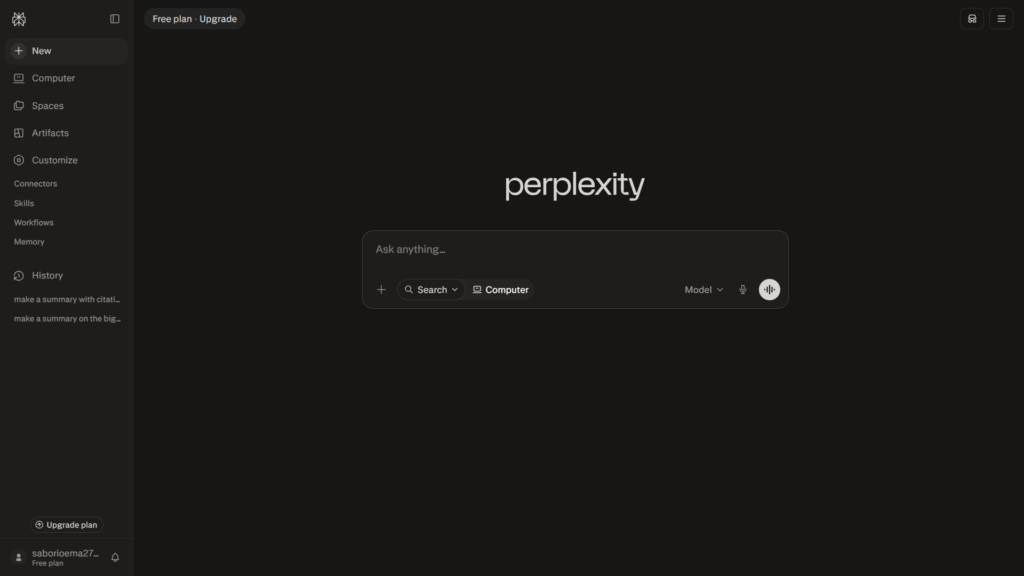
You can sometimes perform basic searches without signing in, but an account is better for a real research project because your conversations remain available in your history.
Step 2: Turn Your Topic Into a Specific Research Question
The quality of a Perplexity answer depends heavily on the question you give it.
A weak prompt might look like this:
“Tell me about artificial intelligence.”
That request is too broad. Perplexity has to guess whether you want a definition, history, list of tools, recent news, benefits, risks, or something else.
A stronger research prompt would be:
“Explain how generative AI has affected university education since 2023. Focus on benefits, concerns raised by educators, and examples of policies introduced by universities. Use reliable and recent sources.”
This prompt gives Perplexity four useful instructions:
- The exact subject
- The period to investigate
- The points the answer should cover
- The type of sources you expect
For most research tasks, I recommend building prompts with this structure:
Research [topic] for [purpose]. Focus on [three or four specific areas]. Prioritize [source types or date range]. Present the answer as [desired format].
For example:
“Research the environmental impact of data centers for a beginner-friendly article. Focus on electricity use, water consumption, renewable-energy efforts, and major limitations in the available data. Prioritize government reports, academic research, and company sustainability reports published since 2024. Present the findings in sections with citations.”
That gives Perplexity a much clearer job than a simple keyword search.
Step 3: Choose the Appropriate Search Mode
Before submitting your question, look near the search box for the available search-mode control. The exact position and wording may change as Perplexity updates its interface.
The free plan may display options such as a basic search, Pro Search, or Research. However, advanced modes have stricter limits than ordinary searches. Perplexity’s current documentation says free users receive limited Pro Searches, while Research performs a larger, multi-step investigation across many searches and sources.
Here is how I would use them:
Use a Basic Search For:
- Understanding a new topic
- Finding definitions and examples
- Creating an initial research outline
- Discovering useful sources
- Asking follow-up questions
- Checking a straightforward fact
Use Pro Search For:
- Comparing several products, ideas, or viewpoints
- Questions that require multiple reasoning steps
- Finding more detailed supporting material
- Building a structured answer from several sources
Use Research For:
- A broad report requiring many sources
- A detailed overview of a complicated subject
- Investigating several subtopics in one request
- Producing a research brief before writing a long article
My mistake when I first approached this workflow was treating the most advanced mode as automatically better. A broad prompt can still produce a broad and unfocused report. I now outline the question with a basic search first, refine the scope, and only then use an advanced search when the topic genuinely needs it.
Step 4: Review the Initial Answer Before Asking More Questions
After you submit the prompt, Perplexity generates a written response with citations placed next to relevant statements.
Don’t immediately copy the answer into your notes. Read it once and check whether it actually addresses the research question.
Look for:
- Missing subtopics
- Unsupported generalizations
- Sources that appear outdated
- Claims that are more confident than the evidence
- Several citations leading to the same original report
- Information taken only from blogs when stronger sources exist
Perplexity’s answer is a map of the topic. Your job is to decide which paths deserve further investigation.
I particularly like using the first response to identify vocabulary I didn’t know. Once Perplexity reveals the proper technical terms, organizations, policies, or reports connected to a topic, the next searches become much more precise.
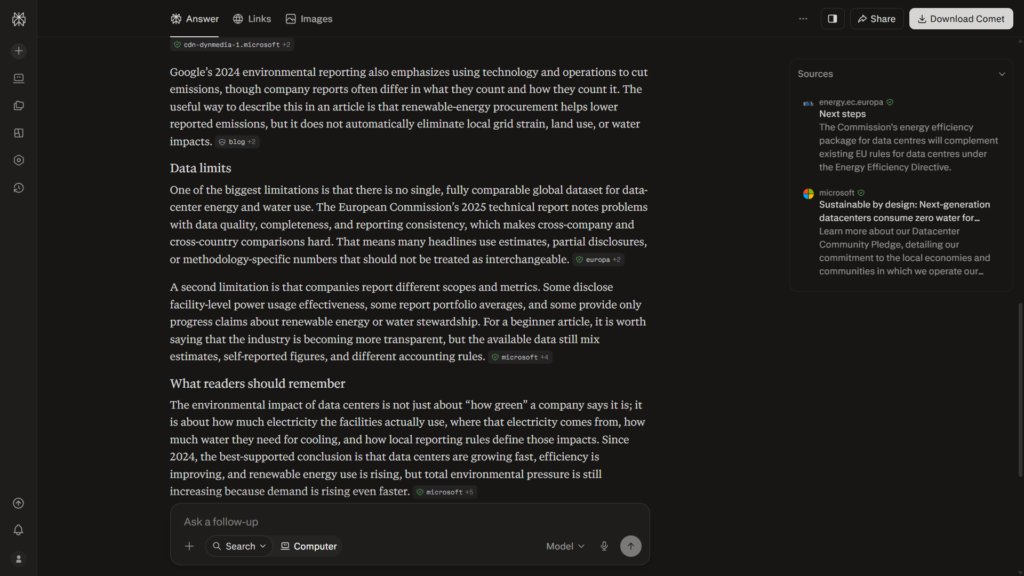
I tested it with the prompt, “Research the environmental impact of data centers for a beginner-friendly article. Focus on electricity use, water consumption, renewable-energy efforts, and major limitations in the available data. Prioritize government reports, academic research, and company sustainability reports published since 2024. Present the findings in sections with citations.”
Perplexity produced the result in under 20 seconds, included at least one citation in almost every paragraph, and most of the sources appeared to come from highly credible organizations.
Step 5: Open and Verify the Citations
This is the most important part of learning how to use Perplexity AI for research.
Select the numbered citation beside a claim. Perplexity should show the source title and provide access to the original webpage. Depending on the interface, you may also see a Links section or a list of the webpages used for the answer.
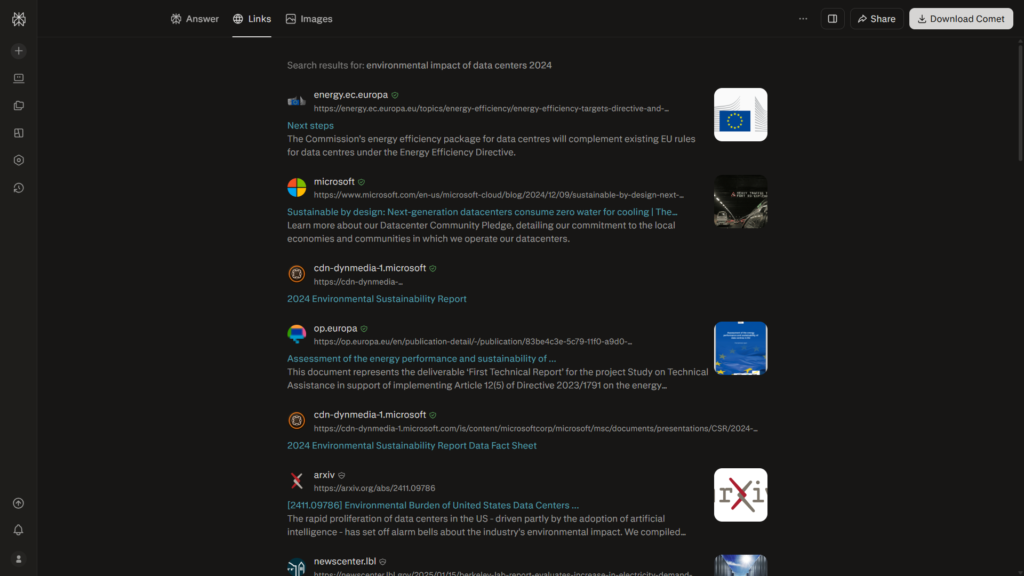
Open the most important sources and ask the following questions:
Who Published It?
A government agency, university, established research organization, or official company page may be more suitable than an anonymous blog.
When Was It Published or Updated?
A source can be credible but too old for a question about current software, policies, or statistics.
Does the Source Support the Exact Claim?
Sometimes a citation is related to the subject without proving the specific wording used in the AI answer.
Is It a Primary or Secondary Source?
A company’s official announcement, original research paper, government dataset, or direct policy document is usually stronger than an article summarizing it.
Does the Source Have an Obvious Interest in the Conclusion?
A company can be a good source for its own product specifications, but it may not be the best independent source for deciding whether that product is superior.
I recommend opening at least two strong sources for every major section of an article or assignment. For a disputed claim, compare sources representing different perspectives instead of accepting the first explanation Perplexity produces.
Step 6: Improve the Research With Follow-Up Questions
Perplexity remembers the context of the current conversation, so you can refine the result without rebuilding the prompt from zero.
Useful follow-up prompts include:
- Which parts of this answer have the weakest evidence?
- Replace blog sources with government, university, or primary sources where possible.
- Find evidence that challenges the main conclusion.
- Separate confirmed facts from predictions or opinions.
- Which claims are supported by only one source?
- Show me the original reports behind these news articles.
- Update this answer using sources published within the last 12 months.
- Explain the disagreement between these two sources.
- Create a table comparing the findings, publication dates, and limitations of each source.
One of my favorite techniques is asking Perplexity to argue against its first answer. This doesn’t guarantee perfect balance, but it can reveal limitations, disagreements, and evidence that a one-sided prompt may miss.
You can also narrow the topic gradually:
- Start with the general subject.
- Identify the main subtopics.
- Choose the most relevant subtopic.
- Ask for primary sources.
- Investigate disagreements or missing evidence.
- Create a structured summary only after verification.
This is more reliable than requesting a complete article in the first prompt.
Step 7: Ask for Better Sources, Not Just More Sources
A long source list isn’t automatically a strong source list.
Tell Perplexity exactly what kind of evidence you need. For example:
“Find primary sources about this topic. Prioritize official documentation, original datasets, peer-reviewed papers, government publications, and direct company announcements. Avoid low-quality summaries and pages that don’t identify an author.”
For academic-style research, try:
“Find recent peer-reviewed or university-published sources about this question. Include the title, author or organization, publication year, main finding, and any limitation mentioned by the researchers.”
For software research, try:
“Use official documentation for features and limits. Use independent reviews only for usability opinions or real-world comparisons. Clearly separate confirmed product information from reviewer opinions.”
That last distinction matters. Official product pages are usually the best place to confirm what a feature does, but independent testing is more useful when evaluating whether the feature works well.
Step 8: Organize the Findings Into a Research Brief
Once you have verified the best sources, ask Perplexity to organize the information rather than generate your final article immediately.
Use a prompt such as:
“Based only on the sources we verified in this thread, create a research brief with these sections: key findings, supporting evidence, conflicting evidence, source limitations, facts that still need verification, and suggested article structure. Do not add new claims without a citation.”
A research brief gives you a cleaner bridge between searching and writing.
Your notes could include:
- The central question
- Three to five main findings
- Supporting primary sources
- Counterarguments or disagreements
- Dates and context
- Quotes you plan to verify manually
- Gaps requiring another search
- Your own observations or test results
Read our Quillbot Review→https://theaitoolreview.com/quillbot-review/
This process also helps prevent accidental plagiarism. You are extracting evidence and building your own structure rather than lightly rewriting an AI-generated response.
Step 9: Save or Return to Your Research Thread
Signed-in users can access previous searches through their history or library area. The exact sidebar labels can change, but look for a section containing saved or recent conversations.
Rename important threads when that option is available. A title such as “AI education research, policies and academic sources” is easier to find later than an automatically generated title based on your opening prompt.
Keep separate threads for separate research questions. When one conversation contains unrelated subjects, Perplexity’s contextual memory can become less useful because follow-up questions may refer to the wrong part of the discussion.
In my experience, Perplexity saves searches using the beginning of the prompt as the title, so it’s better to rename important threads yourself. Finding previous searches is still simple, though, and I didn’t have any trouble returning to an earlier conversation.
A Practical Perplexity Research Workflow
Here is the workflow I recommend for most blog posts, school projects, or general research tasks:
- Write the central research question.
- Run a basic search to understand the topic.
- List the subtopics that need evidence.
- Ask for primary and recent sources.
- Open every important citation.
- Remove sources that don’t support the claim.
- Search for opposing evidence.
- Use Pro Search or Research only when the subject needs deeper investigation.
- Create a verified research brief.
- Write the final content in your own voice.
This method requires more work than copying the first answer, but it is still much faster than wandering through search results without a plan.
Perplexity AI vs. Traditional Google Search for Research
Perplexity and Google solve different parts of the research process.
| Research task | Perplexity AI | Traditional search engine |
| Getting a quick overview | Produces a direct summary | Requires opening several results |
| Following citations | Places sources inside the answer | Displays links as individual results |
| Asking follow-up questions | Keeps conversational context | Usually requires a new search |
| Discovering different webpages | May concentrate on a smaller source set | Gives broader control over result selection |
| Verifying exact wording | Requires opening the original source | Also requires opening the result |
| Exploring an unfamiliar topic | Faster for building initial understanding | Better for manually browsing diverse sources |
I don’t see Perplexity as a full replacement for traditional search. I use Perplexity to understand the research landscape, then use the original websites and additional manual searches to verify what matters.
Perplexity is faster at synthesis. A traditional search engine gives you more control over exploration.
Common Perplexity Research Mistakes to Avoid
Copying the First Answer
The initial answer may be useful, but it can omit context or simplify disagreements. Treat it as a research starting point.
Assuming Every Citation Proves the Claim
Open the source. A related page isn’t the same as direct evidence.
Asking an Overly Broad Question
“Research cybersecurity” is unlikely to produce a focused result. Specify the audience, period, subtopics, and desired evidence.
Using Only Recent Sources
Recent information matters for current tools and events, but older foundational research may still be essential. Choose dates according to the question.
Using Only Sources That Agree
Research should test an idea, not merely collect support for it. Ask Perplexity to find criticism, contrary findings, and limitations.
Spending Limited Advanced Searches Too Early
Free users currently receive limited Pro and Research access. Develop a precise question with basic searches before using those modes.
Treating an AI Summary as a Source
Perplexity is the tool that helps you find and interpret information. The original publication is the source you should evaluate and cite whenever possible.
Tips for Getting Better Research Results
- Include a date range when researching changing topics.
- Request primary sources explicitly.
- Tell Perplexity which source types to avoid.
- Ask for disagreements and limitations.
- Keep one research topic per thread.
- Verify statistics in the original report.
- Compare publication dates with the dates of the events discussed.
- Separate confirmed facts from predictions.
- Ask for a table when comparing several sources.
- Write your own final interpretation.
Best free AI tools for students→https://theaitoolreview.com/best-free-ai-tools-for-students/
Frequently Asked Questions
Is Perplexity AI Free for Research?
Yes. Perplexity’s Standard plan supports practically unlimited basic searches and a limited number of advanced searches and file uploads. The exact allowances can change, so check the current plan comparison before beginning a large project.
Can I Use Perplexity AI Without a Credit Card?
You can use the ordinary free Standard plan without purchasing a subscription. Be careful not to confuse it with a promotional Pro trial, as promotional or trial offers may have separate payment-method requirements.
Is Perplexity Reliable for Academic Research?
Perplexity can help locate papers, reports, and other useful sources, but it shouldn’t replace reading the original material. Verify the author, publication, methodology, date, and conclusions before citing a source in academic work.
Does Perplexity Provide Real Citations?
Perplexity attaches numbered links to the webpages used in its responses. However, you still need to confirm that each webpage supports the exact claim beside the citation.
Can Perplexity Analyze PDF Files for Free?
The Standard plan includes limited basic file uploads at the time of writing. Availability and usage limits may vary, and paid plans provide increased file-upload and analysis allowances.
Is Perplexity Better Than Google for Research?
Perplexity is usually faster for summarizing a topic and connecting an answer to cited sources. Google or another traditional search engine can be better for manually exploring a wider range of results. Using both produces a stronger research process than depending entirely on either one.
Final Verdict: Is Perplexity Good for Research?
Perplexity is one of the most practical free tools I’ve used for turning an unfamiliar topic into an organized research plan. Its main advantage isn’t that it always knows the correct answer. It is that it shows you where the answer may have come from and lets you investigate the subject through follow-up questions.
The free plan is enough for basic research, source discovery, comparisons, and early fact-checking. Its advanced limits mean you need to use Pro Search and Research strategically, but that isn’t a serious problem for occasional projects.
My honest recommendation is to use Perplexity as a research assistant, not as a replacement for judgment. Ask precise questions, inspect the citations, search for contradictory evidence, and write the final interpretation yourself. That workflow is slower than copying an AI response, but it produces work you can actually trust.
Official Perplexity Resources
For the latest information about Perplexity’s features, search modes, free-plan limits, and file support, visit these official resources:
- What Is Perplexity?: An official introduction explaining what Perplexity is and how its AI-powered search experience works.
- How Does Perplexity Work?: Learn how Perplexity searches for information, generates answers, and uses sources to support its responses.
- Which Perplexity Subscription Plan Is Right for You?: Compare the current features and limits of Perplexity’s free and paid plans.
- What Is Pro Search?: An official overview of Pro Search and how it handles more complex research questions.
- What Is Research Mode? : Learn how Perplexity’s Research mode conducts deeper, multi-step research and produces detailed reports.