
Disclosure: This post may contain affiliate links. If you purchase through our links, we may earn a commission at no extra cost to you.
Last updated: July 2026
Tested by: Emanuel Saborío
Rytr Review articles usually focus on one big question: can a low-cost AI writer actually produce useful content, or is it just a cheaper tool with weaker results? I tested Rytr myself to see how easy it is to use, how fast it feels, and whether the free plan is enough to judge the platform before paying.
My experience was positive overall. Registration was simple, the writing tools were easy to understand, and Rytr generated short content quickly. I tested it with a simple prompt, asked it to write a one-paragraph article about AI, tried the chat-style interface, changed tones, and used the “Write” tab to create an email confirmation for my brand, TheAIReviewTool. The results were better than I expected for a budget AI writing tool.
That said, Rytr is not perfect for everyone. It is better for short-form writing, quick drafts, email copy, product descriptions, social media posts, and simple content ideas than for fully finished long-form articles that need deep research, citations, expert insight, and heavy editing. This Rytr review will break down the features, pricing, pros, cons, best use cases, and whether Rytr is worth trying in 2026.
What Is Rytr?
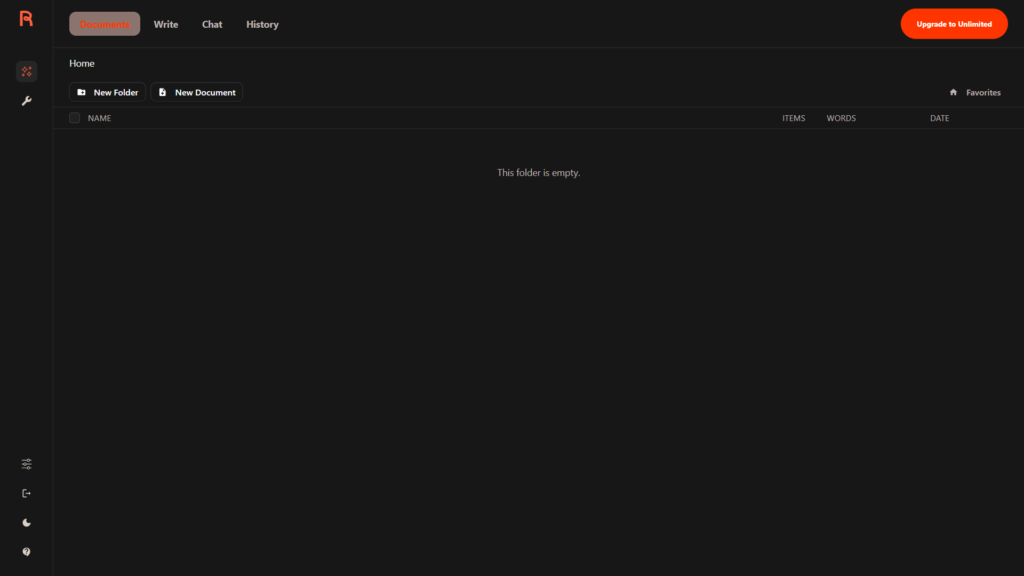
Rytr is an AI writing assistant designed to help users generate written content faster. It can create things like emails, blog ideas, product descriptions, social media captions, ad copy, and other marketing-style text. The main appeal is simple: Rytr gives you a clean writing workspace, multiple use cases, tone options, and a free plan that does not require a credit card.
According to Rytr’s official website, the free plan is free forever and does not require a credit card. Rytr also lists access to 40+ use cases, 20+ tones, and a Chrome extension on its free plan. One important detail: the official Rytr page currently describes the free limit as 10,000 characters per month, not 10,000 words per month. So if you see people mention “10k words,” check the current pricing page before assuming the exact allowance.
The platform is built for speed and convenience. During my test, the signup process only asked me for basic information: Gmail, password, name, and one question about what I planned to use Rytr for. I did not need to enter a card to start testing. That is a big plus for beginners because you can try the tool without feeling locked into a paid subscription.
Rytr feels especially useful for users who already know what they want to write but need help getting the first draft done. For example, if you need a confirmation email, a short product description, a blog intro, or different versions of the same message, Rytr can save time.
Copy.ai vs Jasper: Which AI Writer Wins? (2026 Comparison)→ https://theaitoolreview.com/copy-ai-vs-jasper/
Key Features of Rytr
Rytr is not overloaded with complicated tools. That is part of why I liked it. It gives you enough options to write different types of content, but the interface still feels beginner-friendly.
Fast AI Content Generation
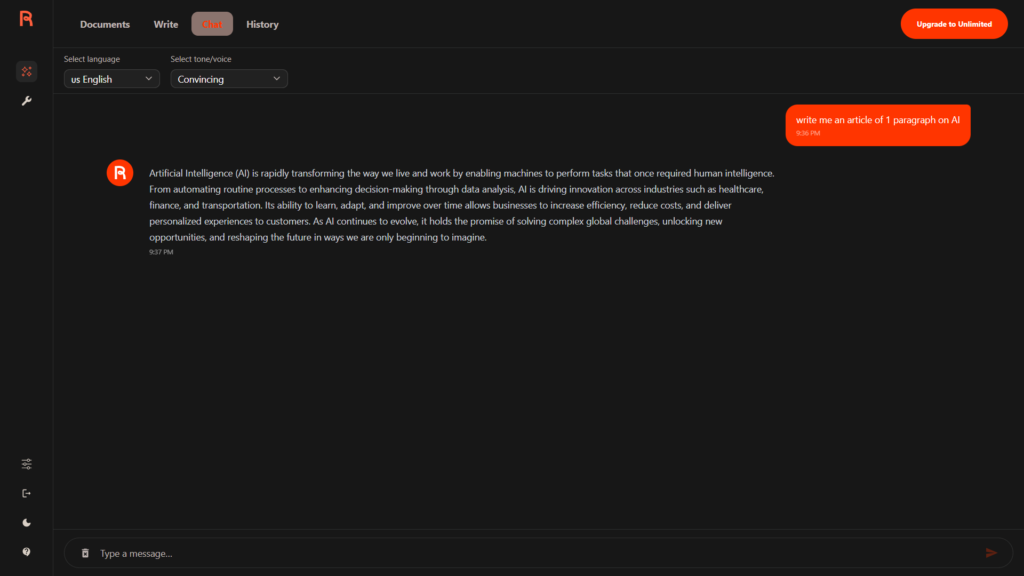
The first thing I tested was a simple prompt: “write me an article of 1 paragraph on AI.” Rytr gave me the result in under 20 seconds. I do not want to overstate that as a guaranteed speed for every user or every prompt, but in my own test, it felt very fast.
For quick writing tasks, that speed matters. A tool does not need to be perfect if it can help you create a starting point quickly. Rytr did that well.
Chat-Style Writing Experience
Rytr has a chat option that feels almost like talking through WhatsApp. That made it less intimidating than some writing tools that feel more like a complicated content dashboard.
This is useful for beginners because chat-based AI writing feels familiar. Instead of adjusting many settings first, you can just type what you need and get a response. For simple requests, that is often enough.
Tone Options
One of the strongest parts of Rytr is how easy it is to change the tone. In my testing, I noticed that the tone control was simple to use, and there were many options available.
That matters because tone can completely change how useful a piece of writing feels. A confirmation email for a brand should not sound the same as a funny caption, a professional pitch, or a casual reply. Rytr makes tone switching easy, which helps when you want to create several versions of the same idea.
Multiple Use Cases
Rytr includes many writing use cases. This is one of its biggest selling points for people who do different types of content.
Some common AI writing use cases include:
- Blog ideas and outlines
- Emails
- Product descriptions
- Social media captions
- Ad copy
- Short-form marketing content
- Replies and message drafts
- Simple article sections
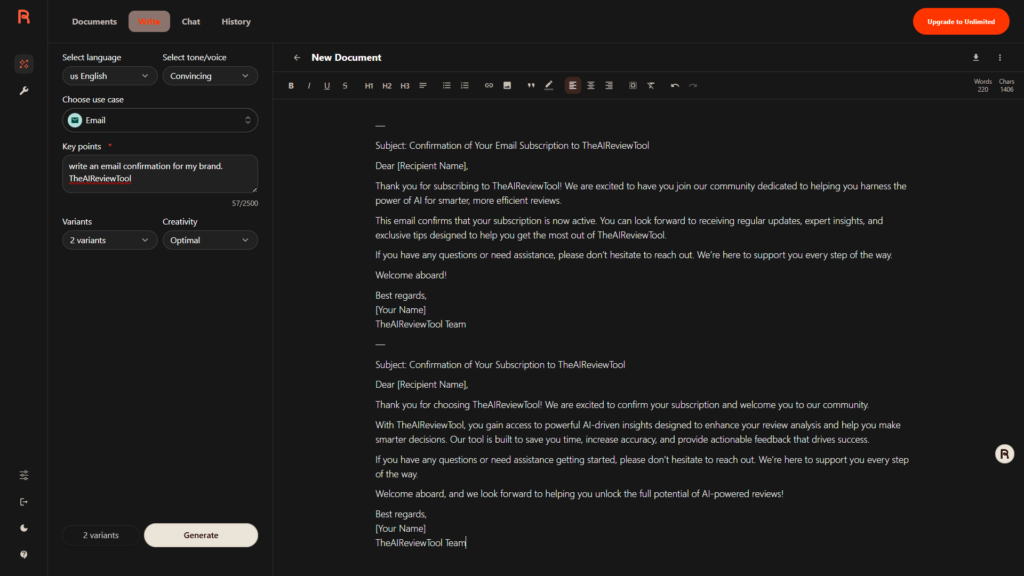
I tested the “Write” tab with this prompt: “write an email confirmation for my brand. TheAIReviewTool.” Rytr gave me two good variants in less than 10 seconds. That was one of the most impressive parts of my test because it did not just give one answer. It gave options, which is helpful when writing for a brand.
Voice and Style Flexibility
Rytr also gives users different voices and tone options. This makes it more flexible than a basic AI text generator. For creators, freelancers, small businesses, and bloggers, voice matters because generic AI writing can sound flat.
A tool like Rytr works best when you use it as a draft assistant, not as a final writer. You can generate the first version, then edit it to match your real voice, brand, and audience.
Browser Extension
Rytr’s free plan includes access to a Chrome extension, according to its official website. This can be useful if you want AI writing support while working across different websites, instead of always opening Rytr directly.
I would still recommend checking the official page before making a decision because AI tool features can change. Pricing, limits, and included tools are often updated.
Rytr Pricing: How Much Does It Cost?
Rytr is positioned as a budget-friendly AI writer. Based on Rytr’s official pricing page, there is a Free plan, an Unlimited plan, and a Premium plan. The official page also states that the free plan is free forever and does not require a credit card.
Here is a simple overview based on the current public pricing information shown by Rytr:
| Plan | Best For | Main Notes |
| Free | Testing Rytr without paying | No credit card required; monthly generation limit applies |
| Unlimited | Individual users who write more often | Designed for users who want unlimited monthly copy generation |
| Premium | Users who need more advanced brand voice/language options | Higher-tier plan with more advanced usage |
The official Rytr homepage currently says the free plan includes 10k characters per month, 40+ use cases, 20+ tones, and Chrome extension access. It also lists an Unlimited option starting at $7.50/month on the annual view.
For this Rytr review, I tested the free experience and focused on whether the tool feels useful before paying. My opinion: yes, the free plan is enough to understand the interface, test the output style, and decide whether Rytr fits your workflow.
The main thing to remember is that “free” does not mean unlimited. If you plan to create full blog posts every day, you will probably hit limits quickly. For occasional short writing tasks, it is a useful starting point.
QuillBot Review 2026: Paraphrasing Tool Tested → https://theaitoolreview.com/quillbot-review/
Pros and Cons of Rytr
No AI writing tool is perfect. Rytr has real strengths, but it also has limits depending on what type of content you want to create.
Pros
- Very easy registration: In my test, signup was simple and only required basic information.
- No credit card needed to start: This makes it safer and easier to test before paying.
- Fast output: My one-paragraph AI article was generated in under 20 seconds.
- Good for email writing: The confirmation email test for TheAIReviewTool gave me two useful variants in under 10 seconds.
- Beginner-friendly interface: The chat option felt familiar, almost like messaging on WhatsApp.
- Many tones and voices: You can adjust the style without much effort.
- Good variety of writing use cases: Helpful for short-form content, marketing copy, and simple drafts.
- Budget-friendly positioning: Rytr is one of the more affordable AI writing tools compared with many premium platforms.
Cons
- Not ideal for final long-form content without editing: Rytr can help draft, but serious blog posts still need human review, structure, fact-checking, and original experience.
- Free plan has limits: The official site currently refers to 10k characters per month, so heavy users may need a paid plan.
- AI output can still sound generic: Like most AI writers, Rytr needs editing if you want a strong brand personality.
- Not a replacement for expertise: For reviews, technical guides, legal topics, medical content, or financial content, you still need real knowledge and careful verification.
- Pricing and limits may change: Always check the official pricing page before buying.
The biggest con for me is not really a Rytr-only problem. It is an AI writing problem. AI can draft quickly, but it does not automatically know your real experience, your audience, or your standards. For a blog monetized with Google AdSense, that matters a lot. You should add original testing notes, screenshots, comparisons, and honest opinions.
Who Is Rytr Best For?
Rytr is best for people who want a fast, affordable AI writing assistant without a complicated setup.
Bloggers
Rytr can help bloggers generate intros, outlines, FAQ sections, meta descriptions, and short article sections. I would not recommend publishing a full AI-generated article without editing, but Rytr can speed up the first draft.
For example, a blogger could use Rytr to create:
- Blog title ideas
- Short intros
- Product review sections
- Pros and cons lists
- FAQ answers
- Meta descriptions
For E-E-A-T, the blogger should still add real experience, screenshots, examples, and personal testing notes.
Small Business Owners
Rytr is useful for simple business writing. My confirmation email test for TheAIReviewTool was a good example. It generated two variants quickly, which gave me options to choose from.
Small businesses can use Rytr for:
- Customer emails
- Confirmation messages
- Social posts
- Product descriptions
- Website copy
- Short announcements
This is probably one of Rytr’s strongest use cases. Many small business owners do not need a huge AI platform. They need quick, decent copy.
2 Best AI Tools for Small Business Owners in 2026 → https://theaitoolreview.com/best-ai-tools-small-business-owners-2026/
Freelancers
Freelancers can use Rytr to speed up repetitive writing tasks. It can help with first drafts, client email templates, short captions, and content ideas.
The key is to avoid sending raw AI output without review. A freelancer’s value is still judgment, editing, strategy, and understanding the client’s voice.
Students and Beginners
Rytr’s simple interface makes it approachable for beginners. The chat-style experience is easy to understand, and the tone options are simple to test.
Students should use it responsibly. It can help brainstorm or rewrite ideas, but it should not be used to submit work dishonestly. For learning, it is better as a support tool than a shortcut.
People Who Need Short-Form Content
Rytr is especially strong for short-form writing. If your main tasks are emails, captions, descriptions, ads, or quick drafts, it makes sense. If your main goal is publishing long, research-heavy articles, you may need a more advanced workflow.
Rytr vs Writesonic: Quick Comparison
For this comparison, I chose Writesonic because it is another popular AI writing platform and I have tested it before. Rytr feels more focused on quick, budget-friendly writing. Writesonic has shifted more toward a broader AI search visibility and content platform, with its official pricing page now showing higher-tier plans for brands and agencies.
| Category | Rytr | Writesonic |
| Best For | Budget AI writing, short drafts, emails, quick copy | AI content workflows, brand/agency use cases, AI search visibility |
| Ease of Use | Very beginner-friendly in my test | Good interface, but can feel bigger and more complex |
| Free Access | Free plan with no card required | Official page says “Start free” and no credit card needed |
| Speed in My Testing | Very fast for short content | In my earlier test, a simple AI article took around 2 minutes |
| Tone Options | Easy to change tones | Also has AI writing tools, but current platform is broader |
| Best Content Type | Short-form copy and quick drafts | Broader content and marketing workflows |
| Budget Friendliness | Strong budget option | Current official plans appear more expensive for full platform use |
In my experience, Rytr is better if you want something simple, fast, and affordable. Writesonic may make more sense for users who need a larger marketing platform, but that also means it may be more than a beginner needs.
Rytr wins for simplicity. Writesonic wins if you need a broader AI marketing platform and are willing to learn more tools.
Writesonic Review 2026: Honest Pros and Cons After Testing It→ https://theaitoolreview.com/writesonic-review/
Our Verdict: Is Rytr Worth It?
Yes, Rytr is worth trying in 2026, especially if you want a budget AI writer for short-form content.
My testing experience was smooth. Registration was easy, the tool did not ask for a credit card, and the interface was simple enough to understand quickly. The chat option felt familiar, and the tone controls were easy to use. When I asked Rytr to write a one-paragraph article about AI, it responded in under 20 seconds. When I asked for an email confirmation for TheAIReviewTool, it gave me two good variants in under 10 seconds.
That is a strong result for a free AI writing test.
However, I would not use Rytr as a “publish without editing” tool. For blog articles, especially review content, you still need human input. Add your own testing notes, real screenshots, accurate pricing checks, honest pros and cons, and original opinions. That is what makes content more trustworthy.
Rytr is best as a writing assistant, not a replacement for a writer.
Frequently Asked Questions (FAQ)
Is Rytr free?
Yes, Rytr has a free plan. Rytr’s official website says the free plan is free forever and does not require a credit card. The official page currently lists the free allowance as 10k characters per month, so check the latest pricing page before relying on any older limits.
Is Rytr good for blog writing?
Rytr can help with blog writing, but I would use it mainly for ideas, outlines, intros, meta descriptions, FAQs, and short sections. For a complete blog article, you should still edit the content, add personal experience, verify facts, and improve the structure.
Does Rytr require a credit card?
In my test, I did not need a credit card to start. Rytr’s official page also says the free plan requires no credit card.
What is Rytr best used for?
Rytr is best for short writing tasks such as emails, social captions, product descriptions, ad copy, simple blog sections, and quick content drafts. It is especially useful when you need multiple versions of the same message.
Conclusion
Rytr is a strong option if you want a simple, fast, and budget-friendly AI writing assistant. It was easy to register, quick to generate content, and useful for real writing tasks like short articles and confirmation emails. I especially liked how easy it was to change tones and how familiar the chat interface felt.
My recommendation: try Rytr’s free plan first. Use it for short-form writing, drafts, and idea generation. If you find yourself using it often and hitting the free limits, then consider whether a paid plan makes sense for your workflow. For serious blog publishing, use Rytr as a helper, then add your own experience, editing, screenshots, and fact-checking before publishing.
Sources
To keep this review accurate, I checked the official Rytr website and pricing information before publishing.
- Rytr Official Website: https://rytr.me/
- Rytr Pricing Page: https://rytr.me/pricing
- Writesonic Pricing Page: https://writesonic.com/pricing