
Disclosure: This post may contain affiliate links. If you purchase through our links, we may earn a commission at no extra cost to you.
Last updated: July 2026
Tested by: Emanuel S.
Gamma Review, Gamma is one of those AI tools that sounds simple at first: type what presentation you want, wait a little, and get a deck. But after testing it myself, I can say the experience is more interesting than just “AI makes slides.” It feels closer to building a presentation through a guided creative process, especially because Gamma shows you a preview of the content before using credits to generate the final result.
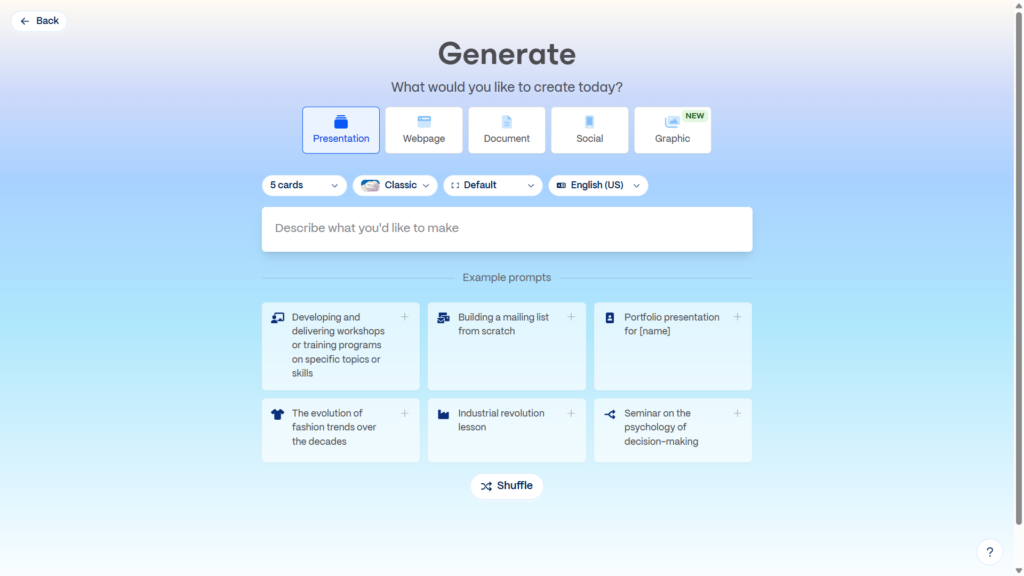
For this Gamma review, I tested the free plan without entering a credit card. My prompt was simple: “presentation about the impact of AI.” Gamma first created a text demo of what the presentation would include, which I liked because it helped me check the direction before spending free credits. After I approved it, Gamma generated a 5-card presentation in less than one minute based on what I requested.
The tool was not perfect from the first second. Login felt a little slower than normal, and Gamma asked me three onboarding questions about how I planned to use the tool. I also got a bit lost at the beginning. But once I understood the flow, the platform became much easier to use. For students, creators, small businesses, and anyone who needs quick AI presentations, Gamma is definitely worth testing.
Notion AI Review 2026: What Can It Actually Do? → https://theaitoolreview.com/notion-ai-review/
What Is Gamma?
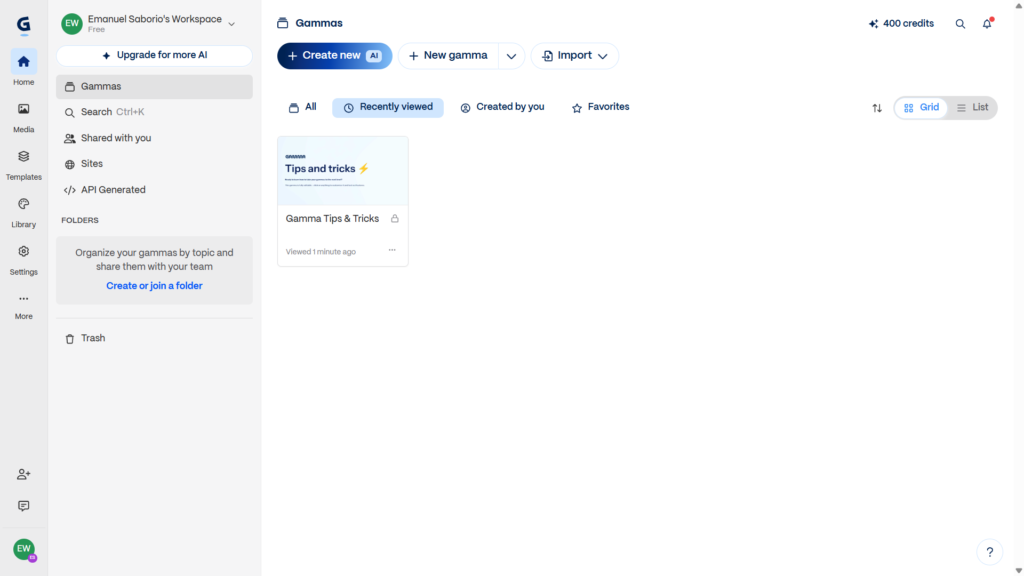
Gamma is an AI presentation maker that helps users create presentations, documents, and web-style pages from prompts. Instead of starting with a blank slide, you describe what you want, and Gamma builds a structured draft with cards, text, and design elements.
The main idea is simple: you give Gamma a topic, and it helps turn that topic into a visual presentation. According to Gamma’s official website, the platform is designed for creating presentations, websites, and other visual content with AI assistance.
In my test, Gamma worked like a guided presentation builder. I did not have to manually create every slide. I typed my topic, reviewed the content preview, and then let Gamma build the presentation. The result was a short 5-card deck about the impact of AI.
One detail I liked is that Gamma uses “cards” instead of only thinking in traditional slides. A card works like a section or slide inside your presentation. This makes the tool feel a little different from PowerPoint or Google Slides.
Gamma is especially useful when you already know the topic but do not know how to structure it. For example, if you need a class presentation, a pitch deck draft, a simple business explanation, or a quick visual summary, Gamma can help you get a starting point faster.
Key Features of Gamma
Gamma has several features that make it useful for creating AI presentations. I tested the basic presentation generation flow, so I will focus on what stood out during that experience, plus the main features available from the platform itself.
AI Presentation Generation
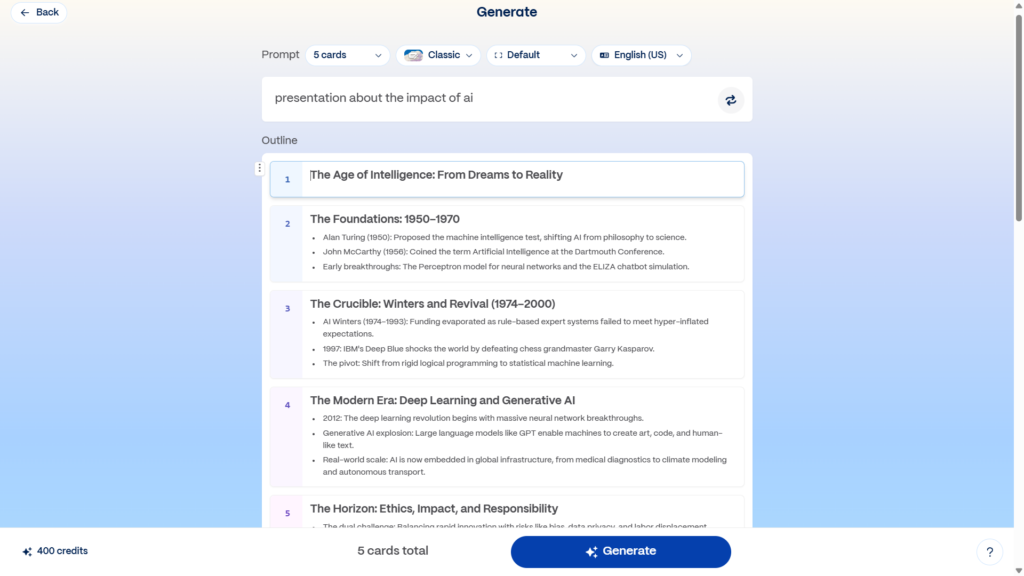
The main feature is the ability to generate a presentation from a text prompt. I gave Gamma the topic “presentation about the impact of AI,” and it created a preview of the content before generating the final presentation.
That preview step matters. Many AI tools immediately use your credits or generate something without showing you much control first. Gamma’s demo text helped me see the direction before committing to the deck. For a free plan with credits, that is helpful.
Content Preview Before Spending Credits
This was one of my favorite parts of the test. Gamma did not instantly jump into the final version. It showed me a draft of the text that would appear in the presentation.
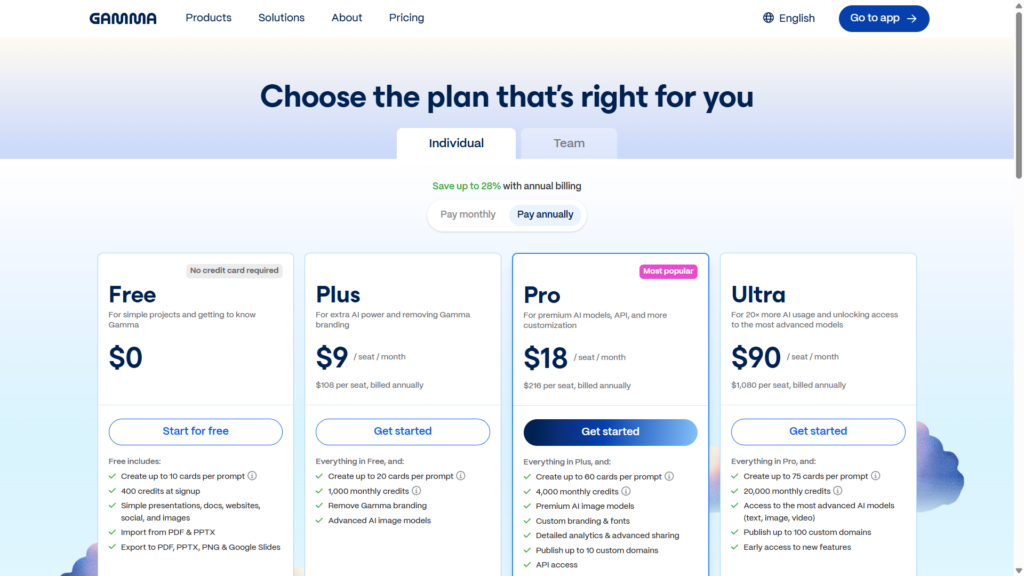
For free users, this is important because Gamma’s free plan uses credits. The official pricing page says the free plan includes 400 starter credits that do not refill, and users can earn more by inviting friends.
Because credits are limited, being able to preview the content before generating the deck helps avoid wasting them on a bad first attempt.
Fast Presentation Creation
After the preview, Gamma generated my 5-card presentation in less than one minute. That felt fast enough for school work, brainstorming, or a quick business draft.
I would not treat the output as a final polished presentation without reviewing it, but it gave me a usable first version quickly.
Visual Building Process
The process of watching the presentation being created was surprisingly nice. Gamma updated the content while it was building the deck, and the experience felt more visual than just waiting on a loading screen.
This does not change the final quality by itself, but it makes the tool feel more polished and easier to trust while it works.
No Credit Card Required for Free Testing
In my experience, Gamma did not ask for a credit card when I tested the free plan. That is a big plus for anyone who just wants to try the tool without subscribing immediately.
This makes Gamma easier to recommend for beginners because there is less risk. You can test the basic workflow, see if you like the presentation style, and then decide later if the paid plan makes sense.
AI Documents and Web Pages
Gamma is not only for presentations. The company describes the platform as an AI-powered tool for presentations, websites, and more.
For this review, I tested it as an AI presentation maker, so I cannot give personal experience on every content type. Still, it is useful to know that Gamma is not limited to slide decks.
Gamma Pricing: How Much Does It Cost?
Gamma has a free plan and paid plans. Pricing can change, so always check the official Gamma pricing page before choosing a plan. As of the latest official pricing information I found, Gamma’s free plan includes 400 starter credits that do not refill.
That credit system is important. Gamma is not simply “unlimited free AI presentations.” The free plan is better understood as a way to test the platform and create a limited number of AI generations.
Based on current pricing information from Gamma’s official page and recent pricing summaries, the free plan gives new users starter credits, while paid plans are designed for people who need more ongoing AI usage.
| Plan | Best For | What to Know |
| Free | Testing Gamma without paying | Includes starter credits; no credit card was required in my test |
| Paid plans | Regular presentation creation | Better for users who need more AI generation and fewer free-plan limits |
| Team/business options | Work teams | Useful if multiple people need presentation workflows |
I like that Gamma lets you test the product without a card. However, the credit system means you should use your free credits carefully. The preview step helps with that.
Pros and Cons of Gamma
No AI tool is perfect, and Gamma is not an exception. My experience was mostly positive, but there were a few things to mention.
Pros
- No credit card required in my test.
- Fast generation: my 5-card presentation was created in less than one minute.
- Helpful preview before generating the final presentation.
- Good for beginners once you understand the workflow.
- Nice visual creation process while the deck is being built.
- Useful for quick drafts when you need structure fast.
- Free plan available with starter credits.
Cons
- Login felt a little slow compared with what I expected.
- The beginning was slightly confusing until I understood how the flow worked.
- Free plan uses credits, so you cannot generate endlessly for free.
- AI content still needs review before using it in a real class, meeting, or client presentation.
- Not a full replacement for presentation strategy, especially if your topic needs deep research or original data.
The biggest weakness for me was the first-time experience. Gamma was not impossible to use, but I did feel a bit lost at the beginning. After a few minutes, it became clearer.
The biggest strength was the balance between speed and control. The preview before generation made the tool feel more careful than some AI presentation makers.
Who Is Gamma Best For?
Gamma is best for people who need to create presentations quickly but still want a clean, modern result.
Students
Students can use Gamma to create first drafts for class presentations. For example, if you need to present a topic like AI, marketing, history, technology, or business, Gamma can help organize your ideas into sections.
That said, students should still review the content. AI can make mistakes, sound too generic, or miss important class requirements.
Content Creators
Creators can use Gamma to turn ideas into visual outlines, lead magnets, mini-guides, or educational decks. Since Gamma can also create web-style content, it may be useful for repurposing ideas into different formats.
Small Business Owners
Small businesses can use Gamma for simple pitch decks, product explanations, service presentations, or internal training documents.
For example, if a business needs a quick presentation for a client meeting, Gamma can create a clean first draft. Then the owner can edit the details, add real examples, and personalize the message.
2 Best AI Tools for Small Business Owners in 2026 →https://theaitoolreview.com/best-ai-tools-small-business-owners-2026/
Teachers and Trainers
Teachers, tutors, and trainers may find Gamma helpful for building lesson decks or workshop materials. The speed is useful when you need a visual structure but do not want to start from scratch.
People Who Hate Designing Slides
This is probably one of Gamma’s biggest audiences. If you can write what you want but struggle with slide design, Gamma helps bridge that gap.
A Tom’s Guide review also described Gamma as useful for creating slide decks quickly, while noting that AI-generated content can sometimes feel generic and may need user editing. That matches my own impression: Gamma is great for a strong draft, but you should still refine the final message.
Gamma vs Canva: Quick Comparison
For this Gamma review, Canva is the most obvious competitor because Canva also offers AI presentation tools and is already popular for design.
Canva’s official AI presentation page says its Magic Design feature can create presentations from prompts and then let users edit the result with Canva’s design tools. Canva also has a free plan, with paid plans for more advanced design and AI features.
| Feature | Gamma | Canva |
| Main focus | AI-generated presentations, docs, and pages | General design platform with AI presentation tools |
| Best for | Fast presentation drafts from prompts | Editing, templates, brand assets, social graphics |
| Free plan | Yes, with starter credits | Yes, with free design tools and limited AI access |
| Beginner experience | Slightly confusing at first, then easy | Familiar if you already use Canva |
| Presentation workflow | Prompt → preview → generate cards | Prompt/design tools → edit with templates |
| Best choice | Quick AI-first deck creation | More manual design control |
Gamma feels more focused on AI presentation creation. Canva feels broader. If your main goal is to create a presentation fast from a prompt, Gamma may feel more direct. If you want more control over templates, graphics, social posts, and brand design, Canva may be better.
Personally, I would use Gamma when I want a quick structured presentation draft. I would use Canva when I want to heavily customize the visuals.
Our Verdict: Is Gamma Worth It?
Yes, Gamma is worth trying, especially if you want an AI presentation maker with a free plan and no credit card required.
My test was positive overall. The login was a little slower than normal, and I did feel lost at the beginning. But after I understood the process, Gamma became easy to use. The tool asked me three onboarding questions, generated a preview of my content, and then created a 5-card presentation in less than one minute.
The best part was the preview before using credits. Since Gamma’s free plan uses starter credits, this makes the experience feel more thoughtful. You are not blindly spending credits on a result you have not reviewed.
Would I use Gamma for a final professional presentation without editing? No. I would still check the text, improve the examples, add my own data, and adjust the message for the audience.
Would I use it to create a fast first draft? Absolutely.
Gamma is best when you need structure, speed, and a clean starting point. It is not best when you need deep research, complex custom branding, or a highly detailed presentation that must be perfect from the first generation.
Frequently Asked Questions (FAQ)
Is Gamma free?
Yes, Gamma has a free plan. According to Gamma’s official pricing page, the free plan includes 400 starter credits that do not refill. In my test, Gamma did not ask for a credit card.
Does Gamma make presentations with AI?
Yes. Gamma can generate AI presentations from prompts. In my test, I typed “presentation about the impact of AI,” reviewed the text preview, and then Gamma created a 5-card presentation in less than one minute.
Is Gamma better than Canva for presentations?
It depends on what you need. Gamma is better if you want a fast AI-first presentation draft. Canva is better if you want more manual design control, templates, and a broader design platform. Canva also offers AI presentation tools through Magic Design.
Does Gamma require a credit card?
In my experience testing the free plan, Gamma did not require a credit card. That makes it easy to try before deciding whether a paid plan is worth it.
Conclusion
Gamma is a strong AI presentation tool for people who want to create clean decks quickly. It is not perfect, and the first few minutes may feel a little confusing, but the actual creation process is fast and polished once you understand it.
My recommendation is simple: try Gamma if you need quick AI presentations for school, business, content, or brainstorming. Use the free credits carefully, review the generated content, and treat the result as a strong first draft rather than a final presentation that needs no editing.
External Sources
- Gamma official website: https://gamma.app/
- Gamma official pricing page: https://gamma.app/pricing
- Canva AI Presentation Maker: https://www.canva.com/create/ai-presentations/
- Tom’s Guide Gamma review: https://www.tomsguide.com/ai/i-tested-gamma-the-ai-that-builds-slide-decks-in-seconds-heres-what-impressed-me-and-what-didnt
Pingback: 3 Best Free AI Tools for Productivity in 2026