
Disclosure: This post may contain affiliate links. If you purchase through our links, we may earn a commission at no extra cost to you.
Last updated: July 2026
Tested by: Emanuel S.
The best free AI tools for productivity can help you research topics, organize projects, prepare presentations, and complete repetitive tasks without immediately paying for a subscription. In 2026, tools such as Gamma, Notion AI, and Perplexity offer useful free access, although each platform has different limits.
To find out which options are genuinely useful, I personally tested Gamma, Notion AI, and Perplexity. I used each tool for a practical productivity task rather than judging it only by its marketing claims. I asked Gamma to create a presentation about productivity, used Notion AI to make a habit tracker and to-do list, and tested Perplexity by requesting a summary of major AI news.
Each tool serves a different purpose. Gamma is designed primarily for visual presentations and documents. Notion combines AI assistance with notes, databases, trackers, and project management. Perplexity focuses on research, web search, summaries, and source-backed answers. This guide compares their free access, usability, output quality, limitations, and best use cases.
How We Chose These Tools
The tools in this list were evaluated using several practical criteria.
First, I looked at free access. A productivity tool may advertise itself as free while placing its most useful features behind a subscription. I checked whether users could complete meaningful tasks without paying and where the major free-plan limitations appeared.
I also considered:
- Ease of use: How difficult is it to create an account, understand the interface, and begin a task?
- Speed: Does the tool provide results quickly enough for everyday work?
- Output quality: Is the generated content useful immediately, or does it require major editing?
- Productivity features: Can the tool save time on presentations, research, planning, writing, or organization?
- Free-plan restrictions: Are credits, advanced models, exports, uploads, or AI responses limited?
- Accuracy and reliability: Does the tool provide sources, and should its output be manually checked?
- Overall value: Is the free version useful enough for students, freelancers, creators, or small teams?
All three tools were personally tested. The experience-based comments below come directly from those tests. Pricing and plan details were also checked against the companies’ official pages in July 2026. Because software plans change frequently, readers should verify current limits before subscribing.
Quick Comparison Table
| Tool | Best For | Starting Price | Free Plan? |
| Gamma | Creating presentations and visual documents | $0; Plus from $9 per seat/month when billed annually | Yes |
| Notion AI | Organizing notes, tasks, trackers, and projects | $0 for Notion; Business from $20 per member/month | Yes, with limited complimentary AI use |
| Perplexity | Research, summaries, and finding cited sources | $0; Pro from $20 per month | Yes |
The prices above reflect the publicly listed starting options available when this article was updated. Billing terms, regional pricing, promotions, and AI usage limits may change.
1. Gamma, Best For AI Presentations
Gamma is the strongest option on this list for turning a prompt, outline, or document into a visual presentation. Instead of starting with an empty slide and manually choosing every layout, users can describe the topic and let Gamma generate the initial structure, text, and visual design.
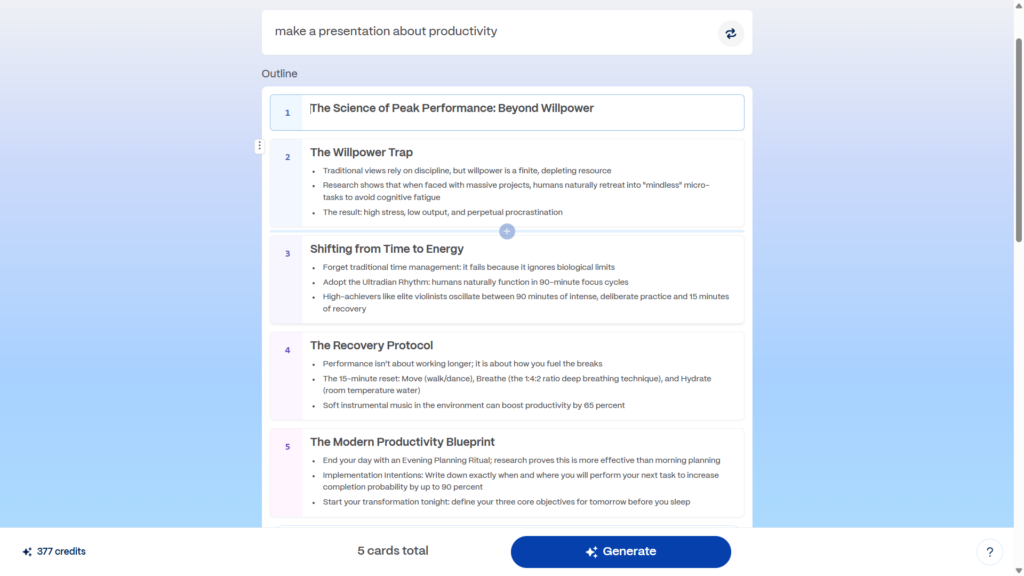
I tested Gamma by asking it to “make a presentation about productivity.” The sign-in process was slightly slower than I expected, and Gamma asked me three questions about how I planned to use the platform. These onboarding questions added an extra step, but they were not difficult to answer.
Before generating the final presentation, Gamma showed me a preview of the proposed text. I liked this part of the process because the preview did not use my generation credits. It gave me an opportunity to review the direction of the presentation before committing to the complete result.
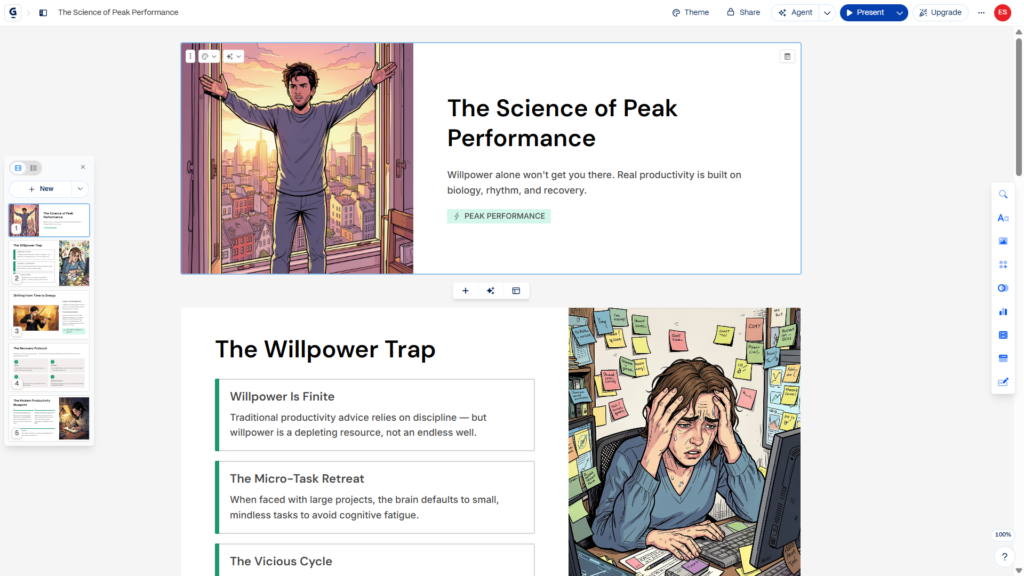
After I approved the preview, Gamma animated the creation process so I could see the presentation being assembled step by step. It produced five cards in less than one minute. The result was fast, easy to follow, and visually more polished than a plain text outline.
The biggest problem appeared on the second card. One of the generated images showed a woman with three hands. This is an obvious AI image-generation error and a reminder that visual content should always be inspected before publishing or presenting it.
Even with that issue, Gamma was easy to use and produced a useful presentation quickly. The structure, design, and card-based format made it the best free AI productivity tool in this list for presentations.
Read our complete Gamma review → https://theaitoolreview.com/gamma-review/
Key Features
- Generates presentations from short prompts, pasted text, or uploaded documents
- Creates visual cards instead of relying only on traditional slides
- Shows a content preview before generating the complete presentation
- Allows users to create documents, presentations, simple webpages, social content, and images
- Supports importing PDF and PowerPoint files
- Supports exports to PDF, PPTX, PNG, and Google Slides
- Provides templates and automatically generated layouts
- Allows users to edit text, design, images, and card structure after generation
- Can create up to 10 cards per prompt on the free plan
- Includes sharing and online presentation options
Gamma’s free plan is more functional than a basic demo. According to its official pricing page, free users can create simple presentations, documents, websites, social content, and images. They can also import PDF and PowerPoint files and export projects into several useful formats.
The option to preview content before spending credits was particularly useful during my test. It reduces the risk of wasting credits on a presentation with the wrong structure or focus.
Pricing
Gamma offers a Free plan for $0. No credit card is required to begin using it. The free plan uses AI credits and includes up to 10 cards per prompt.
At the time of this update, Gamma’s main individual options include:
- Free: $0
- Plus: From $9 per seat per month when billed annually
- Pro: Higher-tier plan with premium AI models, greater customization, analytics, API access, and additional cards per prompt
- Ultra: Designed for substantially higher AI usage and access to more advanced models
The Plus plan includes more monthly credits, removes Gamma branding, increases the number of cards available per prompt, and provides access to more advanced AI image models. Pro adds options such as custom fonts, custom branding, advanced sharing, analytics, API access, and larger presentations.
Free-plan credits are not unlimited. Users who generate presentations frequently may eventually need to purchase a paid plan or use their credits carefully.
Official source: Gamma Plans and Pricing
Pros and Cons
Pros
- Generates an organized presentation very quickly
- The preview helps users check the content before using credits
- Easy to use after completing the initial setup
- Produces more visual results than a standard AI chatbot
- Free users can export to several practical formats
- Useful for school projects, reports, pitch decks, and content planning
- Shows the presentation being created step by step
- Requires little design experience
Cons
- The sign-in and onboarding process was slightly slow in my test
- Free AI credits are limited
- Free exports may contain Gamma branding
- Generated images can contain visual mistakes
- AI-created presentations still need fact-checking and editing
- Some advanced branding and AI image features require a paid plan
- Users may need to replace weak or inaccurate images manually
2. Notion AI, Best For Tasks, Trackers, and Workspace Organization
Notion AI is best suited to people who want AI features inside a larger productivity workspace. Notion can already be used for notes, databases, project boards, calendars, documents, task lists, and personal organization. Its AI functions add writing, summarization, translation, search, planning, and content-generation capabilities.
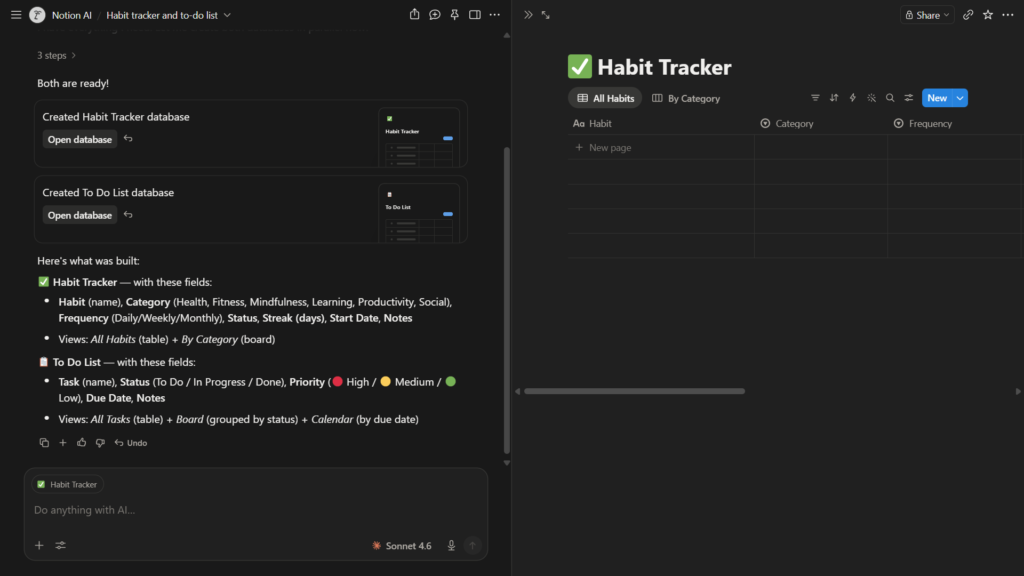
My setup experience was easy. I found Notion straightforward to configure, and its AI responded quickly. I tested it with the prompt “make a habit tracker and a to-do list.”
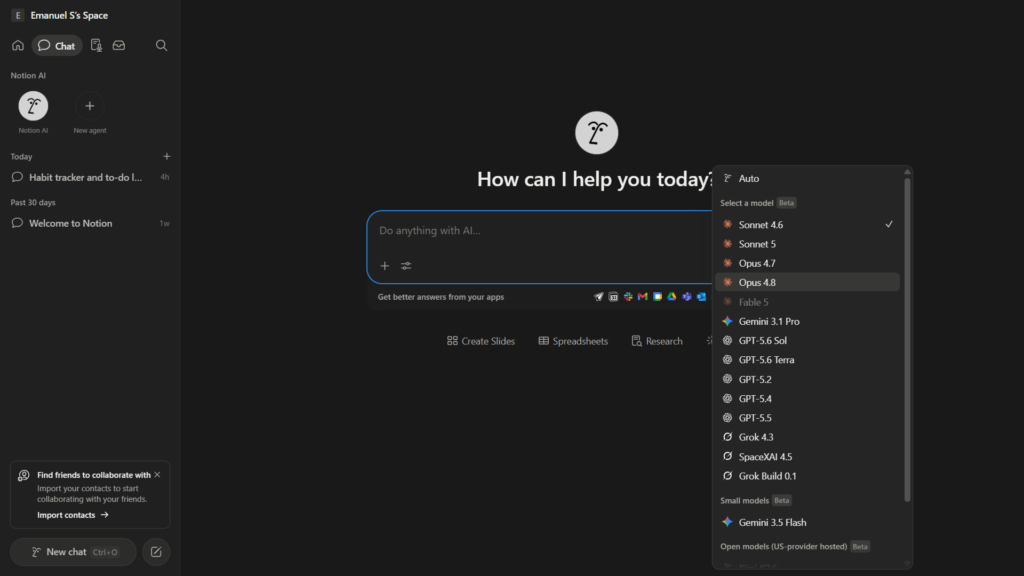
During my test, the interface allowed me to select from several AI model options. I used Claude Sonnet 4.6, while the workspace also displayed options associated with providers such as ChatGPT, Gemini, Grok, and Notion’s own system. Model availability can depend on the feature, account, workspace, and current plan, so users may not always see the same selection.
The generated habit tracker and to-do list were functional, but the result was not especially impressive. It was basic and looked more like a simple starting point than a complete productivity system. I would need to add properties, categories, dates, priorities, views, and automation rules to make it more useful for long-term planning.
Speed was not a problem. Notion AI generated the content quickly, and the result could be edited directly inside the workspace. That is an important advantage over a standalone chatbot. Instead of copying the answer into a separate productivity app, the content already exists where the user can organize and manage it.
Notion AI can also translate text, analyze information, summarize pages, create tables, and assist with trackers. For someone who already uses Notion, the AI features may reduce the need to switch between several apps.
However, the distinction between the free Notion workspace and full Notion AI access needs to be clear. Notion itself has a free plan, but its official help documentation says that full Notion AI availability is tied to Business and Enterprise plans. Free and Plus users receive only a limited number of complimentary AI responses.
Read our full Notion AI review → https://theaitoolreview.com/notion-ai-review/
Key Features
- Creates to-do lists, habit trackers, project plans, and databases
- Summarizes notes, documents, meeting information, and workspace content
- Translates text directly inside a Notion page
- Rewrites, expands, shortens, and adjusts written content
- Helps extract action items from notes
- Answers questions about information stored in a workspace
- Supports pages, databases, calendars, project boards, and templates
- Can help fill database properties and organize information
- Provides access to different AI models in certain features or plans
- Keeps AI-generated content inside the user’s productivity workspace
- Supports collaboration for teams and shared projects
- Can generate and edit images directly on a Notion page
Notion introduced additional model-selection functionality during 2026, although the exact models available can change. Its official documentation references support for models from providers including Claude, GPT, Gemini, and Grok in selected AI features.
Pricing
Notion offers several workspace plans:
- Free: $0 per seat per month
- Plus: $10 per seat per month
- Business: $20 per seat per month
- Enterprise: Custom pricing
The Free plan is suitable for personal notes, tasks, and basic workspace organization. Individuals receive unlimited pages and blocks, although file uploads are limited to 5 MB per file. Team workspaces have additional restrictions on the Free plan.
The important limitation is that a free Notion account does not provide unlimited Notion AI use. Free and Plus accounts may receive complimentary AI responses, but continued or full AI access can require a Business or Enterprise subscription. Therefore, Notion belongs in this list because users can try its AI tools for free, not because all Notion AI functions are permanently unlimited at no cost.
Students and teachers may also qualify for a free Education Plus plan when they register with an eligible institutional email address. Eligibility and included AI access should be confirmed on Notion’s current education page.
Official sources:
Notion Pricing
Notion AI Frequently Asked Questions
Pros and Cons
Pros
- Combines AI with notes, databases, tasks, and project management
- Easy to configure and use
- Responded quickly during my test
- AI-generated content can be edited in the same workspace
- Useful for habit trackers, to-do lists, study plans, and project pages
- Supports translation, summarization, writing, and analysis
- Offers extensive customization after the initial content is generated
- Can reduce the number of separate productivity apps a user needs
- The regular Notion Free plan is useful even without unlimited AI access
Cons
- My generated habit tracker and to-do list were very basic
- Users may need time to understand databases and advanced Notion features
- Full Notion AI access is not included indefinitely with the Free plan
- Free and Plus users receive limited complimentary AI responses
- Advanced team and AI features can become expensive per user
- A generated template may require significant manual customization
- The number of available model options can vary by feature and plan
- Notion may feel excessive for someone who only needs a simple task list
3. Perplexity, Best For AI Research and Source-Based Summaries
Perplexity is the best option in this list for research. It works like a combination of a search engine and an AI assistant, producing direct answers while displaying links to the sources used.
I was able to begin using Perplexity without creating an account. The interface had a good design, and it was easy to understand without a tutorial. This makes it particularly accessible for someone who needs a fast answer and does not want to complete a lengthy setup process.
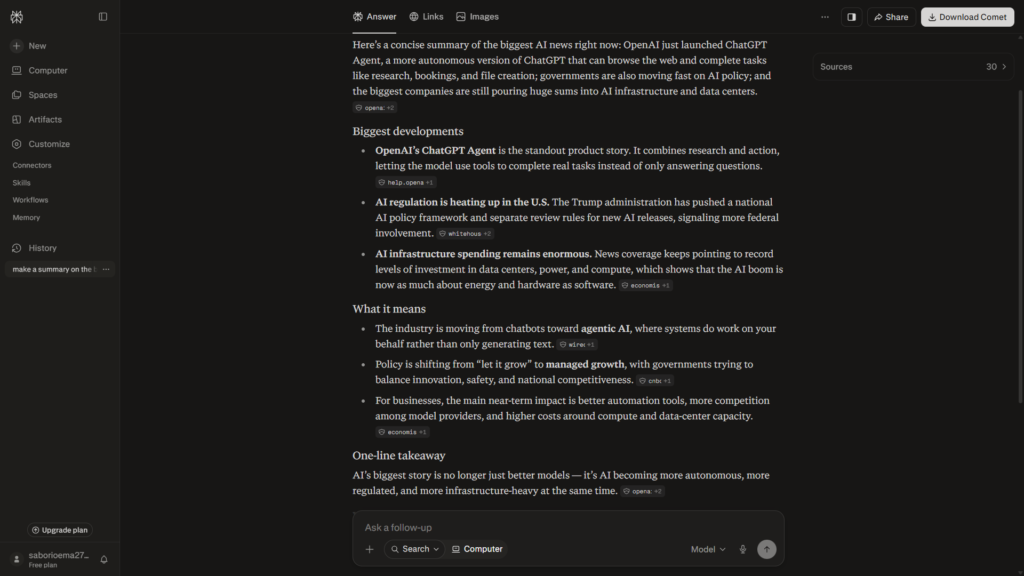
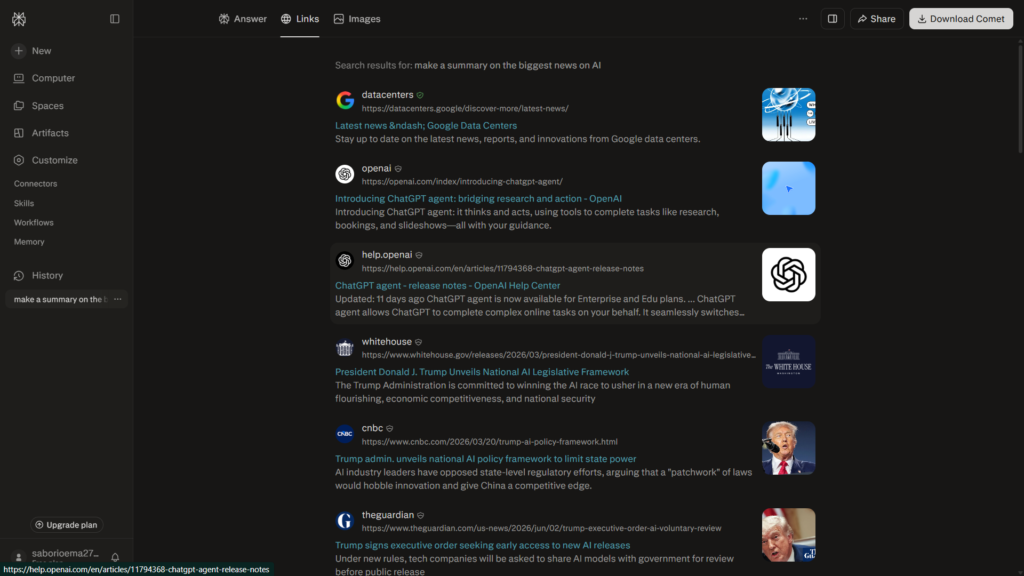
For my test, I asked Perplexity to “make a summary on the biggest news on AI.” It provided a useful summary in less than 20 seconds. The result was fast, readable, and organized well enough to give me a starting point for further research.
The most useful element was the sources section. Perplexity included links to the information behind its response, allowing me to inspect where the claims came from. This is much better than accepting an unsourced AI answer, especially when researching current news, software updates, statistics, or a topic that may change frequently.
Source links do not guarantee that every answer is correct. A source may be outdated, misinterpreted, or weaker than another available reference. Users should open important citations and confirm that they support the statements in the generated answer.
The free version also does not include unrestricted access to the most advanced models. Perplexity’s official support page states that its Standard plan provides practically unlimited basic searches, a very limited number of Pro Searches, basic file uploads, and automatic model selection. Advanced AI models and several premium capabilities are restricted.
Despite those limits, Perplexity was the most immediately useful free research tool in my test. It
Read our complete Perplexity review → https://theaitoolreview.com/perplexity-ai-review/
Key Features
- Searches the web and produces summarized answers
- Includes citations and links to supporting sources
- Can be used for basic searches without creating an account
- Handles follow-up questions within the same research thread
- Offers basic file uploads on the free plan
- Provides a limited number of deeper Pro Searches
- Maintains search history for registered users
- Can compare information from multiple webpages
- Helps create research summaries and topic overviews
- Supports more advanced models and deeper research on paid plans
- Can help identify official documentation and primary sources
- Offers focused research modes for more complex questions on eligible plans
Perplexity describes itself as a free AI-powered answer engine that provides direct responses based on web information. Its strength is not merely generating text; it is connecting the generated answer to material users can inspect.
Pricing
Perplexity offers a Free Standard plan for basic use.
The Free plan includes:
- Practically unlimited basic searches
- Search history for registered users
- A very limited number of Pro Searches
- Basic file uploads with limits
- Automatic model selection by Perplexity
It does not provide full access to advanced AI models, premium support, or all media-generation and research capabilities.
Perplexity also offers paid Pro and Max subscriptions. Max was listed at $200 per month or $2,000 per year in the official help center at the time of this update. Prices and features may differ based on region, platform, taxes, promotions, or whether the subscription is purchased through the web or a mobile app.
For most students and casual researchers, the free plan may be enough for quick questions and basic source discovery. Users who need frequent advanced searches, more file analysis, premium models, or expanded research features may need a paid plan.
Official sources:
Perplexity Plan Comparison
Perplexity Pro
Pros and Cons
Pros
- No account was required to begin my test
- Produced a good AI news summary in less than 20 seconds
- Clean and straightforward interface
- Makes sources easy to find
- Helpful for current topics and initial research
- Basic searches are available for free
- Follow-up questions make it easier to refine a topic
- Faster than manually opening many search results
- Useful for students, writers, bloggers, and general research
Cons
- The Free plan does not include full access to the best advanced models
- Pro Searches are very limited for free users
- Citations still need to be opened and verified
- AI summaries can omit important context
- A cited source is not automatically authoritative
- File uploads and advanced research features are restricted
- Users should not rely on it as the only source for important decisions
- Features and usage limits can change between plans
For more options, see our ChatGPT vs Claude vs Gemini comparison.
Frequently Asked Questions (FAQ)
What is the best free AI productivity tool in 2026?
The best option depends on the task. Gamma is the strongest choice for rapidly creating visual presentations. Notion AI is better for organizing notes, projects, tasks, and trackers inside a customizable workspace. Perplexity is the best of these three for researching topics and finding source-backed summaries.
For general productivity, Notion offers the widest range of organizational tools. However, its complimentary AI usage is limited. Gamma and Perplexity may provide more immediate value for users with one specific need.
Are these AI productivity tools completely free?
All three have some form of free access, but none should be treated as unlimited in every area.
Gamma’s free plan uses AI credits and restricts features such as advanced branding and premium AI models. Notion has a permanent free workspace plan, but Free and Plus users receive only limited complimentary Notion AI responses. Perplexity allows practically unlimited basic searches, while advanced models and deeper Pro Searches are restricted.
Always check the official pricing page before relying on a particular feature.
Which tool is best for students?
Students who regularly make presentations may prefer Gamma because it can turn a topic into a structured visual project quickly. Notion is useful for class notes, assignment trackers, study plans, and personal organization. Perplexity can help students begin research and locate relevant sources.
Students should still verify facts, read original sources, follow academic citation rules, and avoid submitting unedited AI-generated work as their own.
Can AI productivity tools make mistakes?
Yes. During my Gamma test, an AI-generated image showed a person with three hands. Text tools can also invent details, misunderstand instructions, use outdated information, or summarize a source incorrectly.
AI output should be considered a draft or research assistant rather than a guaranteed final answer. Check important claims, inspect images, review citations, and edit the final content before using it professionally or academically.
Which Free AI Productivity Tool Should You Choose?
For fast and visually attractive presentations, Gamma is my top pick. It gave me five cards in less than one minute, and its preview system helped me inspect the proposed content before using credits. Its AI image error shows why manual review remains necessary, but the overall presentation process was efficient and easy to understand.
Choose Notion AI when you want AI assistance inside a complete organization system. It is useful for combining documents, trackers, tasks, databases, and project pages, although the habit tracker generated during my test was basic and needed more customization. Its full AI experience also has stricter plan limitations than the regular free Notion workspace.
For research, Perplexity is the clearest winner. It produced a useful summary quickly, required no registration to begin, and displayed links to its sources. That combination makes it a practical choice for exploring a subject before reading the original material in greater detail.
No single tool is the best for every productivity task. Gamma is best for presenting ideas, Notion is best for organizing them, and Perplexity is best for researching them. Using each tool for its strongest purpose can provide more value than expecting one AI platform to handle an entire workflow.
Official Sources and External Links
For the latest information about features, free-plan limits, and subscription prices, visit the official resources below:
- Gamma Official Website
- Gamma Plans and Pricing
- Notion AI Official Page
- Notion Plans and Pricing
- Perplexity Official Website
- Perplexity Pro
Pricing, free-plan limits, available AI models, and features may change. Check each company’s official website for the latest information.