
Disclosure: This post may contain affiliate links. If you purchase through our links, we may earn a commission at no extra cost to you.
Last updated: July 2026
Tested by: Emanuel S.
I’ve used Notion as my note-taking app for years, so when Notion AI showed up inside the workspace I already had open, I didn’t go in with high expectations. I’ve tried enough “AI assistant” bolt-ons to know most of them feel tacked on. This one didn’t feel that way. I spent real time poking at it inside a free Notion account, no upgrades, no trial codes, just the plan anyone can sign up for in two minutes, and this Notion AI review covers exactly what I found.
If you’re wondering whether Notion AI is worth turning on inside your workspace, or whether it’s just marketing dressed up as a feature, I’ll walk you through what it does well, where it falls short, and who should actually bother with it. Nothing here is theoretical, everything comes from actually clicking around inside the tool.
One thing up front: this review is based on the free plan specifically, since that’s what most people reading this will start with. If you’re already deep into Notion for work, some of what I say about limitations will matter more to you than to a solo user just testing the waters.

What Is Notion AI?
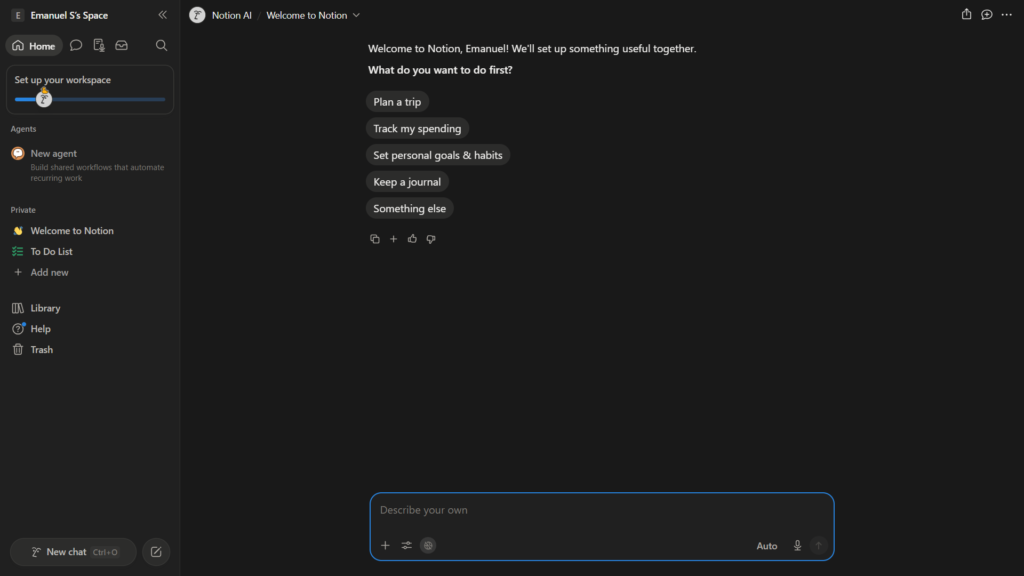
Notion AI is the built-in artificial intelligence layer inside Notion, the all-in-one workspace app used for notes, docs, wikis, and project databases. Instead of being a separate app you switch to, it lives inside the pages you’re already writing, you highlight text, hit a shortcut, or type a slash command, and the AI responds right there.
It’s not a standalone chatbot competing with ChatGPT or Claude directly. It’s closer to a writing and research assistant that’s aware of the content already sitting in your workspace. That distinction matters: Notion AI’s real value isn’t generic text generation, it’s what it can do with the notes, tables, and pages you’ve already built.
Setup, in my experience, was almost nonexistent. I signed up for a free account and the AI features were just there, ready to use, no separate install or activation step. Signing up for free and getting access on the same screen is honestly rarer than it should be in this space.
Key Features of Notion AI
I focused on the features I could actually test without hitting a paywall. Here’s what stood out:
- Writing assistance: drafting, rewriting, summarizing, and continuing text directly inside a page. You select a block of text and ask the AI to shorten it, expand it, fix the tone, or turn bullet points into full paragraphs.
- Translation: I translated content between languages directly inside a page. It worked without needing to explain the request in detail; I just asked and it handled it.
- Analysis: pulling insights or summaries out of blocks of text, which is genuinely useful if you’ve dumped a wall of meeting notes into a page and don’t want to reread the whole thing.
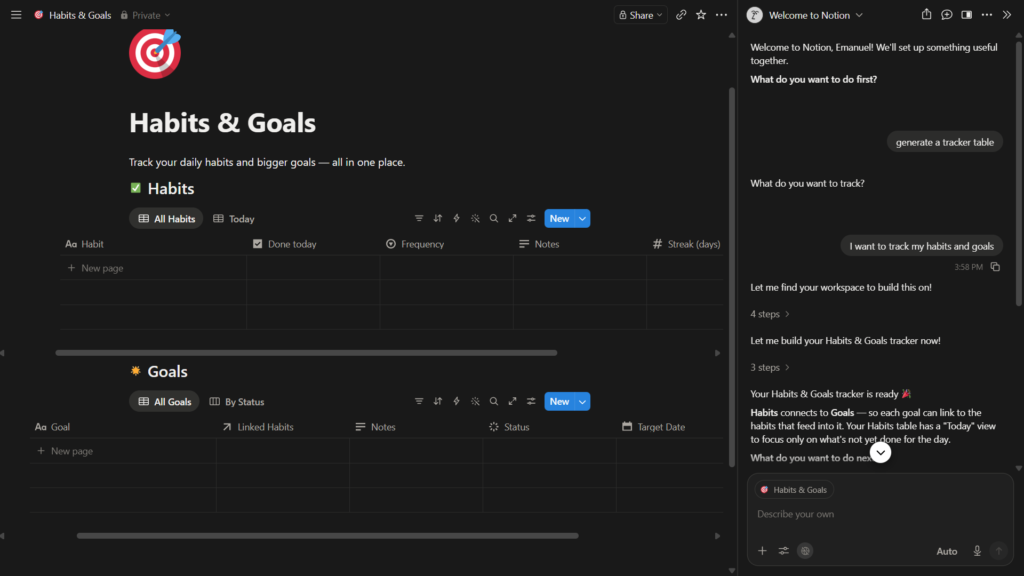
- Tracker and database creation: this is where Notion’s database-first design pays off. I asked it to set up a tracker and it built out a structured table without me having to manually define every property first.
- Speed: responses came back fast in my testing. I didn’t run into the frustrating “thinking…” delay that some AI tools drag you through.
- Minimal prompting required: I didn’t have to write elaborate instructions. Short, plain requests were enough for it to understand what I wanted, which lowers the barrier for people who aren’t used to prompting AI tools carefully.
What I didn’t test, and won’t pretend to have tested, is anything beyond these basics, I’m not going to speculate about advanced automation, custom agents, or enterprise-only features I didn’t have access to on the free plan.
Notion AI Pricing: How Much Does It Cost?
Pricing is where things get a bit more complicated than the “just sign up” simplicity I described earlier, and it’s changed more than once recently, so it’s worth being precise.
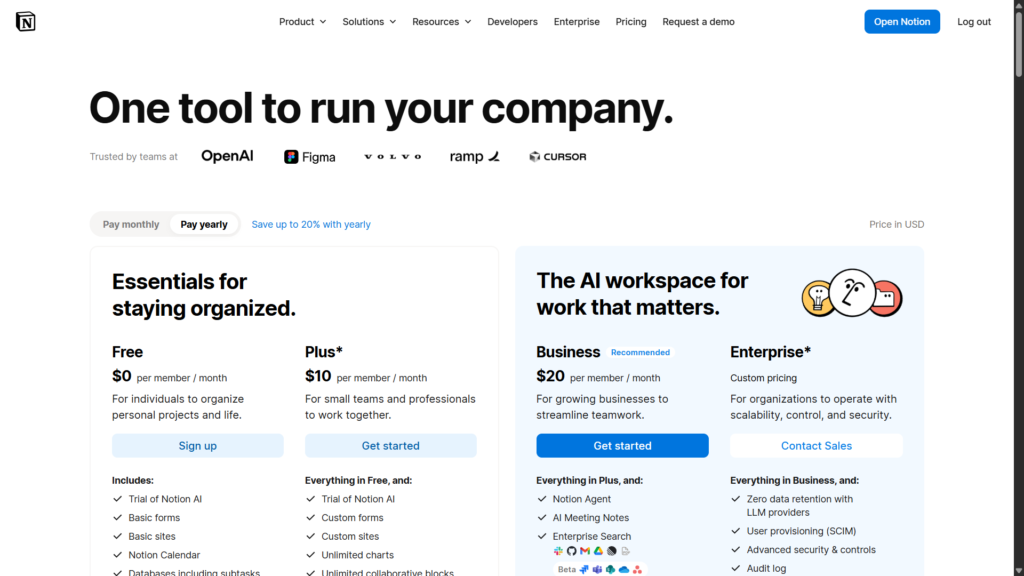
The Notion free plan itself costs nothing and, from what I tested, gives you enough to explore the AI features and get a feel for the product. Beyond the free plan, Notion’s tiers as of mid-2026 look like this:
| Plan | Price (billed annually) | AI Access |
| Free | $0 | Limited trial |
| Plus | $10/user/month | Limited trial only |
| Business | $20/user/month | Full Notion AI, including Notion Agent |
| Enterprise | Custom pricing | Full AI plus advanced security/compliance |
According to Notion’s own pricing page and independent coverage, full AI access including the more advanced agent-style features, is now bundled specifically into the Business plan, while Free and Plus only get a limited trial of the AI tools. That’s a meaningful shift from how Notion AI used to be sold, when it was available as a flat add-on across any plan.
For solo users or anyone just testing the waters like I did, the free plan is genuinely enough to answer the question “can this AI actually help me?” you just won’t get the full, unlimited experience without moving up to Business.
I’d recommend checking Notion’s official pricing page directly before committing to anything, since these tiers have shifted more than once in the past year and could shift again.
Pros and Cons of Notion AI
No tool is perfect, and I want to be straight about both sides here, based only on what I actually experienced.
Pros:
- Easy to set up, no separate account, no complicated configuration
- Fast responses when generating or editing text
- Free to access initially, with no credit card required to try it
- Handles translation, analysis, and tracker creation without extensive setup
- Doesn’t require detailed or carefully engineered prompts to get useful output
- Lives inside your existing notes, so there’s no context-switching to another app
Cons:
- Full AI features are gated behind the Business plan, so the free experience is a taste, not the whole meal
- It’s tied to the Notion ecosystem, you can’t use it as a standalone AI tool outside your workspace
- Because I only tested the free plan, I can’t speak to how it performs at scale or on complex, long-running workflows
I’m deliberately not inflating this list with limitations I didn’t personally run into. If something isn’t listed here, I either didn’t test it or didn’t notice it during my time with the free plan.
Who Is Notion AI Best For?
Notion AI makes the most sense for people who are already living inside Notion for notes, docs, or lightweight project management. If you’re not using Notion at all, adopting it just for the AI features feels like the wrong order of operations, you’d be buying a workspace app for one feature inside it.
It’s a strong fit for:
- Students and solo professionals organizing notes who want quick summarizing or translation without leaving their notes app
- Small teams building out trackers, wikis, or lightweight databases who want AI help structuring that data
- Anyone who values speed and low setup friction over deep customization
It’s a weaker fit for:
- Teams that need heavy, unlimited AI usage right away, since that pushes you toward the paid Business tier
- People who want a general-purpose AI chatbot independent of a specific workspace app
- Users who need advanced, complex AI workflows I simply didn’t test on the free plan
Notion AI vs ChatGPT: Quick Comparison
A common question is whether Notion AI can replace a general assistant like ChatGPT. Based on what I tested, the honest answer is: it depends on what you’re trying to do.
| Factor | Notion AI | ChatGPT |
| Where it lives | Inside your Notion pages | Standalone app/website |
| Best for | Editing, summarizing, and organizing your existing notes | Broad, general-purpose conversations |
| Setup | Immediate, tied to your Notion account | Immediate, separate account |
| Free tier | Limited trial, then gated behind Business plan | Free tier available with usage limits |
| Context awareness | Aware of the page/content you’re working in | No awareness of your personal documents unless you paste them in |
If your work already lives in Notion, having the AI right there saves you the copy-paste dance of pulling content into another tab. If you want a general assistant for anything and everything, a standalone tool still has the edge on flexibility.
Our Verdict: Is Notion AI Worth It?
For what I tested the free plan, testing writing help, translation, analysis, and tracker creation. Notion AI earned its keep. It’s fast, it doesn’t demand elaborate prompting, and it’s already sitting inside a tool a lot of people use daily anyway. That combination of low friction and genuine usefulness is rarer than it should be.
Where it gets murkier is the pricing structure. The free plan is a real trial, not a locked demo, but the deeper, unlimited AI experience sits behind the Business tier. Whether that’s worth it to you depends entirely on how much you’d actually use it and whether your team is already paying for Notion’s collaboration features anyway.
My take: try the free plan first. You’ll know within an afternoon whether the AI features fit how you work, and you won’t have spent a cent finding out.
Frequently Asked Questions (FAQ)
Is Notion AI actually free to use? Yes, in the sense that you can sign up for Notion’s free plan and access a trial of the AI features without a credit card. Full, unlimited AI access requires upgrading to the Business plan.
Do I need to know how to write good prompts to use Notion AI? Not really, based on my testing. I didn’t need to give it detailed instructions for it to understand basic requests like translating text or building a tracker.
Can Notion AI replace a general chatbot like ChatGPT? Not entirely. It’s strongest when working with content already inside your Notion workspace, summarizing, translating, or organizing what you’ve written, rather than as a general-purpose assistant for unrelated tasks.
Is Notion AI good for building trackers and databases? In my testing, yes. It created a structured tracker table from a short request without me having to manually set up every property first.
Conclusion
Notion AI isn’t reinventing what AI assistants do, but it doesn’t need to. What it gets right is removing friction: it’s easy to set up, quick to respond, and doesn’t demand much from you in terms of prompting skill. For anyone already using Notion, or considering it, testing the AI features on the free plan costs nothing but a few minutes.
If you need unlimited, heavy-duty AI usage across a team, budget for the Business plan and go in with clear eyes about the cost. But if you’re a solo user or a small team just curious whether this is useful, start free. That’s exactly how I tested it, and it was enough to form a real opinion.
Sources: Notion Official Pricing
Pingback: Best AI Tools for Freelancers in 2026 (Tested & Ranked)
Pingback: Gamma Review 2026: Making Presentations with AI