
Disclosure: This post may contain affiliate links. If you purchase through our links, we may earn a commission at no extra cost to you.
Last updated: July 2026
Tested by: Emanuel S.
ClickUp AI Review articles can sometimes sound like they are reviewing a completely separate AI writing app. That is not really what ClickUp AI is. ClickUp’s AI features, now branded around ClickUp Brain, are built directly into ClickUp’s project management workspace, which means the tool is most useful when you already use ClickUp for tasks, docs, planning, dashboards, or team collaboration.
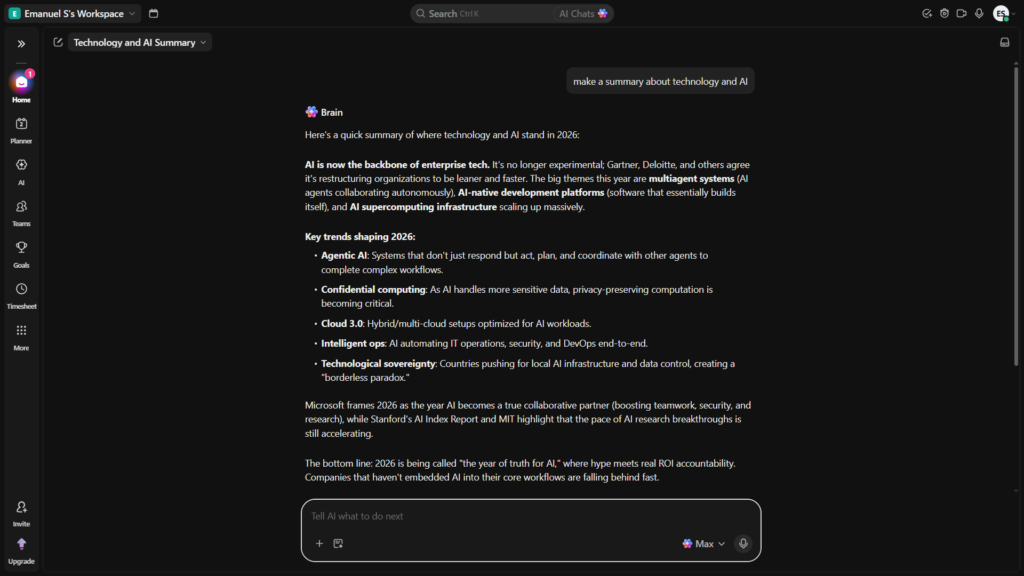
I tested ClickUp AI with a simple goal: see whether it could help me create a useful weekly planner without making the process feel harder than it needed to be. My experience was mixed, but mostly positive. Signing up was easy. After that, the platform felt confusing because ClickUp has a lot going on. Once I learned the basics, though, I asked it for a weekly planner and it generated something complete, organized, and visually nice. It also felt fast.
This ClickUp AI review covers the main features, pricing, pros and cons, who should use it, and how it compares with Notion AI. The goal is not to hype it up. It is to help you decide whether ClickUp AI is actually worth trying for your own workflow.
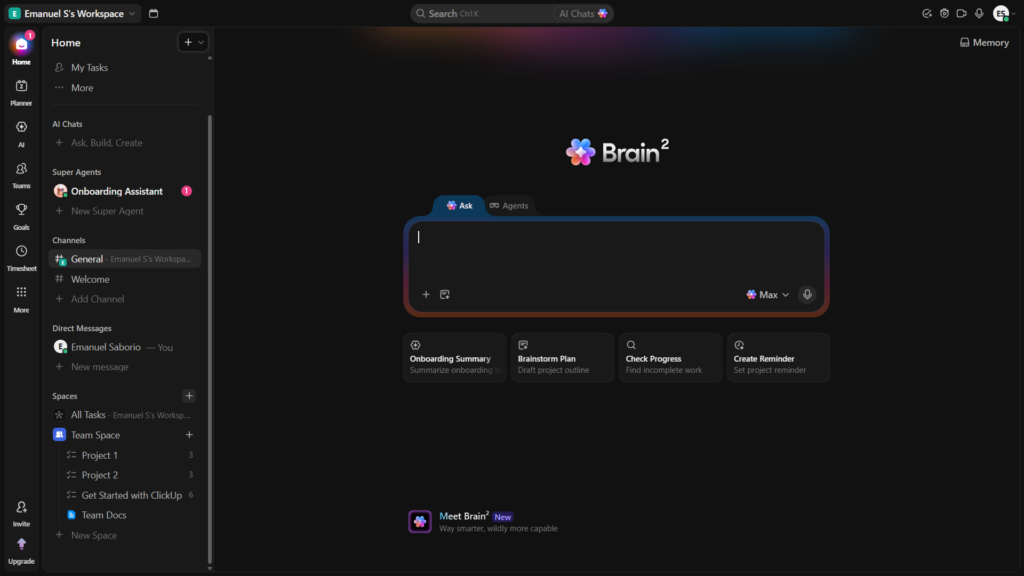
What Is ClickUp AI?
ClickUp AI is the AI layer inside ClickUp, a productivity and project management platform used for tasks, docs, chat, dashboards, goals, and team workflows. ClickUp’s current AI product is called ClickUp Brain AI, and ClickUp describes it as everything in the platform that uses AI, including Brain Assistant, AI features inside ClickUp, and AI-powered agents.
The main idea is simple: instead of using a separate AI chatbot and then copying information into your task manager, ClickUp AI works inside the workspace where your tasks and documents already live. According to ClickUp, Brain can use context from tasks, Docs, Chat, wikis, and connected work data to answer questions or create work outputs.
In practice, that means ClickUp AI is not just a writing assistant. It can help with:
- Project planning
- Task creation
- Summaries
- Docs
- Emails
- Research
- Workflow generation
- AI agents
- Workspace Q&A
My own test was much simpler than a full team workflow. I asked it for a weekly planner. The output was surprisingly complete and aesthetic, which made the tool feel useful once I got past the confusing setup and interface.
Best Free AI Writing Tools (No Credit Card) in 2026 → https://theaitoolreview.com/best-free-ai-writing-tools-no-credit-card/
Key Features of ClickUp AI
ClickUp AI has grown into a broad set of features. Some are simple, like writing and summarizing. Others are more advanced, like AI agents and connected workspace search. For this ClickUp AI review, I focused on the features that matter most to everyday users, creators, students, freelancers, and small teams.
AI writing and planning
The most approachable part of ClickUp AI is its ability to turn a prompt into structured work. ClickUp says Brain can generate things like emails, research, slide decks, dashboards, and workflows from a single prompt.
In my experience, this is where the tool made the strongest first impression. I asked for a simple weekly planner, and it gave me a complete result that felt polished instead of basic. It was not just a plain list. It was organized and looked good enough to actually use.
That makes ClickUp AI helpful for:
- Weekly plans
- Task lists
- Project outlines
- Content calendars
- Meeting prep
- Productivity templates
- Personal planning docs
The main downside is that getting to the point where you know where to ask, what to click, and how ClickUp is organized may take some learning.
Workspace-aware answers
A big selling point of ClickUp Brain is that it can work with your existing ClickUp context. ClickUp says Brain knows about work that users have permission to access, including tasks, Docs, Chats, and data from connected apps.
This matters because generic AI tools often need a lot of context before they can help. You may have to explain your project, your team, your deadlines, and your documents. ClickUp AI is designed to reduce that back-and-forth if your work already lives inside ClickUp.
That said, this benefit depends heavily on how much you actually use ClickUp. If your workspace is empty, messy, or barely used, the AI has less useful context to work with.
AI summaries and project updates
ClickUp AI can help summarize project information, tasks, comments, and updates. This is useful for people who manage multiple projects and do not want to manually read every detail before understanding what changed.
For teams, this could be one of the most valuable use cases. A project manager could ask for a status summary, a writer could summarize a content plan, or a student could organize tasks for an assignment.
AI agents and automation
ClickUp has been expanding its AI product beyond simple chat. Its help documentation says ClickUp Brain AI includes the ability to build Super Agents and use AI features throughout ClickUp.
ClickUp’s feature availability page also explains that Super Agents can use workspace context to perform multi-step workflows, though availability depends on plan, role, and permissions.
This is more advanced than what a casual user may need. For a beginner, it can also add to the feeling that ClickUp has too many things happening at once. That was part of my experience: I could tell the platform was powerful, but I did not understand many of the things inside it at first.
Multi-model AI support
ClickUp says Brain can let users switch between leading AI models such as Claude, GPT, Gemini, and more, while carrying workspace context across models.
That could be useful if you care about model flexibility but do not want to manage separate accounts for every AI platform. For most casual users, though, the bigger question is simpler: does it help you get work done faster? In my weekly planner test, yes, it did.
AI inside a larger productivity system
The strongest thing about ClickUp AI is also the thing that may overwhelm new users: it is part of a large productivity app. You are not just opening a simple AI writer. You are entering a workspace with tasks, folders, lists, docs, dashboards, views, automations, chats, templates, and more.
For organized teams, that can be powerful. For beginners, it can feel like too much.
ClickUp AI Pricing: How Much Does It Cost?
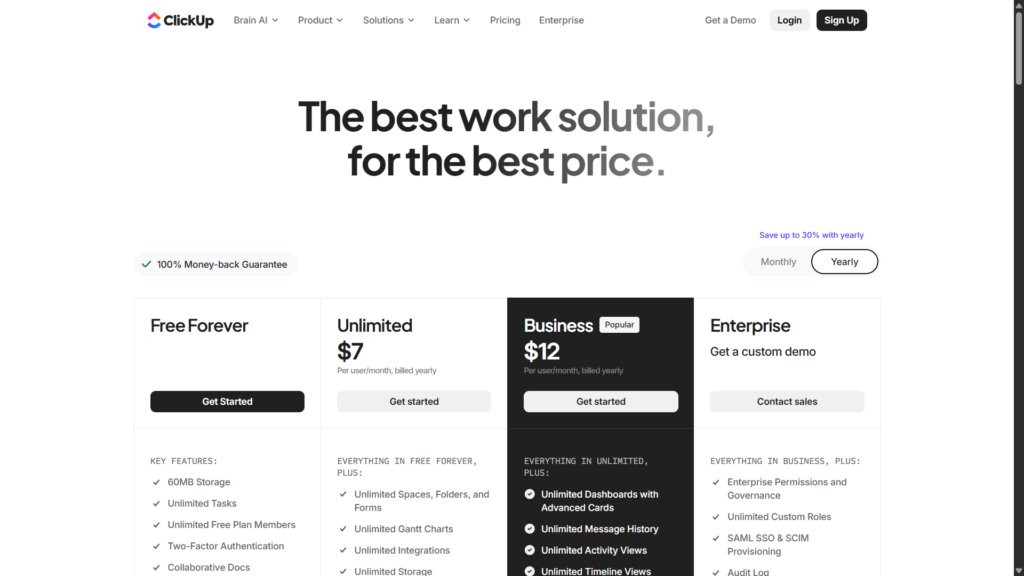
ClickUp has a Free Forever plan, and free workspaces can try selected Brain AI features before committing. ClickUp’s help center says all plans get a trial of select Brain AI features, but after that, only paid plans can purchase various Brain AI add-ons.
On ClickUp’s official Brain pricing page, the listed AI options include:
| Plan / Add-on | Listed price | Best for |
| Free Forever | $0 | Trying ClickUp and limited AI access |
| Unlimited | $7/user/month when billed yearly, shown alongside $10 monthly pricing | Users who want ClickUp Brain features |
| Business | $12/user/month when billed yearly, shown alongside $19 monthly pricing | Teams that want the broader AI stack |
ClickUp’s Brain page also says Unlimited AI starts at $7/user/month and includes unlimited access to Brain², premium models, and 1,500 AI Super Credits. It also lists Business at $12/user/month for teams that want features like Notetaker, AI Fields, Automations, and Super Agents.
The important takeaway: ClickUp AI can be tested for free, but the more complete AI experience is not simply “free forever.” If you are reviewing this as a free AI tool, treat the free access as a trial or starting point, not necessarily the full long-term product.
Pros and Cons of ClickUp AI
Pros
- Easy signup: In my test, registration was simple and did not feel like a barrier.
- Strong output quality for planning: My weekly planner prompt produced a complete and aesthetic result.
- Fast experience: The AI response felt quick during my test.
- Useful for structured work: It is good for planners, task lists, docs, summaries, and project organization.
- Built into ClickUp: If your tasks and docs already live there, ClickUp AI can be more useful than a separate chatbot.
- Free trial access: Free workspaces can try selected Brain AI features before paying.
- Advanced AI options: ClickUp includes features such as Super Agents, AI Fields, Notetaker, and workspace-aware AI depending on plan and access.
Cons
- Confusing after signup: Registration was easy, but after that I found the platform confusing.
- Learning curve: ClickUp has many features, and I did not understand many of them at first.
- Best value requires using ClickUp seriously: If you only want a quick AI writer, ClickUp may feel too heavy.
- AI pricing can add up: The full AI experience may require paid add-ons after the trial.
- Not ideal for people who dislike complex dashboards: The power is there, but simplicity is not the first thing I felt.
Who Is ClickUp AI Best For?
ClickUp AI is best for people who want AI inside a work management system, not just a blank chatbot.
It is especially useful for:
- Project managers who need summaries, updates, task creation, and planning support.
- Small teams that already use ClickUp or want one place for tasks, docs, and AI.
- Freelancers managing clients, deadlines, deliverables, and repeatable workflows.
- Content creators building calendars, briefs, outlines, and production checklists.
- Students who want structured planners, assignment breakdowns, and study schedules.
- Operations teams that may benefit from AI agents, automations, and workspace context.
ClickUp AI is probably not the best choice if you want the simplest possible AI writing tool. For that, a dedicated chatbot or a lighter writing assistant may feel easier. ClickUp gives you more structure, but that structure comes with more setup and more things to learn.
My honest view: if you are willing to spend time learning ClickUp, the AI can be very useful. If you want something you understand in five minutes, it may frustrate you at first.
ClickUp AI vs Notion AI: Quick Comparison
Notion AI is one of the closest comparisons because both tools combine AI with a productivity workspace. The difference is that ClickUp feels more project-management focused, while Notion feels more document and knowledge-base focused.
Notion says Notion AI is included with Business and Enterprise plans, with core features such as Notion Agent, AI Meeting Notes, and Enterprise Search, while other plans receive limited trial usage.
| Category | ClickUp AI | Notion AI |
| Best for | Project management, tasks, workflows, team operations | Docs, notes, wikis, knowledge management |
| Main AI product | ClickUp Brain / Brain² | Notion AI / Notion Agent |
| Free access | Free workspaces can try selected Brain AI features | Limited trial usage on some plans |
| Project management depth | Stronger for tasks, views, dashboards, and workflow structure | Better for flexible docs and databases |
| Ease of use | Powerful but can feel confusing at first | Usually simpler for writing and notes |
| AI context | Uses ClickUp workspace context | Uses Notion workspace and connected context |
| Best user type | Teams that manage projects in ClickUp | Users who organize knowledge in Notion |
The better choice depends on your workflow. Choose ClickUp AI if your work is task-heavy and you need project structure. Choose Notion AI if your work is mostly notes, docs, databases, and internal knowledge.
Notion AI Review 2026: What Can It Actually Do? → https://theaitoolreview.com/notion-ai-review/
Our Verdict: Is ClickUp AI Worth It?
ClickUp AI is worth trying if you already use ClickUp or want an AI-powered productivity system that can handle more than basic writing. The AI output I tested was genuinely useful: I asked for a weekly planner, and it created something complete, organized, and nice-looking. That is a strong sign that ClickUp AI can help with planning and productivity tasks.
However, the platform is not instantly easy. My signup experience was smooth, but after registration, I felt confused. ClickUp has a lot of features, and beginners may need time before they feel comfortable. That is the tradeoff.
My verdict: ClickUp AI is powerful and useful, but best for users who want structure and are willing to learn the platform. It is not my first recommendation for someone who only wants a simple AI chat tool. But for planning, tasks, and project workflows, it is absolutely worth testing.
Frequently Asked Questions (FAQ)
Is ClickUp AI free?
ClickUp has a Free Forever plan, and free workspaces can try selected Brain AI features. After the trial, ClickUp says only paid plans can purchase various Brain AI add-ons.
What is ClickUp Brain?
ClickUp Brain is ClickUp’s AI system. ClickUp describes it as an AI coworker that can work with your tasks, Docs, Chat, and workspace context to answer questions and create work outputs.
Is ClickUp AI good for weekly planning?
Yes, based on my test. I asked ClickUp AI for a weekly planner, and it created a complete and aesthetic result. The main challenge was not the quality of the output; it was learning how to navigate ClickUp first.
Who should avoid ClickUp AI?
People who want a very simple AI writing tool may prefer something lighter. ClickUp AI makes the most sense when you want AI connected to tasks, projects, docs, and workflows.
Conclusion
ClickUp AI is a strong option for users who want AI inside a serious productivity platform. It can help with planning, writing, summaries, task organization, and more advanced workflows. My personal test was simple, but useful: after I got past the confusing parts of the interface, the weekly planner it generated was complete, fast, and visually well organized.
My recommendation is clear: try ClickUp AI if you need help managing projects, tasks, or weekly planning. Start with the free access, test it with a real prompt, and see whether the workspace style fits you. If you only need basic AI writing, it may feel like too much. But if you want an AI project management tool that can grow with your workflow, ClickUp AI deserves a serious look.
- ClickUp Pricing: https://clickup.com/pricing
Pingback: Best AI Tools for Freelancers in 2026 (Tested & Ranked)