
Disclosure: This post may contain affiliate links. If you purchase through our links, we may earn a commission at no extra cost to you.
Last updated: July 2026
Tested by: Emanuel S.
Bing Image Creator, now closely integrated with Microsoft Copilot, is one of the easiest ways to experiment with AI-generated images without paying for a separate creative subscription. It lets you describe an image using ordinary text and receive an original visual based on your prompt. More importantly for casual users, it can be used for free and does not require me to enter a credit card.
I tested Bing Image Creator with both a basic prompt and a much more descriptive one. The images were good in both cases, but my overall experience was mixed. The generator produced attractive fantasy artwork, yet the sign-in process was frustrating and generation felt slower than I expected.
This Bing Image Creator review examines the features, pricing, image quality, ease of use, strengths, weaknesses, and how it compares with Adobe Firefly. The goal is not to claim that it is the best AI image generator available. Instead, I want to explain where it works well and where other tools may provide a better experience.
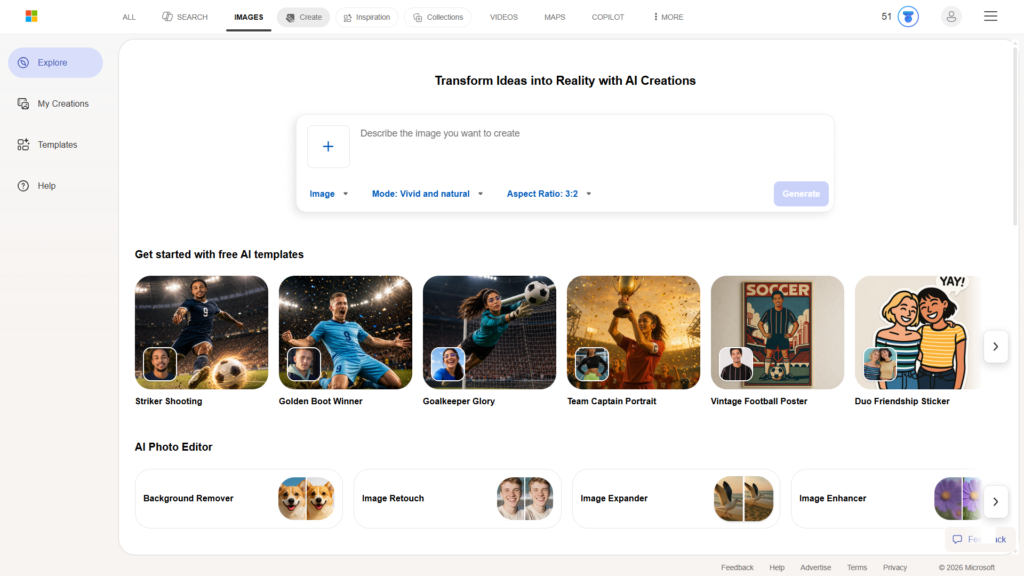
What Is Bing Image Creator?
Bing Image Creator is Microsoft’s AI image-generation tool. It allows users to enter a text description, commonly called a prompt, and receive images representing that idea.
The image-creation experience is now connected with Microsoft Copilot, Microsoft’s broader AI assistant. Copilot can answer questions, assist with writing, and generate images within the same conversational interface. Microsoft officially states that its free Copilot experience can create images, while signing in with a personal account provides access to image creation, chat history, longer conversations, and additional features.
Microsoft also describes its image generator as a tool that can create images from simple written prompts without requiring design experience. Users can request different visual styles, including realistic, illustrated, watercolor, and cartoon-style images.
That simplicity is the main appeal. You do not need to understand professional design software or manually draw anything. A prompt such as “a dragon in a forest” is enough to begin.
The tool may be useful for:
- Blog illustrations
- Concept art
- Fantasy images
- Social media ideas
- Presentation visuals
- Creative inspiration
- Personal projects
- Basic marketing concepts
It should not be confused with a complete photo-editing suite. Although Microsoft offers related editing and design features through Copilot and Microsoft Designer, the central purpose of Bing Image Creator is turning text into images.
Writesonic Review 2026: Honest Pros and Cons After Testing It → https://theaitoolreview.com/writesonic-review/
Key Features of Bing Image Creator
Text-to-image generation
The primary feature is straightforward: describe what you want and allow the AI to interpret it.
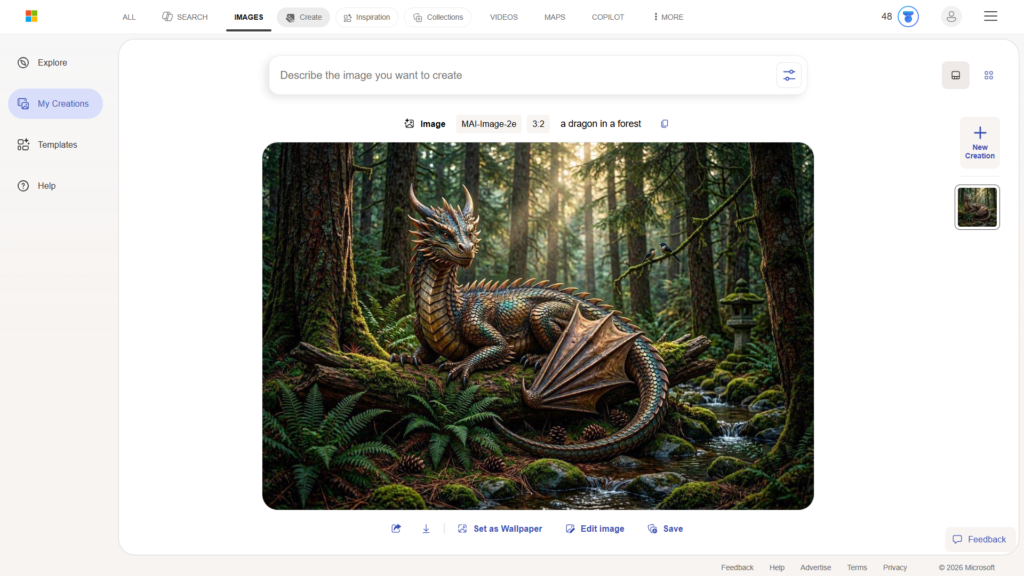
For my first test, I entered:
“a dragon in a forest”
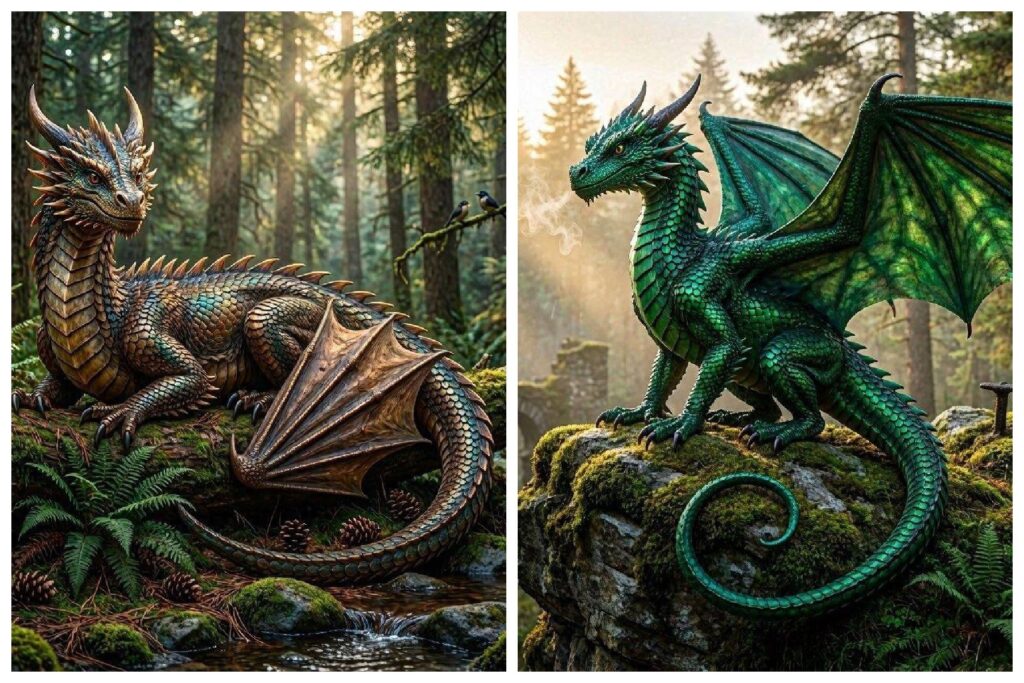
Despite being a short and fairly generic prompt, it produced a good result in less than two minutes. The image understood the main subjects correctly and delivered the fantasy atmosphere I expected.
This is useful for beginners because it shows that you do not necessarily need to learn advanced prompt-writing techniques before getting something usable. You can enter a short idea and see how the generator interprets it.
Support for detailed prompts
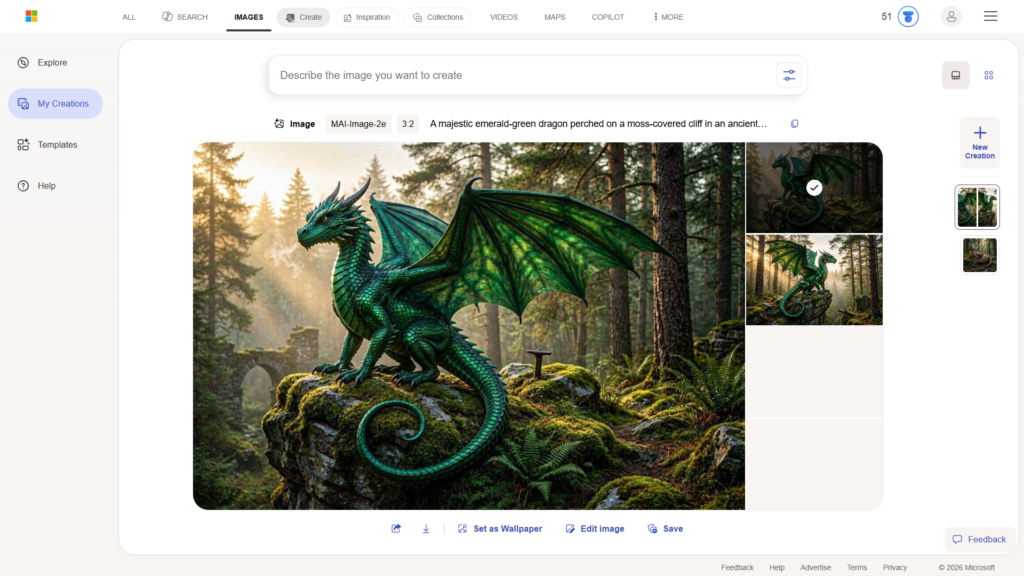
For my second test, I used a considerably more detailed prompt:
“A majestic emerald-green dragon perched on a moss-covered cliff in an ancient misty forest, golden hour sunlight filtering through tall pine trees, intricate scales with a metallic sheen, wings partially spread, cinematic lighting, hyper-realistic, highly detailed, 8k, fantasy digital art style”
The result was good again, and the tool gave me two images. However, the improvement over the short prompt was not as dramatic as I expected.
The longer prompt included details about color, lighting, environment, texture, composition, and artistic style. While the output reflected the general concept, it did not feel significantly better than the image created from the basic prompt. The second generation also took a little longer.
This does not mean detailed prompts are useless. They provide the model with more direction and can make your intentions clearer. In my particular test, however, adding many descriptive terms did not produce a major leap in quality.
That is an important point for beginners. A longer prompt is not automatically a better prompt. Clear details that affect the composition may be more helpful than adding multiple quality-related terms such as “8K” or “highly detailed.”
Integration with Microsoft Copilot
Bing Image Creator benefits from being part of the larger Microsoft Copilot experience. Instead of visiting a tool that only generates pictures, users can move between AI chat and image creation within Microsoft’s ecosystem.
Microsoft presents Copilot image generation as a conversational process. Users can describe an image and then continue asking for changes to its style, composition, or overall direction.
This integration can be convenient when a project involves more than the image itself. For example, you might ask Copilot to help develop an idea, write a description, suggest a visual concept, and then generate the image.
However, the broader Copilot integration can also make the product naming slightly confusing. Depending on the page or Microsoft service being used, you may encounter names such as Bing Image Creator, Copilot, Microsoft Designer, or Microsoft 365 Copilot. The features are related, but they are not always presented as one clearly separated product.
Inspiration section
The tool includes inspiration tabs that help users discover visual ideas. This can be useful when you want to generate something but do not know how to describe the style or scene.
Inspiration examples can help with:
- Discovering prompt structures
- Exploring different artistic styles
- Finding possible compositions
- Understanding what the generator can create
- Overcoming creative blocks
This is particularly helpful for first-time users. Looking at finished examples can make prompt writing feel less intimidating.
Still, inspiration galleries should be treated as starting points rather than promises. AI-generated results can vary, and entering a similar prompt does not guarantee that you will receive an identical image.
Different visual styles
Microsoft says Copilot can generate visuals in multiple styles, from realistic imagery to illustrations, watercolor artwork, and cartoons.
This makes the generator flexible enough for different casual projects. Someone creating a fantasy blog illustration may want digital art, while a teacher preparing a presentation might prefer a simple illustrated style.
The quality and accuracy will depend on the prompt, subject, and individual generation. Users should expect to experiment rather than assume the first result will always be perfect.
Browser-based access
Bing Image Creator and Copilot operate through a web-based interface, so there is no complicated creative application to install before generating an image.
That makes it approachable for people who only need occasional images and do not want to learn professional software. Microsoft also offers Copilot through other parts of its ecosystem, but the browser experience is enough for basic image generation.
Gamma Review: Making Presentations with AI in 2026 → https://theaitoolreview.com/gamma-review/
Bing Image Creator Pricing: How Much Does It Cost?
Bing Image Creator can be accessed through the free version of Microsoft Copilot. Microsoft’s support documentation states that Copilot is available at no cost through its website and that image creation is available when users sign in with a personal Microsoft account.
During my test, I was not asked to enter a credit card. This is a meaningful advantage for anyone who wants to test an AI image generator without beginning a paid trial or worrying about an automatic renewal.
The basic process is:
- Open Bing Image Creator or Microsoft Copilot.
- Sign in with a personal Microsoft account when required.
- Enter a description of the image.
- Wait for the image generation to finish.
- Review the available result or results.
Microsoft also sells paid Copilot and Microsoft 365 plans, but those subscriptions cover a wider group of productivity features. They should not be confused with a requirement to make a basic AI image through the free Copilot experience.
Pricing, account requirements, and included features can change over time or vary by Microsoft service. Check the official Copilot pages before subscribing to any optional paid plan.
My sign-in experience
Although the tool itself was free, signing in was the most frustrating part of my test.
The login process felt slow, and Microsoft asked me to verify my phone number. I requested the verification message, but it did not arrive. That made the initial setup more difficult than it needed to be.
This may not happen to everyone, and I cannot say that it is a universal problem. It was, however, part of my real experience and negatively affected my first impression.
Free access is valuable, but easy access matters too. A tool can produce strong images and still lose points when account verification creates unnecessary friction.
Pros and Cons of Bing Image Creator
Pros
- Free to try: I generated images without entering a credit card.
- Good image quality: Both dragon prompts produced visually appealing results.
- Works with simple prompts: My short “a dragon in a forest” prompt was enough to create a good image.
- Supports detailed descriptions: Users can specify color, lighting, setting, style, and other visual details.
- Integrated with Copilot: Image generation is available alongside Microsoft’s general AI assistant.
- Inspiration tabs: The gallery can help beginners develop ideas and learn how prompts are structured.
- No advanced design knowledge required: The basic text-to-image process is easy to understand.
- Useful for casual projects: It can create illustrations for blogs, presentations, concepts, and personal use.
Cons
- Slow sign-in experience: My login process took longer than expected.
- Phone verification problem: Microsoft requested a phone number verification, but the message did not arrive during my test.
- Generation felt slow: Both tests required some waiting, with the detailed prompt taking a little longer.
- Longer prompt did not transform the result: The detailed version was good, but it was not dramatically better than the short prompt.
- Product naming may feel confusing: Bing Image Creator, Copilot, Designer, and Microsoft 365 Copilot are closely connected.
- Not my top AI image generator: The results were good, but I believe stronger alternatives exist for users who care most about image generation.
- Some experimentation is necessary: A usable result is possible on the first attempt, but precise creative work may require revisions.
Who Is Bing Image Creator Best For?
Bing Image Creator is best suited to people who want an accessible introduction to AI-generated artwork without immediately paying for another subscription.
Beginners exploring AI images
A new user can enter a plain sentence and receive an image without learning complicated controls. My first test proves that even a short prompt can generate a good result.
The inspiration area also gives beginners ideas about possible styles and subjects.
Microsoft Copilot users
People who already use Copilot may appreciate having text assistance and image creation in the same environment. There is less need to move between unrelated platforms when brainstorming a project.
Bloggers and content creators
Bing Image Creator may be helpful for generating visual concepts or original illustrations for articles. Publishers should still review every result carefully and verify that it suits their editorial standards before posting it.
AI-generated images should not be used to mislead readers into believing that a fictional scene depicts a real event.
Students and presentation creators
The tool can help create conceptual visuals for school projects or presentations. A student could generate a historical-style illustration, a futuristic city, or a visual metaphor that would be difficult to find in an ordinary stock-image library.
Users should follow their school’s rules regarding AI-generated material and disclose its use when required.
Casual creative users
Someone who wants a fantasy wallpaper, character concept, or imaginative scene can generate one without investing in professional design software.
Who should consider another tool?
Bing Image Creator may be less suitable for:
- Professionals who need detailed creative controls
- Users who prioritize the fastest possible generation
- Designers building a larger editing workflow
- People frustrated by Microsoft account verification
- Users who want many advanced production features in one place
- Creators who need highly consistent results across multiple images
Bing Image Creator vs Adobe Firefly: Quick Comparison
Adobe Firefly is a major competitor because it combines AI image generation with a broader selection of creative tools. Adobe positions Firefly as a platform for creating and editing images, video, and audio, while offering both free access and several paid plans.
The two services target overlapping audiences, but their strengths are different.
| Feature | Bing Image Creator | Adobe Firefly |
| Free access | Yes, through Copilot | Yes, with limited free usage |
| Credit card required for my free test | No | Depends on the plan or offer selected |
| Main focus | Simple AI image generation inside Copilot | AI creation and editing within Adobe’s creative ecosystem |
| Beginner friendliness | Very approachable after login | Approachable, with more creative options |
| Inspiration features | Yes | Yes |
| Broader creative workflow | Limited compared with a complete design platform | Stronger connection with Adobe creative tools |
| Paid options | Available through Microsoft’s broader plans | Multiple dedicated Firefly plans |
| My tested generation speed | Good results, but somewhat slow | Not tested for this review |
| Best for | Casual users and existing Copilot users | Creators wanting more editing and production options |
Bing Image Creator has the advantage of being easy to test for free within a familiar AI chat experience. For a person who needs one or two illustrations, it may be all that is necessary.
Firefly is more appealing to creators who want a larger creative environment. Adobe’s official plan page lists a free option as well as paid tiers with different generative-credit allowances and access to additional media-generation features.
I did not perform a direct image-quality test between the two tools for this article, so I will not claim that one consistently generates better images. The practical choice depends on whether you prioritize Copilot integration and simplicity or a broader design workflow.
Our Verdict: Is Bing Image Creator Worth It?
Bing Image Creator is worth trying because it can generate good images for free and does not require a credit card for basic use.
My two dragon tests both produced attractive results. The simple prompt worked surprisingly well, while the longer cinematic prompt also created a good image and returned two options. This suggests that beginners can get usable results without becoming prompt-writing experts.
However, the tool did not impress me in every area.
The sign-in experience was slow, and the failed phone verification message made setup frustrating. Image generation was also somewhat slow compared with what I would prefer. Most importantly, the highly detailed second prompt did not produce a dramatic improvement over the basic one.
My overall assessment is that Bing Image Creator is good, free, and convenient, but not the best AI image generator I have tested. It makes sense for casual users, Microsoft Copilot users, and anyone experimenting with AI art for the first time. More demanding creators may prefer a platform with stronger editing controls, faster workflows, or more noticeable prompt precision.
Rating: 7/10
- Image quality: Good
- Ease of generating images: Good
- Sign-in experience: Disappointing in my test
- Speed: Acceptable, but slower than preferred
- Value: Strong because it is free
- Best feature: Accessible text-to-image generation through Copilot
- Biggest weakness: Friction during login and verification
Frequently Asked Questions (FAQ)
Is Bing Image Creator free?
Yes. Microsoft states that its free Copilot experience can create images. Signing in with a personal Microsoft account provides access to image creation and other features.
I was able to test it without entering a credit card. Optional Microsoft subscriptions exist, but I did not need one for the image generations described in this review.
Do I need a Microsoft account to use Bing Image Creator?
Microsoft allows some Copilot interactions without signing in, but its support documentation says signing in provides access to image creation.
My own experience required account access and included a phone-verification request. The verification message did not arrive during my first attempt, which made the process frustrating.
Is Bing Image Creator good for beginners?
Yes. The interface accepts natural-language prompts, and my short prompt generated a good image without advanced instructions.
The inspiration tabs can also help new users understand possible subjects, styles, and prompt structures.
Does a longer prompt create a better image?
Not always. Detailed prompts can provide more direction, but my long dragon prompt was not dramatically better than the simple version.
A focused prompt that clearly describes the subject, environment, composition, and style may be more effective than adding unnecessary descriptive terms.
Conclusion
Bing Image Creator is a practical free AI image generator for beginners and casual creators. It produced good fantasy images from both a simple prompt and a detailed prompt, required no credit card, and offered helpful inspiration features. Its connection with Microsoft Copilot also makes it convenient for users who want to brainstorm and create within the same service.
I recommend trying it when you need occasional AI illustrations and do not want to pay upfront. Keep your expectations realistic, though. The login experience may create friction, generation can feel slow, and detailed prompting does not guarantee a major improvement. It is a useful free option rather than my first choice for advanced or professional AI image creation.
3 Best AI Tools for Freelancers in 2026 → https://theaitoolreview.com/best-ai-tools-for-freelancers/
External Sources:
Microsoft’s official Copilot comparison:
https://support.microsoft.com/en-us/microsoft-365-copilot/what-s-the-difference-between-microsoft-copilot-free-and-copilot-in-microsoft-365
Microsoft’s official AI image creation guide:
https://www.microsoft.com/en-us/microsoft-copilot/for-individuals/do-more-with-ai/ai-art-and-creativity/create-and-edit-images-with-copilot
Microsoft AI image generator:
https://create.microsoft.com/en-us/features/ai-image-generator
Adobe Firefly pricing and plans:
https://www.adobe.com/products/firefly/plans.html
Pingback: Leonardo.ai Review 2026: Free AI Image Generator Tested
Pingback: 2 Best Free AI Image Generators in 2026 (Tested)