
Disclosure: This post may contain affiliate links. If you purchase through our links, we may earn a commission at no extra cost to you.
Last updated: July 2026
Tested by: Emanuel S.
This Leonardo.ai Review examines whether the popular AI image generator is genuinely useful on its free plan. I personally tested its registration process, image quality, generation speed, prompt accuracy, available styles, and credit system. My goal was not simply to create an attractive image, but to see how the platform handled both a basic prompt and a much more detailed description.
My experience was positive overall. Registration was quick, no credit card was required, and my account started with 150 credits. Leonardo.ai generated my first image extremely quickly, while my second and more detailed request was completed in exactly eight seconds. The second result was noticeably better and contained none of the visual errors I noticed in the first attempt.
That does not mean every generation will be perfect. My first robot image had a small coherence problem around one of its feet, and the credit-based system means free users cannot generate endlessly. Still, Leonardo.ai made a strong first impression as a fast, accessible, and flexible free AI image generator.
What Is Leonardo.ai?
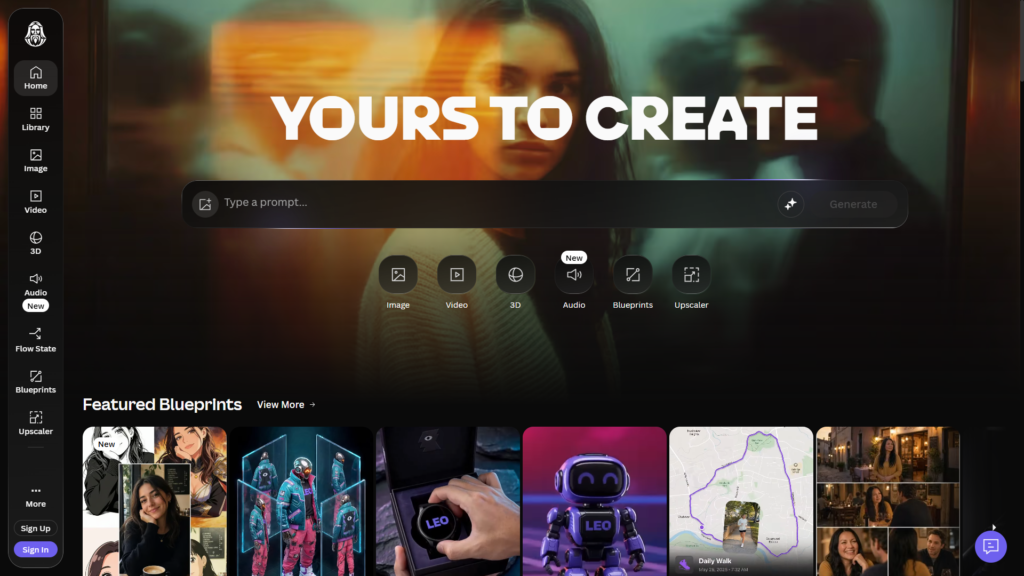
Leonardo.ai is a generative AI platform for creating images, artwork, designs, and videos from written prompts or visual references. A user describes an idea, selects a model or visual style, adjusts the available settings, and asks the platform to generate the result.
It is more than a basic text-to-image website. Leonardo.ai provides different image models, style presets, image guidance, editing options, upscaling tools, and video-generation features. Its official documentation also describes support for workflows such as text-to-image, image-to-image, image guidance, and image-to-video generation.
For a beginner, however, the core experience remains simple: enter a prompt and generate an image.
I could explore the platform before registering, but Leonardo.ai did not allow me to create an image without signing in. Fortunately, account creation was fast, and I was not asked to enter card details. After logging in, I received 150 credits to use on the platform.
Leonardo.ai refers to these credits as tokens. Tokens function as the platform’s internal currency and can be used for image generation, video generation, upscaling, background removal, and other processing tasks. The cost of an action can change according to its computational requirements and selected settings.
Bing Image Creator (Copilot) Review 2026: Free AI Images Tested →https://theaitoolreview.com/bing-image-creator-review/
Key Features of Leonardo.ai
Leonardo.ai includes many creative features, although I focused my hands-on test on image generation. The video tools were visible, but I did not test them, so I cannot offer a personal verdict on their quality.
Text-to-image generation
The main feature transforms a written description into an original AI-generated image. Prompts can be extremely simple or include detailed instructions about the subject, lighting, environment, camera angle, artistic style, and mood.
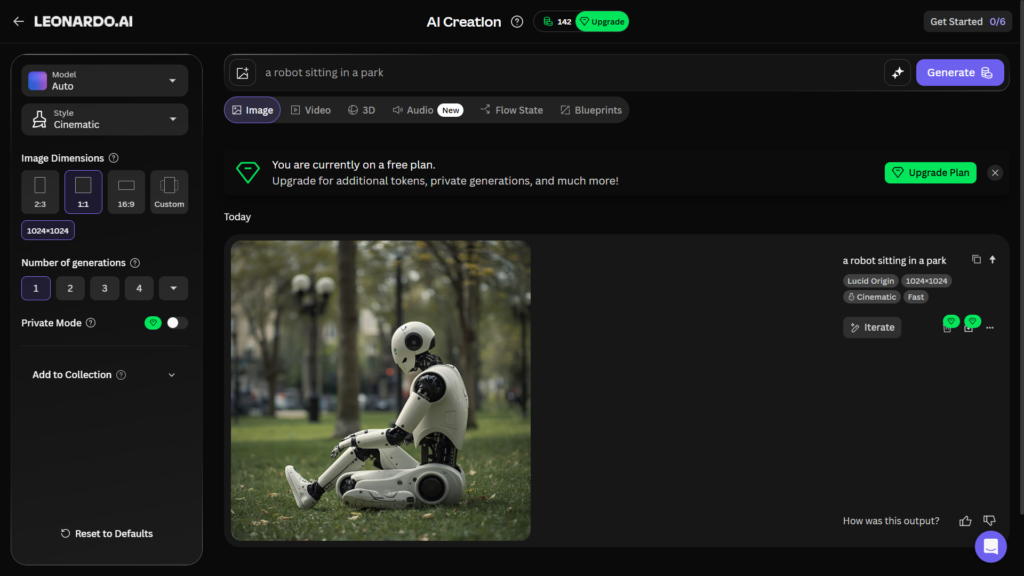
For my first test, I entered:
“a robot sitting in a park”
I selected the Cinematic option and submitted the prompt. Leonardo.ai generated the result very quickly. The image looked quite good overall, especially considering how little detail I provided.
However, it was not flawless. One of the robot’s feet had a visible coherence issue. This is a common type of problem in AI-generated artwork: the overall scene may look convincing, while a smaller anatomical or structural detail does not make complete sense.
The generation reduced my balance from 150 to 142 credits, meaning the settings I used consumed eight credits.
Detailed prompt interpretation
My second test used a significantly more descriptive prompt:
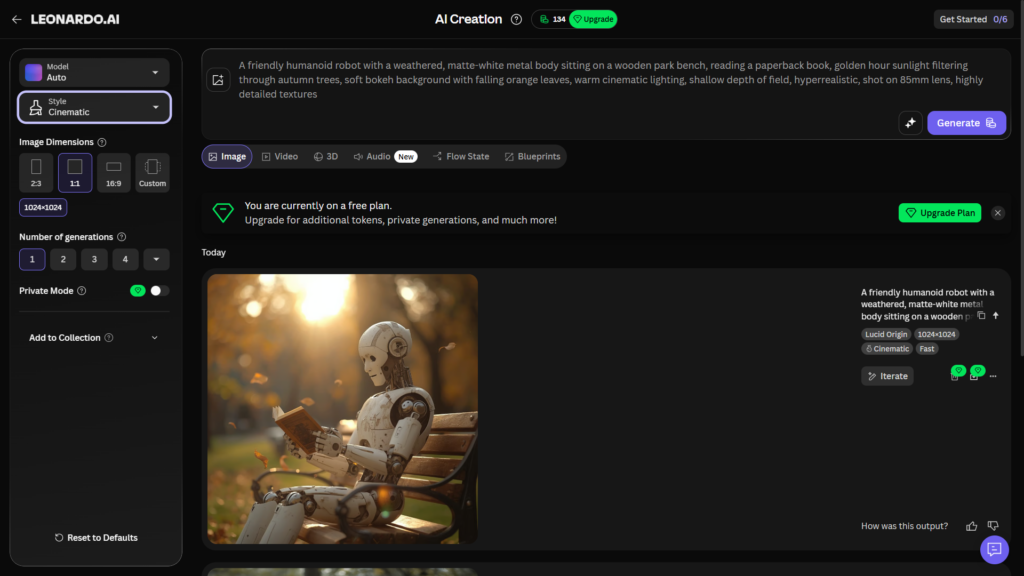
“A friendly humanoid robot with a weathered, matte-white metal body sitting on a wooden park bench, reading a paperback book, golden hour sunlight filtering through autumn trees, soft bokeh background with falling orange leaves, warm cinematic lighting, shallow depth of field, hyperrealistic, shot on 85mm lens, highly detailed textures”
Once again, I used the Cinematic style.
This image was generated in exactly eight seconds. The improvement was substantial. The scene had a clearer visual direction, more convincing lighting, better detail, and none of the coherence errors I noticed in the first result. My remaining balance dropped from 142 to 134 credits.
This test demonstrated an important lesson: Leonardo.ai can work with a short prompt, but a more specific prompt may give the model clearer instructions and produce a more polished result. Mentioning the material of the robot, the season, lighting, camera lens, depth of field, and intended level of realism helped define the scene.
A detailed prompt will not guarantee perfection every time. Nevertheless, in my test, it produced a much stronger image than the basic version.
Multiple visual styles
Leonardo.ai offers many styles that can change the appearance of a generation. I used Cinematic for both tests because it fit the scene I wanted to create.
A cinematic style generally emphasizes elements such as dramatic lighting, camera-like framing, environmental atmosphere, and depth of field. Leonardo.ai’s own style guide describes cinematic imagery as drawing from the visual language of film.
The number of available choices gives users room to experiment. Someone creating a realistic product concept may want different settings from a person producing fantasy art, illustrations, thumbnails, or game assets.
The variety is useful, although beginners may need time to understand how each style and model affects the output. My experience with the basic generation screen was straightforward, but the platform contains far more tools than I used during this review.
Different AI models
Leonardo.ai supports multiple models intended for different creative needs. Users can switch models and test how the same prompt is interpreted in different ways. The company also offers Phoenix, its own foundational image-generation model, which emphasizes prompt adherence and creative control.
This flexibility is valuable for experienced creators. Rather than being limited to a single visual engine, users can choose a model that better matches a particular project.
At the same time, model selection can introduce an extra learning curve. A beginner who only wants one quick image may not immediately know which option to choose.
Image guidance and editing tools
Leonardo.ai also supports image guidance. This allows a user to upload or reuse an image as a reference and influence the appearance, composition, or style of a new generation. Its documentation mentions controls for using images as references and making more precise visual adjustments.
Other tools available across the platform include image editing, inpainting, outpainting, background removal, and upscaling. I did not test these features for this article, so I cannot judge how intuitive or reliable they are from personal experience.
TechRadar’s hands-on review praised Leonardo.ai’s range of tools, image quality, and speed, although it also found parts of the interface and some editing workflows somewhat clunky.
AI video generation
Leonardo.ai includes tools for generating and animating video content. Its current creative platform covers both images and videos, while token consumption depends partly on the processing power required by the selected action. Video generation generally requires more computational resources than producing a still image.
I saw the video options during my test but did not use them. Therefore, this review should not be interpreted as a test of Leonardo.ai’s video quality, motion consistency, or video-generation speed.
QuillBot Review 2026: Paraphrasing Tool Tested → https://theaitoolreview.com/quillbot-review/
Leonardo.ai Pricing: How Much Does It Cost?
Leonardo.ai uses a freemium pricing model. There is a free plan as well as several paid subscriptions.
At the time of this July 2026 update, the main individual plans are:
| Plan | Listed monthly price | Included usage |
| Free | $0 | 150 daily fast tokens and basic controls |
| Essential | $12 per month | 8,500 fast tokens and additional premium features |
| Premium | $30 per month | 25,000 fast tokens plus eligible relaxed image generation |
| Ultimate | $60 per month | 60,000 fast tokens plus eligible relaxed image and video generation |
These prices and allowances can change, so readers should confirm the current details on the official pricing page before subscribing. Leonardo.ai’s published comparison with Midjourney lists these plan prices and identifies 150 daily fast tokens for the free plan.
Free tokens reset daily rather than rolling over indefinitely. Paid plans receive a monthly allowance, and eligible premium subscriptions provide token rollover subject to plan limits. Some paid plans also offer relaxed generation for supported first-party models after the main fast-token allowance has been used. Third-party models may still require tokens for every generation.
My account received 150 credits without requiring a payment card. The two image generations I tested used eight credits each, leaving me with 134. That does not mean every image will always cost eight credits. Leonardo.ai explains that token costs depend on the action, model, settings, and computational load.
I cannot say exactly how long 150 daily credits would last for every person. Someone making occasional images with modest settings will have a different experience from a user generating many variations, videos, or heavily processed results.
A note about image rights
Usage rights deserve attention, especially for bloggers, marketers, and businesses.
According to Leonardo.ai’s current pricing information, free users receive a non-exclusive, royalty-free license to use their generated content commercially. However, Leonardo.ai retains rights to use, reproduce, modify, and distribute images created under the free tier, and publicly available assets may be accessible to others through supported platform features.
Paid subscribers receive broader ownership and intellectual-property rights for their generated images. Anyone planning to use Leonardo.ai for important client work, confidential assets, or a commercial brand should read the current terms carefully rather than relying only on a brief summary.
Pros and Cons of Leonardo.ai
Pros
- Fast generation: My detailed image was ready in exactly eight seconds.
- No card required for my free account: I registered and tested image generation without entering payment details.
- 150 credits provided during my test: This was enough to explore the generator and create multiple images.
- Good image quality: The detailed robot prompt produced an impressive result without visible coherence errors.
- Easy core workflow: Entering a prompt, choosing Cinematic, and generating an image was simple.
- Many styles available: Users can experiment with different visual directions.
- Basic and advanced prompting both work: Even my short prompt produced a usable result.
- Broader creative toolkit: The platform includes image editing, guidance, upscaling, and video features.
Cons
- An account is required to generate images: Browsing without signing in did not allow me to create anything.
- The free plan has limited credits: Generations and other actions consume tokens.
- Simple prompts may produce visual errors: My first result had a coherence issue with the robot’s foot.
- Credit duration varies: It is difficult to predict how long the daily allowance will last without knowing the models and settings a person will use.
- The number of options may feel complicated: Models, styles, and advanced controls can require experimentation.
- Free-tier creations have different rights: Users should review the terms before using outputs for sensitive or valuable commercial projects.
- Video quality was not tested: I cannot personally recommend that feature based on this review.
Who Is Leonardo.ai Best For?
Leonardo.ai is a strong option for:
- Bloggers who need original featured-image concepts.
- Social media creators producing visual ideas and post graphics.
- Students and beginners interested in experimenting with AI-generated art.
- Marketers developing campaign concepts, mockups, or creative variations.
- Game developers exploring characters, environments, props, and concept art.
- Designers who want more control than a very basic prompt generator provides.
- Hobbyists looking for a free daily allowance without entering card information.
- Small businesses that need visual concepts but understand the free plan’s licensing conditions.
The platform may be less suitable for someone who needs a completely unlimited free generator or who does not want to create an account. Teams working with confidential material may also prefer a paid plan that provides private generation and broader ownership terms.
Best AI Writing Tools in 2026 → https://theaitoolreview.com/best-ai-writing-tools/
Leonardo.ai vs Midjourney: Quick Comparison
Midjourney is one of Leonardo.ai’s most recognizable competitors. Both can generate attractive artwork from text, but they differ in pricing, workflow, and creative tools.
| Feature | Leonardo.ai | Midjourney |
| Free plan | Yes, with daily tokens | No regular free plan listed |
| Starting paid price | $12 per month | $10 per month |
| Image generation | Yes | Yes |
| Built-in editing tools | Broad selection of editing and guidance tools | Available creative controls, but a different workflow |
| Model selection | Multiple first-party and third-party options | Primarily built around Midjourney’s own models |
| Video tools | Available | Available, with a different generation process |
| Beginner access | Straightforward basic generation, but many advanced options | Simple prompting, though parameters can require learning |
| Best fit | Users wanting a broad creative workspace and free entry point | Users prioritizing Midjourney’s distinctive visual output |
Leonardo.ai’s main advantage for a new user is the free plan. You can test real generations before deciding whether a subscription makes sense. It also places image generation, model selection, guidance, editing, and video tools inside a broader creative environment.
Midjourney’s listed entry plan is slightly cheaper, but Leonardo.ai offers a no-cost starting point. According to Leonardo.ai’s current comparison, Midjourney plans begin at $10 per month, while Leonardo.ai’s Apprentice plan starts at $12 per month.
Image quality is subjective. Some users may prefer Midjourney’s established aesthetic, while others may value Leonardo.ai’s range of models, styles, and controls. The better choice depends on whether you prioritize a particular visual look or a flexible all-in-one workspace.
Rytr Review 2026: Budget AI Writer, Any Good? → https://theaitoolreview.com/rytr-review/
Our Verdict: Is Leonardo.ai Worth It?
Yes, Leonardo.ai is worth testing, particularly because its free plan lets me generate images without providing a credit card.
Speed was the biggest surprise. The platform generated my detailed cinematic robot image in exactly eight seconds, and the quality was considerably better than the result from my shorter prompt. The second image followed the scene description well, captured the warm cinematic mood, and avoided the foot problem found in the first generation.
The experience also showed why prompt detail matters. Leonardo.ai handled a basic request competently, but the carefully described version gave it more useful information about the robot, environment, lighting, lens, textures, and intended realism.
There are reasonable limitations. Credits are consumed with each action, the free allowance will not suit unlimited production, and AI images can still contain structural mistakes. Users should also understand the free plan’s licensing terms before using generated artwork in major commercial projects.
For casual creation, experimentation, blog concepts, social content, and AI art practice, the free version offers meaningful value. Based on my test, Leonardo.ai earns a positive recommendation for its speed, simplicity, style selection, and strong response to detailed prompts.
Overall rating: 4.4 out of 5
Frequently Asked Questions (FAQ)
Is Leonardo.ai free?
Yes. Leonardo.ai currently offers a free plan with a daily token allowance. My account received 150 credits, and I was able to generate images without entering credit card information. The official pricing information also lists 150 daily fast tokens for free users.
Do you need an account to use Leonardo.ai?
You can visit and explore parts of Leonardo.ai without an account, but I could not generate an image until I signed in. Registration was quick during my test.
How fast is Leonardo.ai?
Generation time can vary according to the model, settings, request, and platform demand. In my personal test, the more detailed robot image took exactly eight seconds. The first image also appeared extremely quickly, although I did not record an exact time for it.
Can Leonardo.ai images be used commercially?
Leonardo.ai states that free users receive a non-exclusive, royalty-free license for commercial use, but the company retains certain rights over free-tier creations. Paid subscribers receive broader ownership and intellectual-property rights. Review the latest official terms for your specific project.
Conclusion
Leonardo.ai is one of the more convincing free AI image generators I have tested. It was fast to access, did not request a payment card, offered many visual styles, and generated my detailed image in only eight seconds. The quality difference between my two prompts was clear, which makes the platform useful for learning how better descriptions affect AI-generated artwork.
I recommend trying the free plan before paying. Start with a simple image, then repeat the idea using more specific details about the subject, setting, lighting, composition, and style. Keep an eye on token costs, inspect every result for visual mistakes, and read the licensing conditions before using free-tier images in important commercial work.
External Sources
- Leonardo.ai Official Pricing: https://leonardo.ai/pricing
- Leonardo.ai Official Documentation: https://docs.leonardo.ai/
- TechRadar Leonardo.ai Review: https://www.techradar.com/pro/software-services/leonardoai-ai-image-generator-review