
Disclosure: This post may contain affiliate links. If you purchase through our links, we may earn a commission at no extra cost to you.
Last updated: July 2026
Tested by: Emanuel S
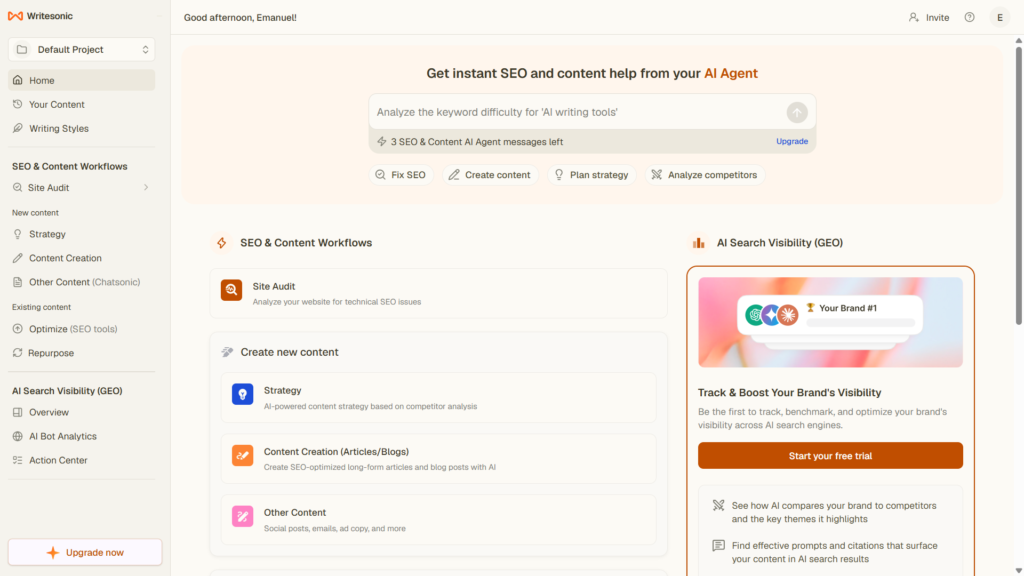
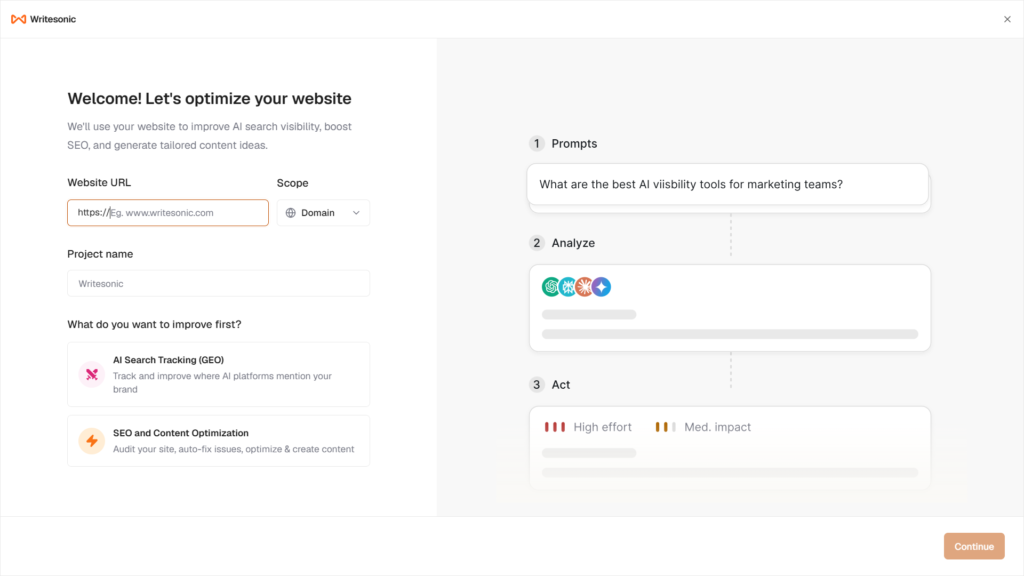
Writesonic review articles often focus only on features, but I wanted to test the tool from a beginner’s point of view: how easy it is to sign up, how fast it feels, what the interface looks like, and whether the trial gives enough value before asking you to upgrade.
After testing Writesonic myself, my honest opinion is simple: Writesonic is good, but not perfect. It was easy to start using, it did not ask for too many details during sign-up, and the interface looks clean. I also liked that it offers a 7-day free trial with no credit card required, according to Writesonic’s own website.
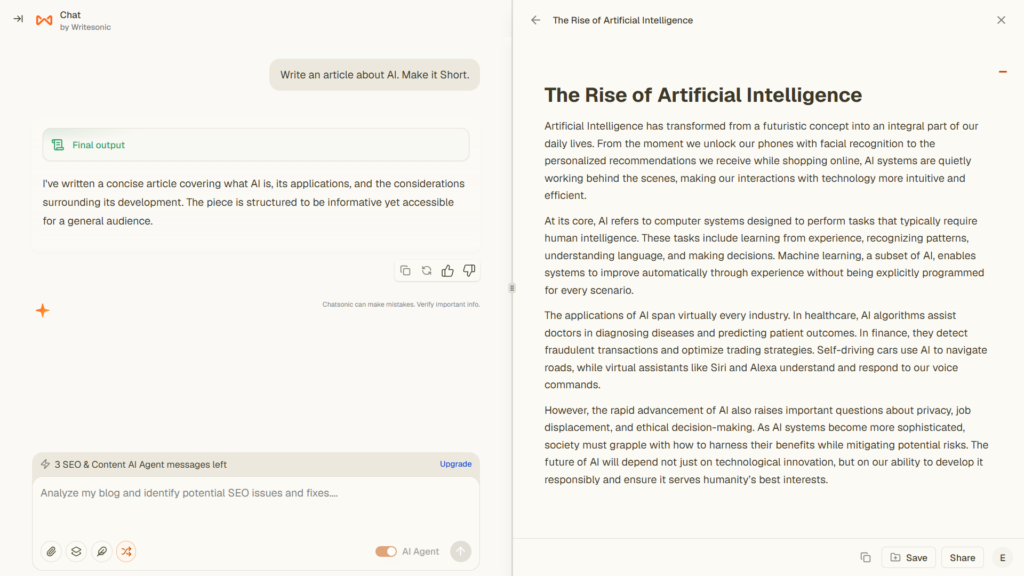
At the same time, I noticed one clear downside during my test. I asked Writesonic to create a simple article about AI, and it took around two minutes to give me the result. That is not terrible, but compared with some other AI writing tools I have tested, it felt slow. So this review is not just “Writesonic is amazing.” It is a balanced look at where the tool works well and where it may frustrate some users.
2 Best AI Tools for Small Business Owners in 2026→ https://theaitoolreview.com/best-ai-tools-small-business-owners-2026/
What Is Writesonic?
Writesonic is an AI writing and SEO platform built to help users create content such as blog posts, marketing copy, website copy, product descriptions, and SEO-focused articles. In 2026, Writesonic is no longer only positioned as a basic AI writing tool. Its official pricing page now highlights AI search visibility, SEO, GEO, AI articles, site audits, and tracking across platforms like ChatGPT, Gemini, and Google AI Overviews.
That makes Writesonic a little different from a simple chatbot. You can still use it to generate written content, but the platform is also trying to serve marketers, agencies, SEO teams, and businesses that care about how their brand appears in AI-powered search results.
In my experience, the first impression was positive. Signing in was easy, and Writesonic did not ask for too many details before letting me try the product. That matters because some software tools make the onboarding process feel heavier than the actual testing. Writesonic felt more direct.
The interface also looks nice. It has a modern layout, and I did not feel lost immediately after opening it. Some areas do require a paid plan, which is normal for a trial-based tool, but it is something beginners should know before expecting unlimited access.
Overall, Writesonic is best described as an AI content writing tool with SEO and AI visibility features added on top. It can be useful, but whether it is worth paying for depends on your content needs, your budget, and how much you value its SEO-focused features.
Key Features of Writesonic
Writesonic includes several features aimed at writers, bloggers, marketers, and businesses. I would not say every user needs all of them, but the platform clearly tries to cover more than basic text generation.
AI Article Writer
The main feature most bloggers will care about is the AI article writer. This is the tool I tested by asking Writesonic to create a simple article about AI. The output did arrive, and the tool did the job, but it took around two minutes in my test.
That timing is based only on my personal experience with one simple article request. I do not want to claim that Writesonic is always slow for everyone. Still, for me, it felt slower than other AI tools I have used.
The article writer can be useful if you want a draft to edit, expand, or use as a starting point. I would not recommend publishing AI-generated content without reviewing it carefully. For AdSense, SEO, and trust, your content should include original insight, human editing, examples, and fact-checking.
SEO and Content Tools
Writesonic’s pricing page includes Content & SEO features such as AI articles and site audits. The Starter plan listed 15 AI articles per month and 10 site audits, while higher plans included more articles and audits.
For bloggers, this is important because content creation is only one part of publishing. You also need to think about search intent, structure, optimization, internal links, and whether your article actually helps the reader.
AI Search Visibility Tracking
One of Writesonic’s bigger 2026 features is AI search visibility tracking. The official pricing page says the platform can track brand visibility across ChatGPT, Gemini, and Google AI Overviews on its paid plans.
This feature is probably more useful for businesses and agencies than casual users. For example, if a brand wants to know whether AI tools mention them when users ask for product recommendations, this type of tracking could be valuable.
For a beginner blogger, though, this may feel like too much. If your main goal is simply writing articles, you might not need advanced GEO or AI visibility tools right away.
Site Audits
Writesonic also includes site audits in its paid plans. On the official pricing page, the Starter plan includes 10 site audits with 100 pages each, while the Basic and Growth plans include larger audit limits.
This can help users identify content or SEO issues, but again, the value depends on your website size. If you only have a small blog with a few articles, you may not need a high audit limit. If you manage a business website or multiple client sites, it becomes more relevant.
Brand and Marketing Use Cases
Writesonic can be used for more than blog posts. Depending on the plan and available tools, it can help with marketing content, SEO workflows, and brand visibility work. Y Combinator describes Writesonic as a platform that tracks AI visibility and helps users take actions such as creating new content, refreshing pages, or reaching out to sites that mention competitors.
That shows the direction Writesonic is taking. It is moving from “write me a blog post” toward “help my brand perform better in search and AI search.”
Writesonic Pricing: How Much Does It Cost?
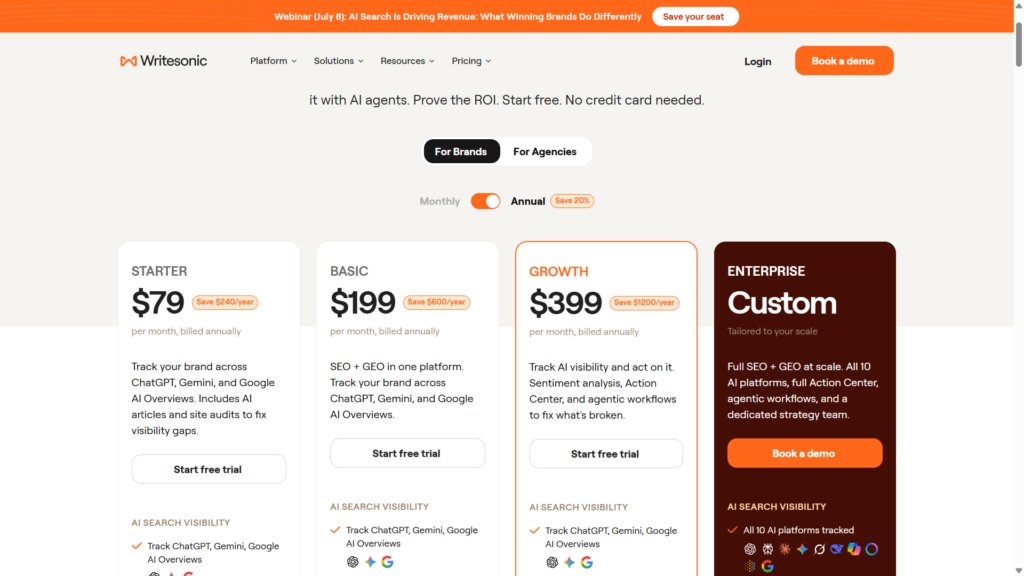
Writesonic pricing can change, so always check the official pricing page before buying. As of my July 2026 review, Writesonic’s official pricing page lists these annual prices:
| Plan | Price Listed | Best For |
| Starter | $79/month, billed annually | Small teams or users who want AI articles, site audits, and basic AI visibility tracking |
| Basic | $199/month, billed annually | Teams that need more AI articles, more audits, and higher tracking limits |
| Growth | $399/month, billed annually | Growing teams that need more visibility tracking, sentiment analysis, and higher limits |
| Enterprise | Custom pricing | Large companies, agencies, or teams with custom needs |
The official pricing page lists Starter at $79 per month billed annually, Basic at $199 per month billed annually, Growth at $399 per month billed annually, and Enterprise as custom pricing.
There is also a free trial. Writesonic’s homepage mentions a 7-day free trial with no credit card required. In my own testing, I also saw the 7-day free trial, which made it easy to try the tool before deciding whether it was worth paying for.
My honest take on the pricing: Writesonic is not the cheapest AI writing tool. If you only need a simple AI assistant for occasional writing, the paid plans may feel expensive. But if you need AI articles, SEO tools, audits, and AI search visibility tracking in one platform, the pricing makes more sense.
Best Free AI Writing Tools (No Credit Card) in 2026 → https://theaitoolreview.com/best-free-ai-writing-tools-no-credit-card/
Pros and Cons of Writesonic
Here are the main pros and cons I noticed while testing Writesonic.
Pros
- Easy sign-up: I was able to start without a complicated process.
- Does not ask for too many details: The onboarding felt simple and beginner-friendly.
- 7-day free trial: The trial makes it easier to test before paying.
- Nice interface: The platform looks modern and clean.
- Good overall tool: In my experience, Writesonic worked well for basic content generation.
- Useful for SEO-focused users: The platform includes AI articles, site audits, and AI visibility features.
- More than a basic writing app: Writesonic can support content and marketing workflows, not just simple text generation.
Cons
- It felt slow in my test: My simple AI article request took around two minutes.
- Some features require a paid plan: The trial is useful, but you will run into paid limitations.
- Pricing may be high for beginners: The paid plans are more suited for serious content creators, businesses, or teams.
- Still needs human editing: Like any AI writing tool, the output should be checked, improved, and personalized.
- May feel too advanced for casual users: Some SEO and GEO features are useful, but not everyone needs them.
A TechRadar review also described Writesonic as powerful and easy to use, while noting that it can be expensive and could improve in areas like integrations and tone control. That matches part of my own feeling: Writesonic is good, but it is not automatically the best choice for every budget or use case.
Who Is Writesonic Best For?
Writesonic is best for users who need more than a simple chatbot. If your goal is to create blog content, improve SEO workflows, and test AI-assisted writing, it can be a strong option.
Writesonic is a good fit for:
- Bloggers who want help drafting articles.
- Affiliate site owners who need content ideas and article drafts.
- Small businesses that publish marketing content.
- SEO teams that want content tools and site audits.
- Agencies managing content for multiple clients.
- Marketers interested in AI search visibility and GEO.
It is especially useful if you plan to edit the content yourself. Writesonic can give you a starting point, but the final quality depends on how much you improve the draft.
Writesonic may not be the best fit for:
- People who only need free AI writing occasionally
- Students who need a simple writing assistant
- Beginners with a very small budget
- Users who want instant responses every time
- People who do not care about SEO or AI visibility tools
If you are only writing one or two short pieces per month, you may get enough value from other free or cheaper AI tools. But if content is part of your business, Writesonic becomes more interesting.
Copy.ai vs Jasper: Which AI Writer Wins? (2026 Comparison) → https://theaitoolreview.com/copy-ai-vs-jasper/
Writesonic vs ChatGPT: Quick Comparison
For this Writesonic review, ChatGPT is the most obvious competitor because many people compare AI writing tools against it. Both can help you write content, but they feel different.
| Feature | Writesonic | ChatGPT |
| Main Use | AI writing, SEO, AI visibility, content workflows | General AI assistant for writing, coding, brainstorming, research help, and more |
| Beginner Experience | Easy to sign in and use | Very easy for general prompts |
| Blog Writing | Built around article and content workflows | Strong, but requires more manual prompting |
| SEO Features | More structured SEO and audit features | Depends on user prompts and external workflow |
| AI Search Visibility | Built into paid Writesonic positioning | Not the main purpose |
| Trial / Free Access | 7-day free trial mentioned by Writesonic | Free access available, with paid upgrades depending on plan |
| Best For | Marketers, bloggers, SEO teams, agencies | General users, students, creators, developers, writers |
Writesonic is more specialized. It gives you a platform built around content and SEO. ChatGPT is more flexible and can help with a wider range of tasks, but it does not automatically give you the same structured SEO dashboard or AI visibility tracking that Writesonic promotes.
My personal opinion: if you want a general AI assistant, ChatGPT is easier to recommend. If your main goal is SEO content production and AI search visibility, Writesonic is more targeted.
Our Verdict: Is Writesonic Worth It?
Writesonic is worth trying, especially because it offers a 7-day free trial. I liked how easy it was to log in, and I appreciated that it did not ask for too much information before letting me test the product. The interface also looks good, which makes the experience feel more professional.
The biggest issue from my test was speed. When I asked for a simple article about AI, it took around two minutes. That does not make Writesonic bad, but it does make it feel slower than some competing tools. If you are used to very fast AI responses, this might bother you.
Still, Writesonic is a good AI writing tool overall. The paid plans are not cheap, but they include more than basic writing. You get AI articles, site audits, SEO features, and AI visibility tracking depending on the plan. That makes it better for serious bloggers, businesses, agencies, and marketing teams than for casual users.
My recommendation: start with the free trial. Test the exact type of content you plan to create. Try one blog post, one product description, and one SEO-focused article. Then decide if the speed, output quality, and paid features match your needs.
Frequently Asked Questions (FAQ)
Is Writesonic free?
Writesonic offers a 7-day free trial with no credit card required, according to its website. After the trial or once you need more features, you may need a paid plan.
How much does Writesonic cost in 2026?
As of July 2026, Writesonic’s official pricing page lists Starter at $79/month billed annually, Basic at $199/month billed annually, Growth at $399/month billed annually, and Enterprise with custom pricing. Monthly prices may be higher, and pricing can change, so check the official pricing page before subscribing.
Is Writesonic good for blog writing?
Yes, Writesonic can be good for blog writing, especially if you want help creating article drafts. In my test, it created a simple AI article, but it took around two minutes. I would use Writesonic as a drafting assistant, not as a replacement for human editing.
Is Writesonic better than ChatGPT?
Writesonic is better if you want a tool focused on AI writing, SEO, site audits, and AI search visibility. ChatGPT is better if you want a more general AI assistant for many different tasks. The better choice depends on your workflow.
Conclusion
Writesonic is a solid AI writing platform with a clean interface, easy sign-up, and useful content features. My experience was mostly positive: it was simple to start, the platform looked nice, and the free trial made testing easy. The main downside was speed, because my simple article request took around two minutes.
For beginners, I recommend trying Writesonic before paying. For bloggers, SEO users, and small teams, it can be a useful tool if you are willing to edit the output and use the SEO features. For casual users who only need quick AI writing once in a while, the paid plans may feel expensive.
Useful Links
- Official Writesonic pricing page: https://writesonic.com/pricing
Pingback: Bing Image Creator Review 2026: Free AI Images Tested