
Disclosure: This post may contain affiliate links. If you purchase through our links, we may earn a commission at no extra cost to you.
Last updated: July 2026
Tested by: Emanuel S.
This Microsoft Copilot review takes a close look at the free version of Microsoft’s AI assistant to see whether it is actually useful or simply another chatbot competing for your attention. I tested Copilot with a real research-style prompt, explored its learning tools, checked its suggested follow-up questions, and looked through the available agents.
My first impression during this Microsoft Copilot review was positive. Signing in was extremely quick, faster than with any of the other AI tools I have tested. That was probably because I already had a Microsoft account, but it still made the setup process feel effortless. I did not have to enter payment information or subscribe to a paid plan before starting.
Copilot gave me a strong answer to my test prompt and included sources from universities, which made the response easier to verify. Its Study and Learn feature was another pleasant surprise. However, the free plan also has restrictions, especially if you want deeper customization or advanced Microsoft 365 integration.
What Is Microsoft Copilot?
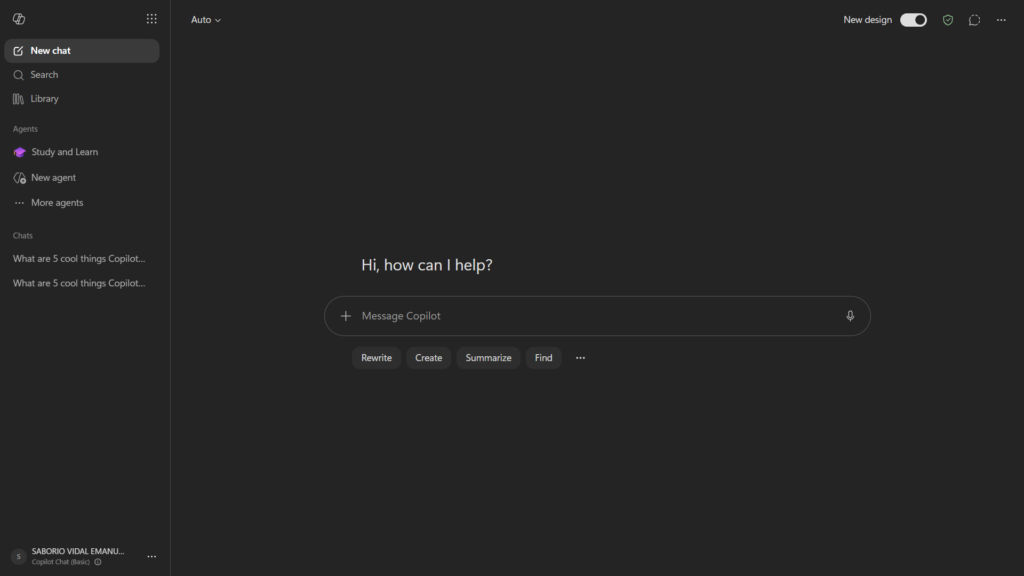
Microsoft Copilot is an AI assistant created by Microsoft. It can answer questions, summarize information, help with writing, explain topics, generate ideas, and create images.
The standard consumer version is available through the Copilot website and mobile apps. Microsoft says the free version can provide direct answers, assist with writing, and create images. You can use basic Copilot features without signing in, although signing in with a personal Microsoft account provides access to features such as conversation history, longer chats, voice interactions, and image creation.
Copilot should not be confused with every other product carrying the Copilot name. Microsoft uses the branding across several services, including:
- Microsoft Copilot for general AI conversations
- Microsoft 365 Copilot for productivity applications
- GitHub Copilot for programming
- Copilot Studio for building business agents
- Copilot features inside Windows and Microsoft apps
This review focuses mainly on the free Microsoft Copilot AI assistant for personal use, not the enterprise or developer-specific versions.
At a basic level, it works like other conversational AI tools. You enter a prompt, Copilot processes your request, and it generates a response. You can then ask follow-up questions without starting from the beginning.
How to write better AI prompts → ChatGPT prompting guide
One useful part of the interface is that Copilot suggests possible follow-up questions after answering. During my test, these appeared as small clickable bubbles below the response. They made it easy to continue researching without having to think of the next prompt myself.
Key Features of Microsoft Copilot
Microsoft Copilot includes several tools beyond basic question answering. Some are more useful than others, depending on what you need from an AI assistant.
AI Chat and Question Answering
Copilot’s main feature is its conversational chatbot. You can use it to:
- Ask general questions
- Summarize a topic
- Rewrite or draft text
- Brainstorm ideas
- Explain difficult concepts
- Compare products or concepts
- Create outlines and study materials
- Find information from the web
For my main test, I entered this prompt:
“Make a summary about the impact of AI in the last three years.”
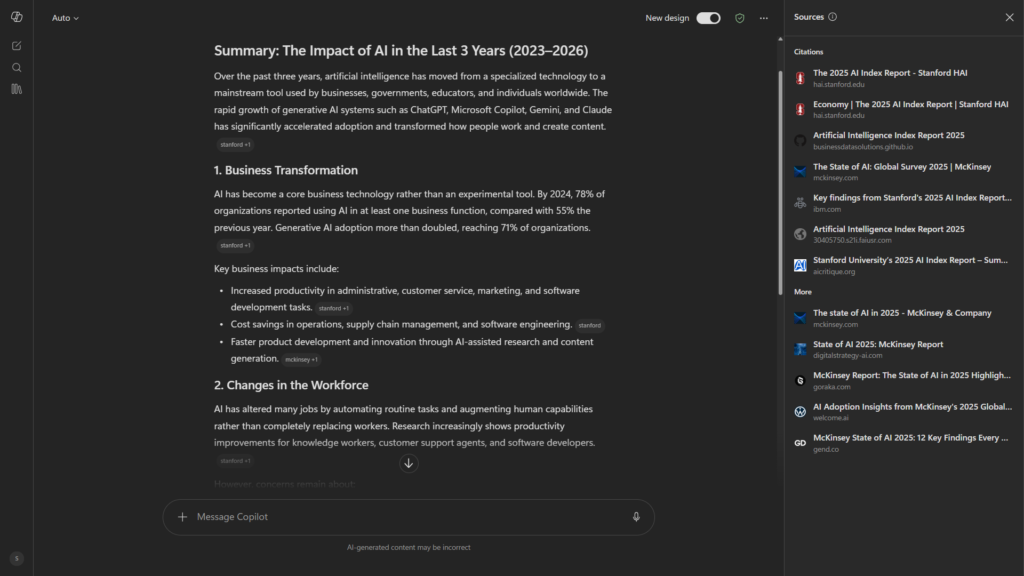
Copilot generated the answer fairly quickly. The response was clear, useful, and well organized. More importantly, it included sources from universities.
That does not automatically guarantee that every statement is correct, but it gives the user a better starting point for verification. Citations are especially helpful when using AI for research because generated answers can still contain mistakes, misunderstand a source, or present outdated information.
I would still open the cited pages and check the original information before using Copilot’s response in schoolwork, professional content, or published research. AI summaries should assist your research, not replace the source material.
Suggested Follow-Up Questions
After Copilot answered my prompt, it displayed several suggested questions in clickable bubbles.
This may sound like a small feature, but it improves the experience. Instead of stopping after one response, you can select a related question and explore the subject in more detail.
These suggestions are useful when:
- You are not sure what to ask next
- You are researching an unfamiliar subject
- You want a simpler explanation
- You want examples or additional context
- You want to explore both sides of a topic
They also make Copilot feel less like a search box and more like an ongoing conversation.
Study and Learn
One of the most interesting Microsoft Copilot features is its Study and Learn experience.
I used it to learn about technology and hackers. The explanations were easy to understand, and Copilot used analogies and examples instead of only presenting technical definitions. In my experience, this made complex ideas more approachable for a beginner.
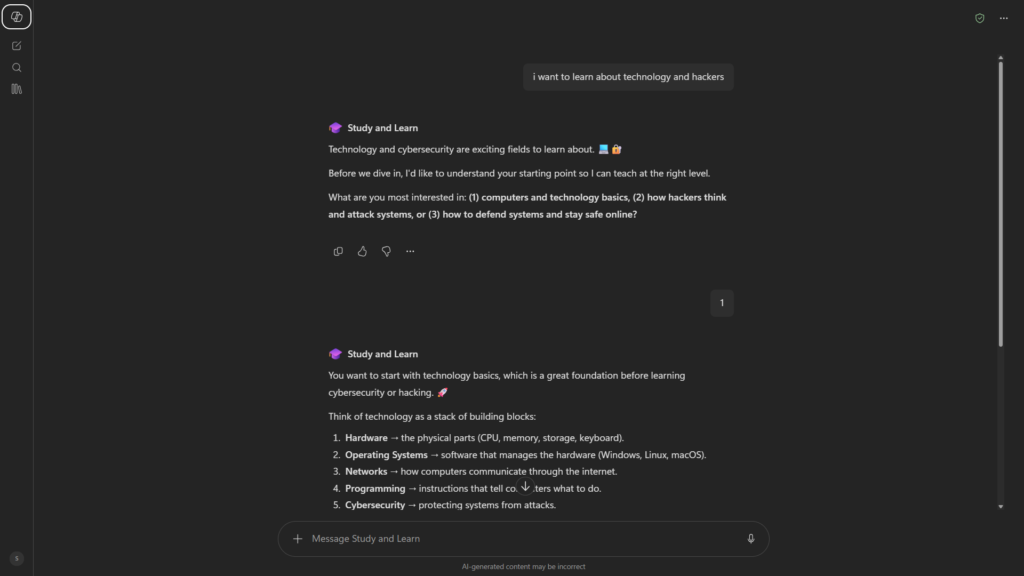
Microsoft says its Study and Learn Agent can work across subjects such as science, mathematics, history, literature, and languages. It can also include web-sourced diagrams, charts, photographs, and other visual aids when those materials help explain the topic. Sources are provided for those visuals.
The quality of the explanation was one of the strongest parts of my test. It did not feel as though Copilot was simply giving me a dictionary definition. It tried to teach the idea in a way that a person without much previous knowledge could follow.
Students could use this feature for:
- Reviewing a difficult concept
- Creating practice questions
- Requesting step-by-step explanations
- Finding real-world examples
- Comparing two related ideas
- Turning a long topic into smaller lessons
Still, students should avoid copying AI-generated answers directly into assignments. A better approach is to use Copilot to understand the material, verify the important facts, and then explain the subject in their own words.
Best free AI tools for students → Best Free AI Tools for Students in 2026
Sources and Web-Based Answers
Copilot can support answers with web sources, as it did during my test.
This is useful because it gives the user a visible path back to the original material. Traditional chatbots can provide polished answers without clearly showing where the information came from. Copilot’s source links make verification easier.
However, citations should not be treated as proof that the complete answer is accurate. A source might support only one part of a paragraph, or the AI might interpret it incorrectly.
When accuracy matters, check:
- Whether the source actually supports the claim
- When the source was published
- Whether the organization is trustworthy
- Whether newer information is available
- Whether multiple reliable sources agree
For academic research, Copilot can help you begin the process, but specialized search tools may provide more control over sources and research depth.
How to use Perplexity AI for research → Perplexity AI research guide
Writing and Summarization Tools
Microsoft Copilot can help generate or improve many types of text, including:
- Emails
- Blog outlines
- Social media captions
- Summaries
- Study notes
- Product descriptions
- Brainstorming lists
- Explanations
- Simple reports
Its summarization ability performed well in my test. Copilot identified key ideas and organized them into a readable response rather than returning an unstructured block of text.
The result you receive will still depend heavily on your prompt. Asking Copilot to “summarize AI” is much less specific than requesting a summary of AI’s impact during a defined period, for a particular audience, with sources and a clear format.
Image Creation
The free version of Copilot also supports AI image creation for signed-in users. Microsoft’s official support page lists image creation as one of the features available when using a personal account.
Image generation can be useful for concept art, blog illustrations, presentation ideas, and other creative experiments. Results may still contain visual inconsistencies, so every image should be inspected before publication.
I did not make image generation a central part of this particular Copilot test, so I cannot give a detailed first-hand judgment about its current image quality in this review.
Copilot Agents
Copilot includes access to agents designed for more specific tasks. Agents can provide specialized assistance, perform certain workflows, or focus on a particular type of request.
Microsoft describes agents as AI-driven tools that can offer suggestions, provide insights, and help automate repetitive processes. More advanced agents in Microsoft 365 can also connect with organizational knowledge and data.
I saw the agents during my testing, but I did not use them enough to judge their quality in depth. Because of that, I would not consider agent performance a major part of my final score.
This is also an area where the distinction between free Copilot and paid Microsoft 365 services becomes important. Some advanced or customizable agents require a paid subscription, an eligible work account, or a separate Microsoft product.
Limited Personalization on the Free Plan
The free plan did not allow me to personalize the AI in the way I expected.
For someone who only needs occasional answers, this may not matter. You can still guide the response by writing detailed prompts and specifying the format, audience, or tone each time.
The limitation becomes more noticeable if you want Copilot to consistently follow your preferences across many conversations. Users looking for deeper customization may need to consider paid Microsoft options or another AI assistant.
Microsoft Copilot Pricing: How Much Does It Cost?
The standard version of Microsoft Copilot is available for free. A credit card is not required to begin using its basic chat features.
Here is a simplified look at Microsoft’s current consumer options in the United States:
| Plan | Current US price | Main purpose |
| Microsoft Copilot Free | $0 | General AI chat, writing help, answers and selected creative tools |
| Microsoft 365 Personal | $9.99/month or $99.99/year | Copilot inside selected Microsoft 365 apps, 1 TB storage and higher AI usage |
| Microsoft 365 Family | $12.99/month or $129.99/year | Microsoft 365 for up to six people; AI benefits are primarily for the subscription owner |
| Microsoft 365 Premium | $19.99/month or $199.99/year | Advanced Copilot features, extensive usage and access to more capable AI agents |
These prices were verified on Microsoft’s US pricing page in July 2026 and may vary by country, taxes, promotions, or billing period. Microsoft lists Personal at $9.99 per month, Family at $12.99 per month, and Premium at $19.99 per month.
Microsoft 365 Personal includes desktop versions of applications such as Word, Excel, PowerPoint, Outlook, and OneNote, along with Copilot features and higher usage than the free version for selected AI tools. Premium adds broader access to advanced agents, research reports, data analysis, and greater image-generation usage.
For basic questions, explanations, and occasional summaries, the free plan will be enough for many people. Paying makes more sense when you already use Microsoft 365 regularly and want Copilot integrated into those applications.
Do not subscribe only because you assume every Copilot feature requires payment. Test the free version first and identify the exact limitation preventing you from completing your work.
Pros and Cons of Microsoft Copilot
Pros
- Free access: You can use the main AI assistant without paying or entering card details.
- Extremely quick sign-in: My Microsoft account let me begin faster than with any other AI tool I had tested.
- Good summary quality: Copilot provided a useful, organized response to my test prompt.
- Visible sources: My response included university sources that I could review separately.
- Helpful follow-up prompts: Suggested question bubbles made it easier to continue researching.
- Strong learning experience: Study and Learn explained technology topics with analogies and beginner-friendly examples.
- Microsoft ecosystem: Paid plans can connect Copilot with familiar productivity applications.
- Multiple use cases: It can assist with research, writing, explanations, brainstorming, and image creation.
Cons
- Limited free personalization: I could not customize the AI deeply on the free plan.
- Advanced features can be confusing: Microsoft uses the Copilot name across many different services and subscription levels.
- Some agents require paid access: The most capable or customizable agent tools are not all included in the standard free experience.
- Sources still require verification: Citations make fact-checking easier, but they do not guarantee that every generated statement is correct.
- Not every feature was equally tested: I did not use the available agents enough to evaluate them thoroughly.
- Paid value depends on your workflow: The subscription is harder to justify if you do not regularly use Word, Excel, PowerPoint, Outlook, or other Microsoft services.
Who Is Microsoft Copilot Best For?
Microsoft Copilot is best for people who want an accessible AI assistant without paying upfront.
Students and Beginners
The Study and Learn experience makes Copilot particularly useful for students and beginners. Its use of analogies, examples, and simplified explanations helped me understand technical topics without assuming advanced knowledge.
It can support learning, but it should not replace teachers, textbooks, or original sources.
Microsoft 365 Users
People who already use Word, PowerPoint, Excel, Outlook, and OneNote are the most obvious audience for the paid plans.
The free chatbot works independently, but the subscription becomes more attractive when Copilot can assist inside applications that are already part of your daily workflow.
Casual Researchers
Copilot is useful for gaining an overview of a topic and locating possible sources. The follow-up questions also help users continue exploring a subject.
For serious academic or professional research, however, you should verify sources independently and compare the response with specialized databases or research tools.
Writers and Content Creators
Writers can use Copilot for outlines, titles, summaries, email drafts, and early brainstorming.
The strongest approach is to treat its output as a first draft. Edit the text, add original experience, check factual claims, and remove generic language before publishing.
People New to AI Assistants
Copilot’s simple interface and quick setup make it approachable for someone who has never used an AI chatbot.
You do not need advanced prompting knowledge to start, although more detailed instructions generally produce better results.
Microsoft Copilot vs ChatGPT: Quick Comparison
ChatGPT is Microsoft Copilot’s most obvious general-purpose competitor. Both can answer questions, summarize text, generate content, explain concepts, and support follow-up conversations.
| Category | Microsoft Copilot Free | ChatGPT Free |
| General AI chat | Yes | Yes |
| Web-supported answers | Available for relevant queries | Available for relevant queries |
| Sources in responses | Often emphasized in research-style answers | Depends on the tool and query |
| Learning tools | Dedicated Study and Learn experience | Can provide guided explanations and study support |
| Image generation | Available to signed-in users, subject to current limits | Available under current free-plan limits |
| Microsoft integration | Strongest advantage, especially with paid Microsoft 365 plans | Not natively centered on Microsoft 365 |
| Customization | Limited in the free Copilot experience I tested | Available features depend on the current plan |
| Best fit | Microsoft users, beginners and source-supported overviews | Broad creative, analytical and conversational tasks |
The better choice depends on your workflow.
Choose Microsoft Copilot if you value its Study and Learn experience, like seeing suggested follow-up questions, or already use Microsoft products.
Choose ChatGPT if you prefer its overall interface or rely on it for broader creative and conversational workflows.
Neither tool should be trusted blindly. Both can produce incorrect information, misunderstand prompts, or present uncertain claims confidently.
ChatGPT vs Claude vs Gemini” → AI chatbot comparison
Our Verdict: Is Microsoft Copilot Worth It?
Yes, the free version of Microsoft Copilot is worth trying.
It handled my summary request well, delivered the response quickly, and provided university sources. The suggested follow-up questions were practical, while Study and Learn was better than I expected. Its explanations of technology and hackers used examples and analogies that could help a complete beginner understand the subject.
The free plan is not perfect. Personalization is limited, and Microsoft’s growing collection of Copilot plans, agents, and product names can make it difficult to know exactly what is included. Some of the more advanced productivity features require a Microsoft 365 subscription.
For free users, my rating is:
Microsoft Copilot score: 8.5/10
That rating reflects the version I personally tested. It performed strongly for summaries, source-supported answers, and beginner-friendly learning. I would need to test its agents more thoroughly before rating that part of the service.
The paid plans are most valuable for people who already use Microsoft 365. Everyone else should begin with the free version and upgrade only when a specific paid feature becomes necessary.
Frequently Asked Questions (FAQ)
Is Microsoft Copilot really free?
Yes. Microsoft provides a free version of Copilot for general AI conversations. Basic access does not require a paid subscription or credit card. Signing in with a personal Microsoft account unlocks additional features such as conversation history, longer chats, voice interactions, and image creation.
Do I need a Microsoft account to use Copilot?
You can access some Copilot functionality without signing in. However, using a personal Microsoft account gives you access to more features and makes it possible to save conversation history.
Because I already had a Microsoft account, my own sign-in process was extremely fast.
Is Microsoft Copilot good for students?
Copilot can be useful for explanations, summaries, examples, practice questions, and guided learning. Its Study and Learn experience was one of the best features I tested.
Students should verify important facts and follow their school’s rules regarding AI use. It should help you understand a topic rather than complete all your work for you.
Is Microsoft Copilot better than ChatGPT?
Neither assistant is automatically better for every user. Copilot is attractive for Microsoft users and offers a useful dedicated learning experience. ChatGPT may be preferable for people who want a different interface or broader general-purpose workflows.
Trying both free versions with the same prompts is the easiest way to decide.
Conclusion
Microsoft Copilot is a capable free AI assistant with more depth than a basic chatbot. My test produced a good summary, credible-looking university sources, and practical follow-up prompts. Study and Learn also showed that Copilot can explain difficult ideas in a way that feels accessible to beginners.
I recommend starting with the free plan. It is a good choice for students, casual researchers, Microsoft users, and anyone exploring AI assistants for the first time. Consider a paid Microsoft 365 plan only when you need stronger integration with Office applications, higher usage, or access to advanced agents.
Official Microsoft Copilot Resources
To learn more about Microsoft Copilot, its free features, learning tools, and paid subscription options, visit these official Microsoft resources:
- Microsoft Copilot Pricing Plans for Individuals :Compare Microsoft 365 Personal, Family, and Premium plans that include Copilot features.
- Microsoft Copilot Free vs. Copilot in Microsoft 365: See the official differences between free Copilot and the version included with eligible Microsoft 365 subscriptions.
- Microsoft Copilot Study and Learn Agent: Learn how Microsoft’s Study and Learn Agent explains topics and supports guided learning.
- How to Use the Study and Learn Agent: Read Microsoft’s instructions and overview of the learning activities available in Study and Learn.