
Disclosure: This post may contain affiliate links. If you purchase through our links, we may earn a commission at no extra cost to you.
Last updated: July 2026
Tested by: Emanuel S.
ChatGPT can produce a genuinely useful answer or a frustratingly generic one depending on how you ask. In this guide, you’ll learn how to write better ChatGPT prompts, improve weak responses, and create reusable instructions using the free plan.
Table of Contents
What Is a ChatGPT Prompt?
A ChatGPT prompt is the instruction, question, or information you enter in the message box before sending it. It can be one sentence, several paragraphs, an uploaded document, or a combination of text and supporting material.
For example, this is a prompt:
“Write a short email thanking a customer for their purchase.”
That request is understandable, but ChatGPT still has to guess the tone, audience, length, business type, and desired next step. The result may be acceptable, but it probably won’t sound tailored to your situation.
A stronger version would be:
“Write a friendly 120-word thank-you email for a customer who purchased a handmade notebook from my online store. Thank them for supporting a small business, mention that their order will ship within two business days, and end by inviting them to reply with questions.”
Both prompts request the same basic task. The second one gives ChatGPT enough information to make useful decisions.
In my experience, better prompting isn’t about learning complicated technical language. It’s mostly about replacing hidden expectations with clear instructions.
Do You Need ChatGPT Plus to Write Better Prompts?
No. The techniques in this guide work with the free version of ChatGPT.
At the time of writing, OpenAI provides free users with access to regular conversations and a selection of tools, although model availability and usage limits can change. Some tasks may have tighter limits than others, so it’s better to check the current information shown inside your account rather than relying on an old limit from another website.
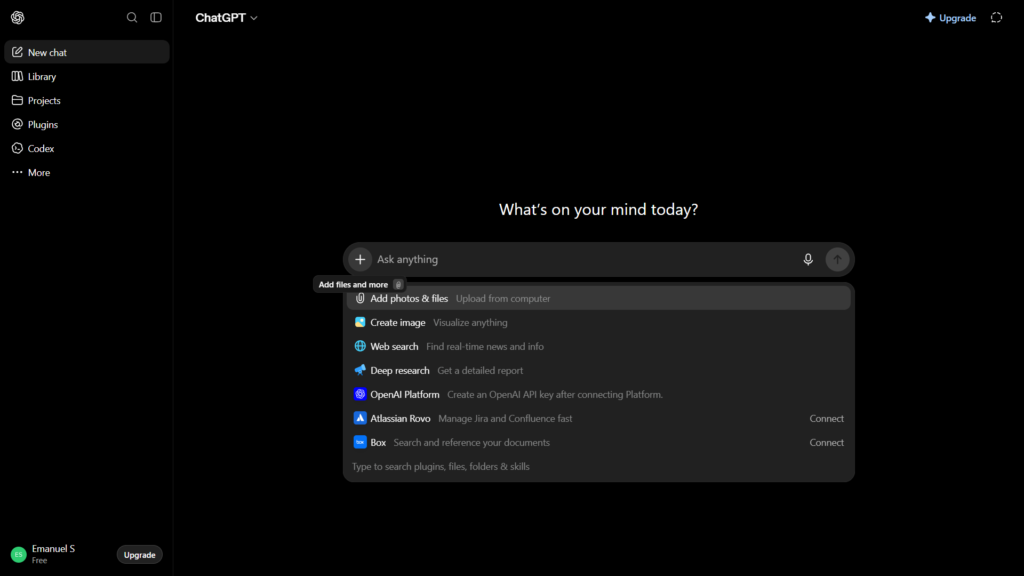
You can begin from the ChatGPT home screen by selecting the message field labeled “Ask anything” or the equivalent text displayed in your version. Type your prompt and press the arrow button or Enter to send it.
You don’t need to find a hidden “prompt engineering” setting. The improvement comes from what you include in the conversation.
The Simple Formula I Use for Better ChatGPT Prompts
A useful beginner prompt usually includes five elements:
- Task: What should ChatGPT do?
- Context: What does it need to know?
- Requirements: What must the response include or avoid?
- Format: How should the answer be organized?
- Audience or tone: Who is it for, and how should it sound?
You don’t need all five elements in every message. A simple factual question may only need the task and context. A blog post, business email, study guide, or project plan usually benefits from more detail.
Here is a reusable structure:
“Help me [task]. The situation is [context]. Include [requirements]. Format the answer as [format]. Write for [audience] using a [tone] tone.”
For example:
“Help me create a weekly study plan. I’m a first-year university student taking programming, statistics, and networking. I can study for two hours on weekdays and four hours on Saturday. Format the answer as a Monday-to-Saturday table. Keep the schedule realistic and include short breaks.”
That prompt tells ChatGPT what success looks like. It also reduces the number of assumptions the tool has to make.
Step 1: Start With One Clear Task
The first sentence should tell ChatGPT exactly what you need.
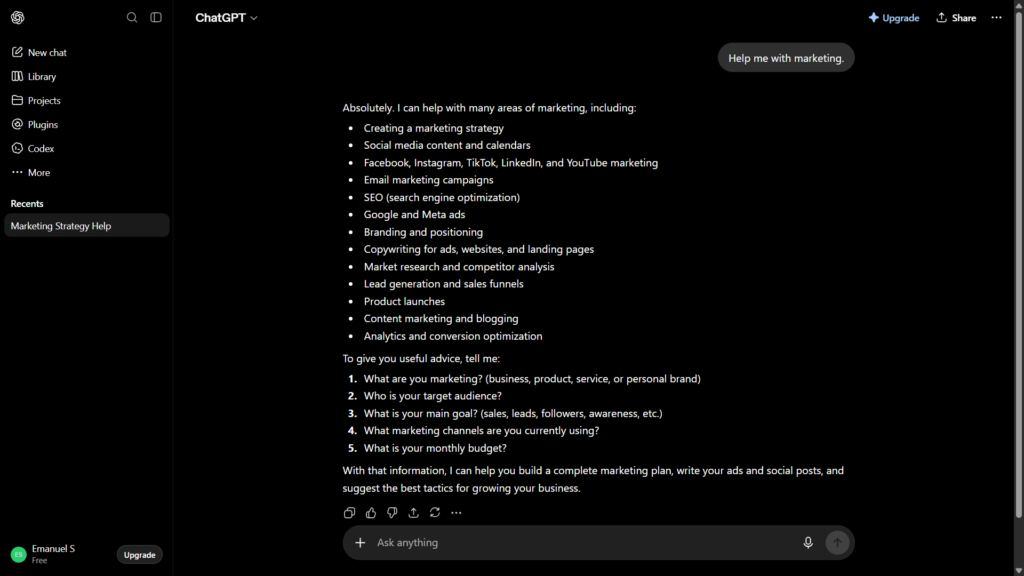
Weak prompt:
“Help me with marketing.”
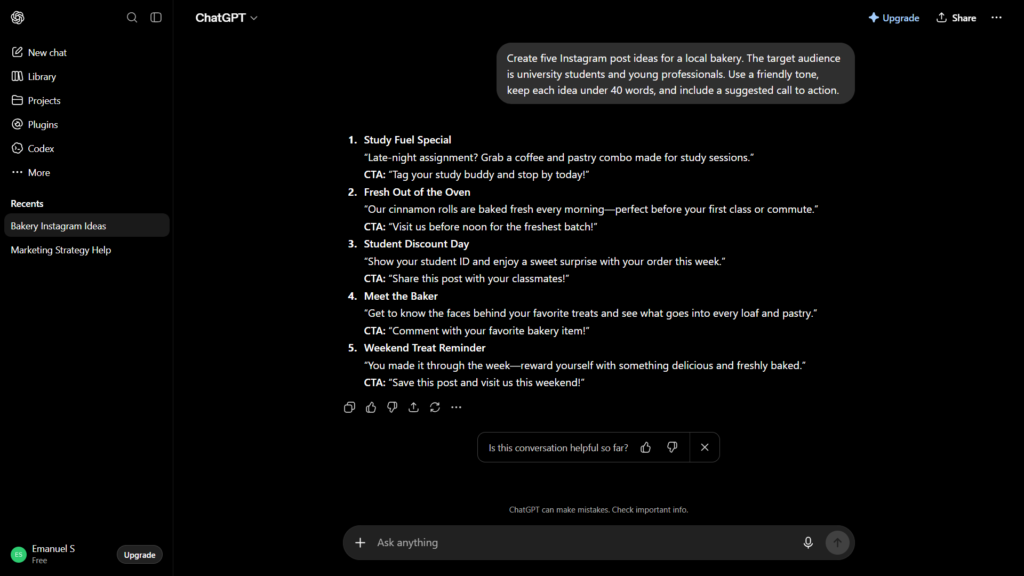
Better prompt:
“Create five Instagram post ideas for a local bakery.”
The weak version could lead to advice about advertising, email campaigns, social media, branding, or customer research. The improved version narrows the task to a specific platform, content type, quantity, and business.
Try to begin with a direct action word:
- Write
- Rewrite
- Summarize
- Explain
- Compare
- Brainstorm
- Organize
- Review
- Create
- Turn
I recommend avoiding long introductions before the actual request. Put the desired outcome near the beginning, then provide the background information.
For example, instead of writing:
“I’ve been thinking about starting a newsletter because several people have told me it could help my website, and I’m not completely sure where to begin…”
Start with:
“Create a beginner-friendly launch plan for a weekly newsletter. Here is my situation…”
The second version makes the objective obvious before ChatGPT processes the supporting details.
Step 2: Give ChatGPT Relevant Context
Context explains the situation behind your request.
Imagine asking someone to choose a restaurant without telling them your location, budget, dietary needs, or who is attending. They could make a recommendation, but it would mostly be a guess.
ChatGPT has the same problem when a prompt leaves out essential details.
Useful context might include:
- Your goal
- Your experience level
- The intended reader
- The platform where the content will appear
- The information you already have
- The problem with your current result
- A deadline or practical constraint
Suppose you need help improving a paragraph.
Basic prompt:
“Make this paragraph better.”
Context-rich prompt:
“Rewrite this introduction for a beginner-friendly technology blog. The readers are interested in AI tools but may not understand technical terminology. Keep my main argument, use short sentences, and avoid sounding promotional. Here is the paragraph: [paste paragraph].”
The second prompt defines what “better” means.
One mistake I made when I first started using ChatGPT was assuming it already understood the entire project in my head. I would provide half the information and then blame the tool when it filled the gaps incorrectly. Once I started including the audience, goal, and important restrictions, the responses became much easier to use.
I experienced this firsthand when I asked ChatGPT for help with the description and text for an image I was editing, as well as advice on which photo would work best. Instead of giving me the information I requested, ChatGPT started generating an image. My prompt wasn’t clear enough about the fact that I only wanted guidance, not a new image. I don’t have a screenshot of that conversation, but it was a good reminder that even a small ambiguity can completely change the result.
Step 3: Add Specific Requirements
Requirements tell ChatGPT what the finished answer must contain.
For example:
“Write a product description for a reusable water bottle.”
That is a valid prompt, but it leaves many decisions open. You could improve it by adding:
- Maximum length
- Important product details
- Desired tone
- Words or claims to avoid
- Call to action
- Intended customer
- Output language
A stronger prompt would be:
“Write a 100-word product description for a 750 ml stainless-steel reusable water bottle. Mention the leak-resistant lid, easy-carry handle, and BPA-free materials. Write for university students in a friendly, practical tone. Don’t claim that the bottle is completely spill-proof, and avoid exaggerated environmental claims.”
Specific instructions are especially helpful when accuracy matters. If you don’t want ChatGPT to invent missing details, say so directly:
“Use only the information I provide. If an important fact is missing, mark it as [DETAIL NEEDED] instead of making it up.”
That single instruction is useful for articles, reports, product descriptions, résumés, school projects, and professional documents.
Step 4: Request a Clear Output Format
ChatGPT often gives a technically correct answer in an inconvenient format. You can prevent that by stating how you want the response organized.
Common format instructions include:
- Use a table
- Write five bullet points
- Divide the answer into H2 and H3 sections
- Create a numbered tutorial
- Provide a checklist
- Use question-and-answer format
- Write three alternatives
- Keep each paragraph under four sentences
- Put the most important recommendation first
For example:
“Compare Grammarly and QuillBot for a beginner. Use a table with rows for ease of use, free features, writing suggestions, paraphrasing, and best use case. After the table, give a two-sentence recommendation.”
This is more practical than requesting a general comparison and reorganizing the entire answer afterward.
My preferred method is to describe the final format before ChatGPT starts writing. Asking it to restructure a finished 1,500-word response can work, but it creates another opportunity for useful details to be removed or changed.
Step 5: Define the Audience and Tone
The same information can be written very differently depending on who will read it.
Compare these instructions:
“Explain two-factor authentication to a cybersecurity professional.”
“Explain two-factor authentication to a teenager who has never studied cybersecurity.”
The topic is identical, but the vocabulary, examples, and level of detail should change.
You can define an audience using factors such as:
- Age or experience level
- Job or industry
- Familiarity with the topic
- Country or region
- Reason for reading
- Preferred language level
Tone instructions can include:
- Friendly
- Professional
- Conversational
- Direct
- Reassuring
- Neutral
- Persuasive
- Academic but accessible
Avoid vague requests such as “make it sound good.” Explain what “good” should sound like in that situation.
For example:
“Use a professional but warm tone. The message should sound confident without being demanding.”
That gives ChatGPT two useful boundaries.
Personally, I prefer the friendly tone because it usually feels less robotic and more natural to read. It can still sound AI-generated sometimes, though. I don’t think any tone completely removes that robotic feeling, but in my experience, a professional tone is more likely to sound stiff or overly formal.
Step 6: Provide an Example When Style Matters
Examples are one of the easiest ways to show ChatGPT what you want.
Suppose you need several product captions with a consistent style. You could write:
“Create three captions that match the structure and tone of this example, but don’t copy its wording: ‘Small upgrade, big difference. Our new desk lamp keeps your workspace bright without taking over your desk.’”
The example communicates rhythm, length, vocabulary, and energy more clearly than a list of adjectives.
However, don’t paste copyrighted articles or another creator’s full work and ask ChatGPT to imitate it closely. A short example you wrote yourself is safer and usually more useful.
You can also describe the characteristics you want ChatGPT to follow:
“Use short opening sentences, practical examples, brief paragraphs, and a clear recommendation. Avoid exaggerated claims and generic introductions.”
For content creation, I prefer combining a small original example with written rules. The example shows the direction, while the rules prevent ChatGPT from copying surface-level details too closely.
Step 7: Break Complicated Tasks Into Stages
A common beginner mistake is asking ChatGPT to complete a large project in one message.
For example:
“Write a complete 2,000-word article about productivity apps.”
ChatGPT may produce something usable, but it has to choose the keyword, audience, structure, apps, comparison criteria, examples, tone, and conclusion at the same time.
A staged process gives you more control:
- Ask for possible keywords and search intent.
- Choose the target keyword.
- Request an outline.
- Review the outline.
- Provide your personal testing notes.
- Ask for the full draft.
- Review factual claims and improve weak sections.
- Request a final proofreading pass.
This method takes a few more messages, but I think it produces much better long-form content. You can correct the direction before ChatGPT writes hundreds of words around a weak idea.
4 best free AI tools for students → Best Free AI Tools for Students in 2026
Step 8: Improve the Answer With Follow-Up Prompts
Your first prompt doesn’t need to produce the final result.
ChatGPT works as a conversation, so you can continue refining the same answer. Useful follow-up prompts include:
- “Make the introduction more direct.”
- “Add a practical example to the second section.”
- “Shorten this to 200 words without removing the main recommendation.”
- “Which parts of this answer are assumptions?”
- “Rewrite the response for a complete beginner.”
- “Give me three alternatives with noticeably different tones.”
- “Remove repeated ideas and explain what you changed.”
- “Ask me three questions that would help you improve this.”
One of my favorite follow-ups is:
“Review your previous answer critically. Identify unclear, unsupported, repetitive, or overly generic parts, then provide an improved version.”
It encourages ChatGPT to evaluate the response instead of immediately generating more text.
Step 9: Ask ChatGPT to Clarify Missing Information
When you aren’t sure what details belong in the prompt, ask ChatGPT to interview you first.
Use this instruction:
“Before completing the task, ask me up to five questions about any information you need. Don’t draft the final answer until I respond.”
This works well for:
- Business plans
- Résumés and cover letters
- Content strategies
- Study schedules
- Website copy
- Travel planning
- Project requirements
- Personalized recommendations
You can make the questions more focused:
“Ask one question at a time. Prioritize questions that would materially change the final answer.”
I find this especially helpful when starting an unfamiliar project. Instead of trying to predict every detail ChatGPT needs, I let it identify the most important gaps.
Step 10: Verify Facts Instead of Trusting Every Answer
A well-written prompt can improve relevance, structure, and tone, but it doesn’t guarantee that every factual statement will be correct.
For current information, you can explicitly ask ChatGPT to search and cite sources where that feature is available:
“Search the web for current information. Use primary or official sources where possible, cite each major claim, and clearly identify anything you could not verify.”
ChatGPT can search the web when current information is needed, and users can also choose the search control in supported versions of the interface.
For important work, open the sources and confirm that they support the claim. Check dates, names, product features, limits, quotations, and numerical information yourself.
A polished answer can still contain a mistake. Presentation quality and factual reliability are not the same thing.
how to use Perplexity AI for research→ Perplexity research guide
A Complete ChatGPT Prompt Template for Beginners
Here is a flexible template you can adapt:
Task
I need you to [describe the exact task].
Context
This is for [project, platform, situation, or goal]. The intended audience is [audience]. They already know [knowledge level], but they may not know [knowledge gap].
Information to Use
Use the following details: [facts, notes, examples, source text, or product information].
Requirements
The response must include [essential elements]. Do not include [unwanted elements]. Do not invent missing facts; mark them as [DETAIL NEEDED].
Format
Organize the response as [table, numbered steps, headings, email, checklist, or another format]. Keep it approximately [length].
Tone
Use a [tone] tone. The writing should feel [desired quality] without sounding [undesired quality].
Quality Check
Before finishing, check the response for repetition, unsupported claims, unclear wording, and missing requirements.
You don’t have to include the labels every time. They simply make longer prompts easier to organize.
Before-and-After ChatGPT Prompt Examples
Example 1: Writing an Email
Weak prompt:
“Write an email to my teacher.”
Better prompt:
“Write a respectful email to my university professor explaining that I couldn’t access the online assignment portal before the deadline. Don’t invent an excuse. Ask whether I can submit the completed assignment by email today. Keep the message under 150 words and include a clear subject line.”
Example 2: Learning a Topic
Weak prompt:
“Teach me Python.”
Better prompt:
“Teach me how Python dictionaries work. I understand variables, lists, if statements, and basic loops, but I haven’t used dictionaries before. Explain the concept in simple Spanish, show two short examples, and finish with one beginner exercise without giving me the solution.”
Example 3: Creating Website Content
Weak prompt:
“Write a blog article about AI.”
Better prompt:
“Create an outline for a beginner-friendly article titled ‘How to Use AI Tools for Studying.’ The audience is university students who have never used AI seriously. Include sections on research, summarizing notes, creating quizzes, checking answers, responsible use, and common mistakes. Avoid claiming that AI can replace studying.”
Example 4: Comparing Products
Weak prompt:
“Which tool is better?”
Better prompt:
“Compare ChatGPT and Perplexity for a student researching a school project. Focus on ease of use, current information, source visibility, follow-up questions, and limitations of the free versions. Use a comparison table, then recommend which tool is better for initial research and which is better for developing explanations.”
Common ChatGPT Prompt Mistakes to Avoid
Asking for Something “Better” Without Defining Better
Words such as better, professional, interesting, and high quality are subjective. Replace them with observable requirements.
Instead of:
“Make this more professional.”
Try:
“Remove slang, shorten long sentences, use a respectful tone, and make the request clear in the first paragraph.”
Adding Too Many Conflicting Instructions
A prompt can be detailed and still be confusing.
For example:
“Write a detailed answer, keep it extremely short, explain every concept, and don’t use more than 100 words.”
ChatGPT must choose which instruction matters most. Set realistic requirements and identify priorities:
“Keep the main answer under 150 words. Prioritize the recommendation over background information.”
Requesting a Role Without Giving a Task
Prompts often begin with:
“Act as an expert marketer.”
A role can influence vocabulary and perspective, but it doesn’t replace instructions. Explain what the expert should produce, for whom, and under what constraints.
Starting a New Chat Without Necessary Context
A new conversation usually won’t contain all the details from a separate chat. Paste or summarize the information required for the new task instead of saying, “Continue what we were doing before.”
For longer, related work, you may find it easier to keep the discussion in one conversation or organize it inside a Project where available. OpenAI currently lists Projects as available across free and paid subscription types, although tool limits still depend on the account and plan.
Treating the First Answer as Final
The first response is a draft. Ask for corrections, challenge weak assumptions, and request a different structure when necessary.
The biggest mistake I make is expecting ChatGPT to read my mind and understand exactly what I want from a basic prompt with very little context. The best way to avoid that problem is to give it a stronger prompt with enough background information and detailed instructions about the result I’m trying to achieve.
My Recommended ChatGPT Prompting Workflow
For most writing and productivity tasks, I use this process:
- Explain the outcome I need.
- Add only the context that affects the answer.
- List essential requirements.
- Request a practical output format.
- Ask ChatGPT to identify missing information.
- Review the first response for assumptions and repetition.
- Refine one problem at a time.
- Verify important factual claims.
I wouldn’t spend time searching for a “perfect prompt” that works for everything. A clear first prompt followed by two focused corrections is usually more practical than building a huge instruction containing every possible rule.
The goal isn’t to prove that you can write the longest prompt. The goal is to communicate the task with as little ambiguity as possible.
Quick Checklist for Writing Better ChatGPT Prompts
Before sending a prompt, check whether you have included:
- A clear task
- Relevant background information
- The intended audience
- Required facts or details
- Restrictions or information to avoid
- The desired response format
- An approximate length
- A suitable tone
- Instructions for handling missing information
- A request for sources when facts must be current
You won’t need every item for every request. Use the ones that materially affect the result.
ChatGPT vs Claude vs Gemini → AI chatbot comparison
3 Best free AI tools for productivity → Productivity AI tools list
Frequently Asked Questions
How Do I Write a Good Prompt for ChatGPT?
Start with a specific task, add the context ChatGPT needs, state your requirements, and request a clear output format. Define the audience and tone when they affect how the answer should be written.
Do Longer ChatGPT Prompts Produce Better Answers?
Not automatically. A longer prompt helps when it contains relevant context and clear requirements, but unnecessary details can make the task harder to interpret. Focus on useful information rather than word count.
What Should I Do When ChatGPT Gives a Bad Answer?
Explain what is wrong with the response and request one specific improvement at a time. You can ask ChatGPT to remove repetition, add an example, change the format, correct assumptions, or rewrite the answer for a different audience.
Should I Tell ChatGPT to Act as an Expert?
A role can help establish perspective and vocabulary, but it should be followed by a concrete task, audience, requirements, and format. Writing only “act as an expert” usually isn’t enough.
Can ChatGPT Improve My Original Prompt?
Yes. Paste your prompt and ask ChatGPT to identify ambiguity, missing context, conflicting requirements, and unnecessary instructions. You can also ask it to create an improved version while preserving your original goal.
Can I Use These Prompting Techniques With the Free ChatGPT Plan?
Yes. Clear tasks, relevant context, specific requirements, examples, formatting instructions, and follow-up prompts work with the free plan. Available models, tools, and usage limits may change over time.
Final Thoughts
Learning how to write better ChatGPT prompts is less complicated than the term “prompt engineering” makes it sound. Tell the tool what you need, explain the situation, define the result, and correct the response when it misses the mark.
My honest recommendation is to focus on clarity rather than complicated prompt formulas. The most useful prompts I’ve tested aren’t always the longest, they’re the ones that remove the most important uncertainty while leaving room for a natural, useful answer.
Official Resources
- ChatGPT Free Tier FAQ : Official information about the tools and capabilities currently available with the ChatGPT free plan.
- Prompt Engineering Best Practices for ChatGPT : OpenAI’s recommendations for writing clear prompts and refining responses.
- How to Create a Good Prompt for an AI Model : Official tips for adding context, tone, instructions, and formatting.